How to Set Up WhatsApp Business Auto-Replies, From Away Messages to AI Agents (+20 Examples)
WhatsApp auto-replies keep customers served when your team is offline. Learn the three levels of auto-reply, how to set them up in the WhatsApp Business app and the WhatsApp API, 20 message examples and mistakes to avoid.

Antonio Kurniawan
Product & Customer Success

On this page
- Three levels of auto-reply
- How to set up auto-reply in the WhatsApp Business app
- Smarter auto-replies with the WhatsApp API
- 20 WhatsApp auto-reply message examples
- A complete auto-reply flow for an online store
- Auto-replies on WhatsApp Unofficial
- Auto-reply best practices
- Common mistakes
- Measuring the impact of auto-replies
- Auto-replies for holidays and peak seasons
- Conclusion
Key takeaways
- The WhatsApp Business app offers free Greeting and Away messages under Business Tools.
- The WhatsApp API allows smarter auto-replies: button menus, keywords, business-hour conditions and AI agents.
- The best auto-replies are short, say when a person will reply, and always offer a path to an agent.
- Complaints should always go to a person, never be handled by a machine alone.
- On the WhatsApp API, auto-replies are billable messages once the free allowance is used, so send one clear message instead of several bubbles.
A WhatsApp Business auto-reply is an automatic message sent when a customer contacts your business, such as a greeting for the first chat or a message outside business hours. In the WhatsApp Business app, this is free under Business Tools: Greeting Message and Away Message. For busier businesses, the WhatsApp Business API allows much smarter auto-replies: button menus, keyword-based replies, business hours per team, and AI agents that actually answer customer questions.
This article covers the three levels of auto-reply, how to set them up, 20 ready-to-use messages, and the mistakes that make auto-replies annoy customers instead of helping them.
Three levels of auto-reply
You can combine all three. For example, a button menu to choose a branch, then an AI agent for open questions, with a human agent taking over when needed.
How to set up auto-reply in the WhatsApp Business app
Greeting message
Open the WhatsApp Business app, go to Settings, then Business Tools.
Choose Greeting Message and turn it on.
Write your greeting, then choose recipients: everyone, everyone except certain contacts, or only certain contacts.
Save. The message is sent when a customer messages you for the first time or after 14 days without a conversation.
Away message
In Business Tools, choose Away Message and turn it on.
Write the message and set a schedule: always send, a custom schedule, or outside the business hours in your profile.
Choose recipients and save.
These features are handy but limited: only one greeting and one away message, they cannot read what the customer asked, and they run on one number with no team assignment.

Smarter auto-replies with the WhatsApp API
With the WhatsApp Business API, auto-replies become part of a complete service flow. In ChatMo, three approaches are most common:
Workflows with button menus
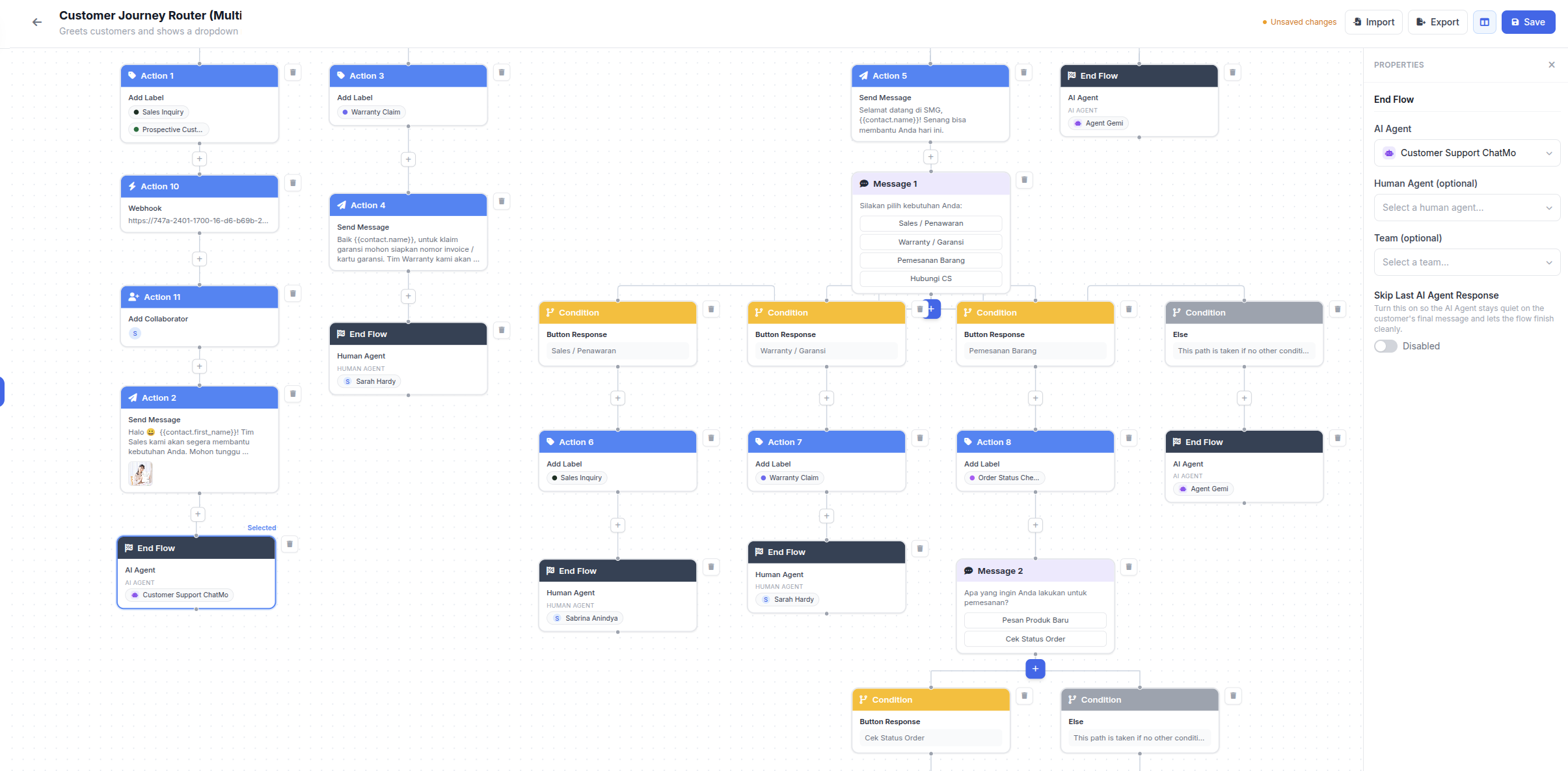
When a customer sends their first message, a workflow sends a greeting with buttons such as "Check my order", "Product info" and "Talk to an agent". Each choice can trigger the next step: sending information, adding a label or routing the chat to a specific team.
Time conditions: business hours and after hours
ChatMo workflows can check the day and time of the first message. For example, chats arriving Monday to Saturday between 08:00 and 20:00 go straight to agents, while chats outside those hours get a message saying the team will reply in the morning and are then handed to an AI agent so customers are still served.
First-message keywords
Workflows can also read keywords in the first message, such as "tracking" or "complaint", then add a label, send a matching reply and route the chat to the right team.
AI agent
An AI agent reads questions in everyday language and answers from your business documents: prices, stock, policies, schedules. When a question is beyond it, the AI hands the chat to an agent. See WhatsApp AI chatbot for customer service for the full guide.
20 WhatsApp auto-reply message examples
Greetings
"Hi, thanks for contacting Our Store. Tell us what you are looking for and we will help you find it."
"Hello! Welcome to Healthy Clinic. Would you like a consultation, the doctors' schedule or a booking? Tap one of the buttons below."
"Hi, this is Smart Courses' official WhatsApp. To speed things up, please share your name and the class you are interested in."
"Thanks for reaching out. Our team usually replies within 5 minutes during business hours."
Outside business hours
"Hi, we are currently outside business hours (Monday to Saturday, 08:00-20:00 WIB). We have your message and will reply tomorrow morning."
"Thanks for waiting. Our team is back at 08:00 WIB. In the meantime, prices and our catalog are at ourstore.com/catalog."
"Our agents are offline right now. Our virtual assistant can still help with stock, shipping and order status. Just type your question."
"Orders placed outside business hours will be processed tomorrow morning in the order they arrived. Thanks for your patience."
Holidays and special moments
"Happy holidays! Our team is off from 31 March to 2 April. Orders will ship from 3 April."
"During Ramadan, our service hours are 09:00-16:00 and 19:30-22:00 WIB."
"We are receiving a very high number of orders because of our sale. Replies may take a little longer, sorry about that."
Confirmations and status
"We have passed your question to our technical team. Expect a reply within 24 hours."
"We have received your transfer receipt. Our finance team will verify it within 30 minutes during business hours."
"Thanks, your booking details are recorded. We will send the confirmed schedule in a few minutes."
"Your complaint is recorded as ticket {{number}}. We are sorry for the trouble and will contact you as soon as possible."
Redirecting to other channels
"For corporate billing questions, please email [email protected] so the documents can be processed."
"For longer consultations, please continue on our chat page where it is easier to send photos and documents: [webchat link]."
"Job applications can be sent to [email protected]. This number is for customer service only."
Closing the conversation
"Thanks for contacting us. If you have any other questions, just reply to this message any time."
"Happy to help! How was our service today? Reply with a number from 1 to 5."
Tip: always say when customers can expect a human reply. Clear expectations cut follow-up messages like "hello?" and "please answer".
A complete auto-reply flow for an online store
The first message arrives. The workflow checks the time: during business hours, it sends a greeting with "Check my order", "Product question" and "Complaint" buttons.
The customer picks "Check my order". The workflow adds an "order status" label and hands the chat to an AI agent that can read the order number and answer with its status.
The customer picks "Product question". The AI agent answers from the catalog and knowledge base, then offers a purchase link.
The customer picks "Complaint". The workflow adds a "complaint" label, sends a short apology and routes the chat straight to a human agent.
Outside business hours, the customer gets the opening hours, then is still served by the AI agent for questions it can answer.
This flow makes sure routine questions are resolved fast, while complaints are never handled by a machine alone.
Auto-replies on WhatsApp Unofficial
If you use WhatsApp Unofficial (connected by QR scan), ChatMo workflows and AI agents still work. On this channel, button menus appear as numbered menus that customers answer with a number. Turn on Reply Delay so AI replies feel typed by a person, and avoid sending identical automatic messages to many numbers.
Auto-reply best practices
Short and clear. Customers skim auto-replies. Two or three sentences are enough.
Offer a way out. There should always be an option to talk to a person.
Do not pretend to be human. Customers appreciate an honest, helpful virtual assistant.
Give the AI a natural pause. In ChatMo, the Reply Delay setting makes the AI wait a few seconds before replying, and messages a customer sends in a row get one reply.
Update for special moments such as public holidays and big sales.
Common mistakes
Repeating the auto-reply every time the customer sends a message, so it feels like spam.
Menus that are too long, with more than six options, confuse customers.
Promises you cannot keep, such as "reply within 5 minutes" when the team is swamped.
No out-of-hours message, so late-night chats feel ignored.
Forgetting the cost. On the WhatsApp API, auto-replies are also billable messages once the free allowance is used. One clear greeting is cheaper than three short bubbles. See WhatsApp API per-message pricing.
Measuring the impact of auto-replies
Compare these metrics before and after turning auto-replies on:
Average first reply time, including outside business hours.
Share of chats resolved without an agent if you use menus or an AI agent.
Number of chaser messages such as "hello?", which signal customers waiting too long.
Chat-to-order conversion, especially for chats that arrive at night.
The full set of service metrics is in our article on customer service KPIs.
Auto-replies for holidays and peak seasons
Public holidays, company leave and shopping seasons such as Ramadan or year-end are when auto-replies are tested the most. Customers keep messaging while your team is away or overloaded. Prepare these well in advance:
A dedicated holiday message that states the holiday dates, when the team is back and what is still handled, for example orders are accepted but shipped after the break.
Shipping information such as the last order date before the holiday and expected courier delays.
An updated AI knowledge base with the holiday schedule and seasonal promotions, so the AI does not promise deliveries that cannot happen.
An emergency path for cases that cannot wait, such as payment problems, with a clear on-call agent.
Example message: "Hi, thanks for contacting us. Our team is off from 30 March to 3 April. You can still place orders, and they will ship from 4 April. For payment issues, type PAY and our on-call agent will help." Remember to switch back to your normal message once the holiday is over.
Conclusion
Auto-replies are the cheapest way to make customers feel looked after, even when your team is offline. Start with greeting and away messages in the app, then move to button menus and an AI agent as chats grow. The keys stay the same: short messages, clear expectations and a way out to a person.
Want auto-replies that actually answer customer questions 24/7? See ChatMo AI Agents or book a demo.
Frequently asked questions
How do I set up an auto-reply in WhatsApp Business?
Open Settings, then Business Tools, and turn on Greeting Message or Away Message. Write the message, set the schedule and recipients, then save.
When is the WhatsApp Business greeting message sent?
When a customer messages you for the first time, or after 14 days without a conversation.
Can WhatsApp auto-replies answer customer questions?
The app's built-in features do not understand questions. To answer them, use an AI agent or keyword workflows on the WhatsApp API.
How do I auto-reply outside business hours?
In the app, use an Away Message scheduled outside business hours. In ChatMo, a workflow can check the day and time of the first message, send your opening hours and hand the chat to an AI agent.
Are auto-replies on the WhatsApp API charged?
Yes, automatic replies are billable messages once the free service message allowance is used, except inside the free 72-hour window from Click-to-WhatsApp ads.
About the author
Antonio Kurniawan
Product & Customer Success
The ChatMo product and customer success team helps Indonesian businesses run WhatsApp, Instagram and webchat conversations with AI agents and shared inboxes.