8 Customer Service KPIs for Chat Support: How to Calculate Them and Sensible Targets
Customer service KPIs show how quickly, completely and satisfyingly your team serves customers on chat. Learn the eight key KPIs, how to calculate them, starting targets per channel, how to improve them and a 30-minute weekly review routine.

Antonio Kurniawan
Product & Customer Success
On this page
- The 8 customer service KPIs for chat at a glance
- 1. First response time: the first impression that counts
- 2. Average response time: keeping the conversation moving
- 3. Resolution time and 4. First contact resolution
- 5. CSAT: the customer's voice
- 6. Missed chats
- 7. AI resolution rate
- 8. Chat conversion
- How to track KPIs in ChatMo
- Setting service targets (SLAs) per channel
- An example weekly KPI summary
- Working out how many agents you need
- A weekly review routine (30 minutes)
- KPIs for AI agents and human agents
- Mistakes when measuring KPIs
- Where to start
- Presenting KPIs to management
- Conclusion
Key takeaways
- The eight key chat KPIs: FRT, average response time, resolution time, FCR, CSAT, missed chats, AI resolution rate and chat conversion.
- Sensible starting targets: first reply under 5 minutes in business hours, FCR of 70% or more, and CSAT of 85% or more.
- Separate automatic messages from real answers so FRT does not mislead you.
- Set different targets per channel, because expectations on WhatsApp, live chat, Instagram and email differ.
- A 30-minute weekly review that includes reading real conversations beats looking at numbers alone.
Customer service KPIs are the numbers that show how quickly, completely and satisfyingly your team serves customers. For chat-based service on WhatsApp, Instagram and live chat, the eight that matter most are: first response time, average response time, resolution time, first contact resolution, customer satisfaction (CSAT), missed chats, the share of chats resolved by AI, and chat-to-sale conversion. Track them per channel and per agent, and review them every week.
This article explains how to calculate each KPI, sensible targets for chat support, how to improve them, and a weekly review routine you can start using right away.
The 8 customer service KPIs for chat at a glance
These targets are starting points. Every industry differs, so what matters most is your own trend week by week.

1. First response time: the first impression that counts
On chat, customers expect replies in minutes, not hours. A slow FRT pushes customers to ask a competitor or send chaser messages that add to your team's load.
How to improve it: assign chats automatically to agents who are online, add an AI agent for busy periods and out-of-hours chats, and prepare quick replies for the most common questions.
Note: separate FRT from automatic messages and FRT from a person or AI that actually answers. "We will reply soon" makes the number look good but solves nothing.
2. Average response time: keeping the conversation moving
A conversation that starts fast but then sits for 40 minutes mid-way still feels slow. Track the average gap between replies, especially at peak times.
How to improve it: cap the number of active chats per agent, use internal notes to consult colleagues without leaving customers waiting, and tell customers when you need time to check something.
3. Resolution time and 4. First contact resolution
Speed means little if the problem is not solved. FCR measures how many cases are closed without the customer coming back. Back-and-forth cases usually come from incomplete information or agents without the authority to fix the issue.
How to improve it: complete your knowledge base and quick replies, give agents access to order data, and use tickets for cases that need cross-team follow-up so they stay tracked until resolved.
5. CSAT: the customer's voice
Send a short question after a chat ends, such as "How was our service today? Reply with a number from 1 to 5." Calculate the share of 4 and 5 ratings. Read the comments from low ratings too; that is where the most valuable improvements are found.
6. Missed chats
A chat that never gets a reply is the most expensive loss: the customer wanted to talk to you and was ignored. Set a time limit, for example 30 minutes during business hours, and track the chats that exceed it. Common causes are chats with no owner and agents assuming a colleague already replied.
7. AI resolution rate
If you use an AI agent, measure the share of chats resolved without a person and how many are handed over. A rising rate week by week means your knowledge base is getting more complete. Also check that CSAT for AI-handled chats is not lower than for agent-handled chats.
8. Chat conversion
For businesses that sell through chat, customer service is part of sales. Calculate the share of chats that end in an order, appointment or qualified lead, and compare across channels and agents.
How to track KPIs in ChatMo
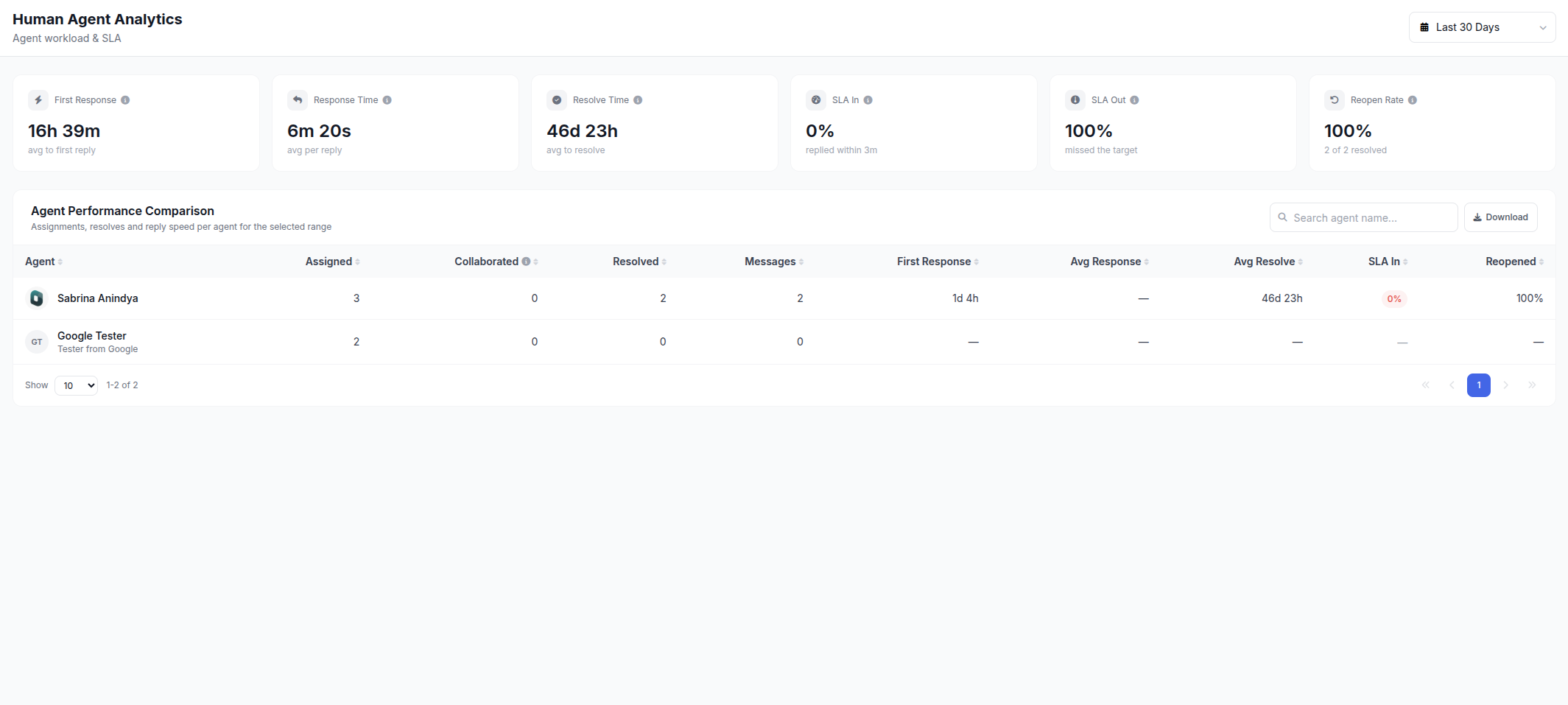
Human Agent report: response time, conversation counts and resolutions per agent, sortable to see who needs support.
AI Agent report: conversations handled by AI, those handed to people, and AI credit usage.
Session analytics: conversation duration and how time splits between AI and agents.
Filters by channel and period to compare WhatsApp, Instagram and webchat.
Setting service targets (SLAs) per channel
Write these targets down and share them with the team. Unwritten targets tend to be ignored when chats get busy.
An example weekly KPI summary
These figures are an example. What matters is the notes column: every change in a number should be explained by an action you took.
Working out how many agents you need
KPIs also answer the classic question: do we need more agents? A rough method:
Work out the average number of chats per day that genuinely need a person (after removing chats resolved by AI).
Measure how many chats one agent can resolve per hour at good quality.
Divide chats per hour at peak by capacity per agent. The result is the minimum number of agents at peak.
Often, raising the AI resolution rate and tidying quick replies is cheaper than hiring.

A weekly review routine (30 minutes)
5 minutes: check the trend in FRT, missed chats and CSAT against last week.
10 minutes: read the 10 conversations with the lowest CSAT or longest resolution time.
5 minutes: check which questions the AI hands to people most, and add those answers to the knowledge base.
5 minutes: compare workload and performance across agents for fairer chat assignment.
5 minutes: pick one improvement for next week and name an owner.
KPIs for AI agents and human agents
Measuring them separately tells you when to improve the AI knowledge base and when to coach the team.
Mistakes when measuring KPIs
Chasing speed only until answer quality drops.
Counting automatic messages as replies, so FRT looks good while customers are still waiting.
Combining every channel into one number, even though expectations differ.
Using KPIs to punish rather than coach. Agents afraid of bad numbers tend to close chats too early.
To speed up replies without adding people, also read WhatsApp Business auto-reply and customer service chat script examples.
Where to start
If you have never measured anything, start with just three KPIs: first response time, missed chats and CSAT. All three are easy to measure and customers feel the impact immediately. After a month, once the process is stable, add others such as FCR, AI resolution rate and chat conversion.
Presenting KPIs to management
KPIs only matter when they drive decisions. A monthly report to management should be short, compare against the previous period and always come with context:
Start with three headline numbers, such as first response time, CSAT and chat conversion, before going into detail.
Show trends, not single numbers. A three to six month chart shows whether improvements are real.
Explain what changed. A spike in chats from an ad campaign or a delivery disruption explains why response times got worse.
Connect to cost and revenue, such as sales from chat, messaging costs and the number of chats handled by AI without adding agents.
Close with a plan and a request, for example extra agents during peak hours or an update to the AI knowledge base.
A one-page format like this helps management grasp the state of service quickly and makes it easier to approve the investment your customer service team needs.
Conclusion
Good customer service KPIs balance speed, resolution and satisfaction. Start with the eight above, set targets per channel, review weekly by reading real conversations, and improve one thing at a time. The numbers improve on their own as your processes and team knowledge get tidier.
Want team and AI performance reports in one dashboard? See ChatMo Analytics or book a demo.
Frequently asked questions
Which customer service KPIs matter most?
For chat support: first response time, average response time, resolution time, first contact resolution, CSAT, missed chats, AI resolution rate and chat conversion.
What is a good first response time on WhatsApp?
As a starting point, under 5 minutes during business hours, and instant with an AI agent.
How do I calculate CSAT?
Send a rating question after a chat ends, such as a 1 to 5 scale, then calculate the share of customers who give a 4 or 5.
What is first contact resolution?
The share of cases resolved without the customer having to come back. A sensible starting target is 70% or more.
How do I track customer service KPIs in ChatMo?
Use the Human Agent report, the AI Agent report and session analytics, with filters by channel and period.
About the author
Antonio Kurniawan
Product & Customer Success
The ChatMo product and customer success team helps Indonesian businesses run WhatsApp, Instagram and webchat conversations with AI agents and shared inboxes.