WhatsApp API at IDR 356 per Message from October 2026? 2 Ways to Keep Customer Chats Free
From 1 October 2026, WABA replies cost IDR 356.65 per message after 1,000 free messages per number. See the price table per category, the free 72-hour window from Click-to-WhatsApp ads, and two ChatMo strategies to keep customer chats free.

Antonio Kurniawan
Product & Customer Success
On this page
- What changes in WhatsApp Business API pricing on 1 October 2026?
- The free 72-hour window from Click-to-WhatsApp ads
- Why customer service chats get expensive fast
- Strategy 1: WhatsApp Unofficial for incoming chats, WABA for broadcasts
- Strategy 2: Keep WABA, move the chat to ChatMo Webchat
- Strategy 1 vs Strategy 2
- Which strategy fits your business?
- More ways to keep WABA costs under control
- Other Meta rules you should know
- Conclusion
Key takeaways
- From 1 October 2026, service messages (replies within 24 hours) cost IDR 356.65 each after 1,000 free per number per month; marketing templates cost IDR 586.33 each.
- Chats from Click-to-WhatsApp ads answered within 24 hours open a free 72-hour window for every message type.
- Customer service replies count too, so 3,000 monthly conversations with 8 replies each can cost about IDR 8.2 million.
- Strategy 1: use WhatsApp Unofficial on the same number to answer incoming chats, and keep WABA for broadcasts so bulk sending stays safe. Turn on a 3-10 second Reply Delay so AI replies look human.
- Strategy 2: stay 100% official on WABA and move the chat to ChatMo Webchat, so each conversation uses only one billable message.
- Turn off Multiple Chat Bubbles in AI Settings so every AI answer on WABA is 1 message instead of 1-3. At 5,000 answers a month, that saves about IDR 2.67 million.
- In a 3,000-conversation monthly simulation, Strategy 2 saves about IDR 7.49 million, or 91% of the WABA cost.
From 1 October 2026, regular replies on the WhatsApp Business API (WABA) cost IDR 356.65 per message once the 1,000 free messages per number are used up. A business sending 10,000 replies a month will pay about IDR 3.2 million, even though those messages are simply answers to customers asking questions. The good news: you can cut that cost without giving up WABA. ChatMo offers two ways: use WhatsApp Unofficial to receive and answer chats while keeping WABA for broadcasts, or redirect incoming WABA chats to ChatMo Webchat, which has no per-message fee.
Data source: the rates here follow the WhatsApp Business Platform pricing changes Meta announced for 1 October 2026, as republished by official partners (BSPs). Rupiah rates exclude tax and can change. Always check Meta's official rate card in your billing currency before setting a budget.
What changes in WhatsApp Business API pricing on 1 October 2026?
Until now, Meta only charged for template messages; regular replies inside the 24-hour service window were free. From 1 October 2026, regular replies (service messages) are charged too. In short:
Service messages (free-form replies sent within 24 hours of the customer's last message, whether by an agent, a bot or AI) cost IDR 356.65 per message.
Each WABA number gets 1,000 free service messages per month. The allowance does not roll over and is counted per number, not per account.
Utility templates sent inside the 24-hour window, which used to be free, are now charged as well.
Incoming customer messages stay free, and conversations from Click-to-WhatsApp ads stay free during a 72-hour window (covered below).
That means every reply sent by your team or your AI agent counts once the free allowance runs out. A normal customer service conversation can contain 5 to 10 messages from the business side: greeting, answer, product details, payment link, confirmation and a thank-you.
WhatsApp API price per message category (Indonesia)
Two things stand out: the 1,000 free allowance only covers service messages, not template broadcasts; and marketing broadcasts are the most expensive category, about 1.6 times the service rate.
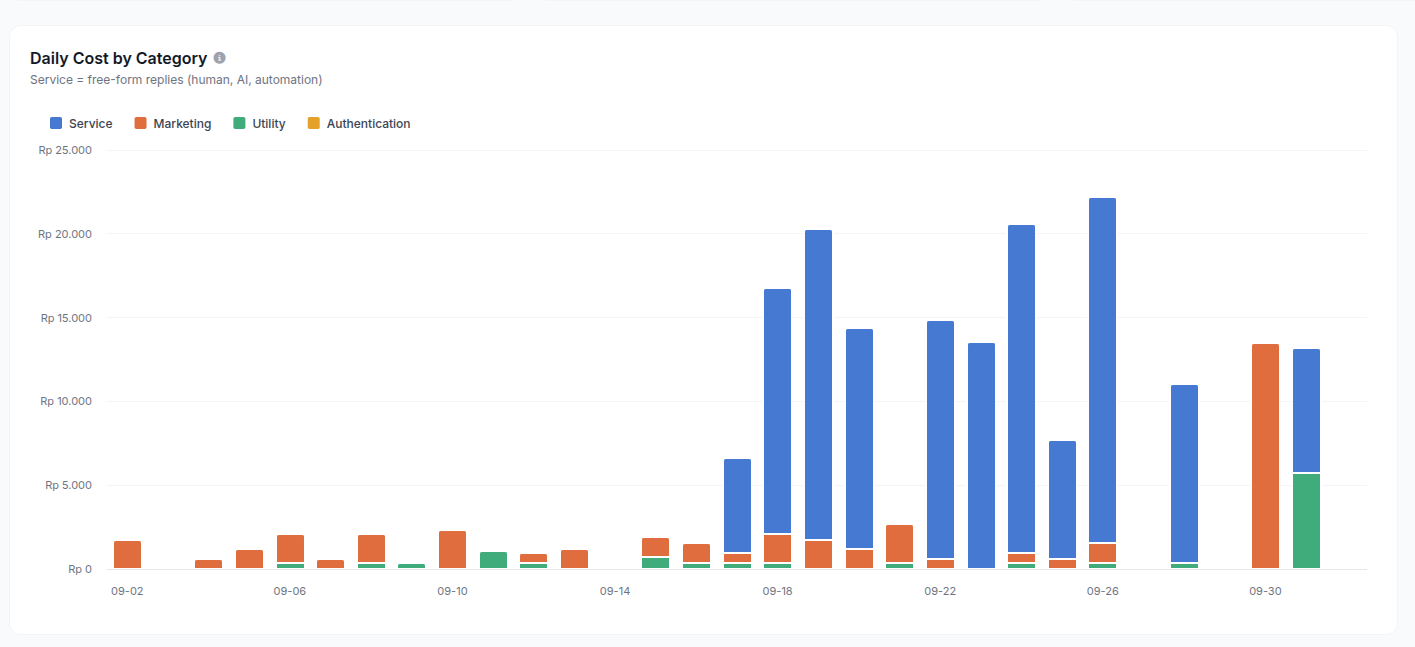
Monthly WABA cost simulation
The free 72-hour window from Click-to-WhatsApp ads
There is one exception that is easy to miss and very useful for businesses that advertise. When a customer starts a chat from a Click-to-WhatsApp ad (or the WhatsApp button on a Facebook Page) and the business replies within 24 hours, Meta opens a free entry point window for 72 hours. For those 72 hours, every message type is free: regular replies, utility templates and even marketing templates.
Conditions to keep in mind:
The first reply must go out within 24 hours of the customer's message from the ad. Reply late and the 72-hour window does not open.
The customer must open the chat from the WhatsApp app on Android or iOS; clicks from WhatsApp Web or desktop do not open the free window.
Messages inside this window do not use your 1,000 free service messages.
In practice: put an AI agent on your WABA channel so every chat from an ad gets a reply within seconds, then use the first 72 hours to send catalogs, offers and follow-ups at no message cost. In ChatMo, chats coming from Click-to-WhatsApp ads are logged with their ad data, so your team can prioritize these leads.
Tip: if you advertise regularly, move part of your marketing broadcast budget (IDR 586.33 per message) into Click-to-WhatsApp ads. Conversations from ads are free for 72 hours and usually come from people who are already interested.
Why customer service chats get expensive fast
Many businesses assume WABA costs come from broadcasts. Under per-message pricing, customer service chats burn through the quota fastest, because:
Every reply counts, including short ones like "Sure, let me check that for you".
An AI agent that answers in several bubbles creates several billable messages for one answer.
Consultative conversations (choosing a product, shipping quotes, complaints) can run to dozens of messages.
Example: 3,000 incoming conversations a month with an average of 8 replies each is 24,000 messages. After the free quota, that is about IDR 8,202,950 per month just to answer customers.
Strategy 1: WhatsApp Unofficial for incoming chats, WABA for broadcasts
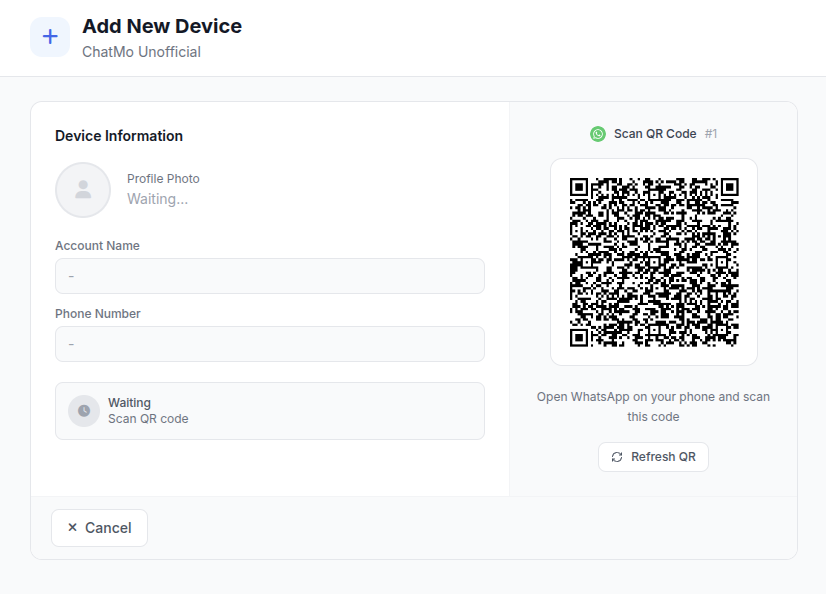
The idea is simple: separate the bulk-sending lane from the conversation lane. Broadcasts and template messages still go through official WABA, which keeps them safe from bans. Incoming customer chats are received and answered through WhatsApp Unofficial in ChatMo, which connects like a linked device (QR scan) and is not billed per message by Meta.
In ChatMo you create two channels on the same number:
WhatsApp Official (WABA) channel for broadcasts, notifications and templates.
WhatsApp Unofficial channel to receive and reply to customer chats, including AI agent replies.
How to set up Strategy 1 in ChatMo
Make sure your number uses the WhatsApp Business App connected to the WhatsApp Business API (Coexistence), so one number works in the app and the API at the same time.
Connect that number as a WhatsApp Official channel in ChatMo Integrations.
Add a WhatsApp Unofficial channel for the same number and scan the QR code from the WhatsApp Business App on your phone.
Attach your AI agent and auto-assign rules to the Unofficial channel only, and turn off auto-reply on the WABA channel so customers never get double replies.
Use the WABA channel only for Broadcasts and template sending.
Make the AI agent reply like a person with Reply Delay
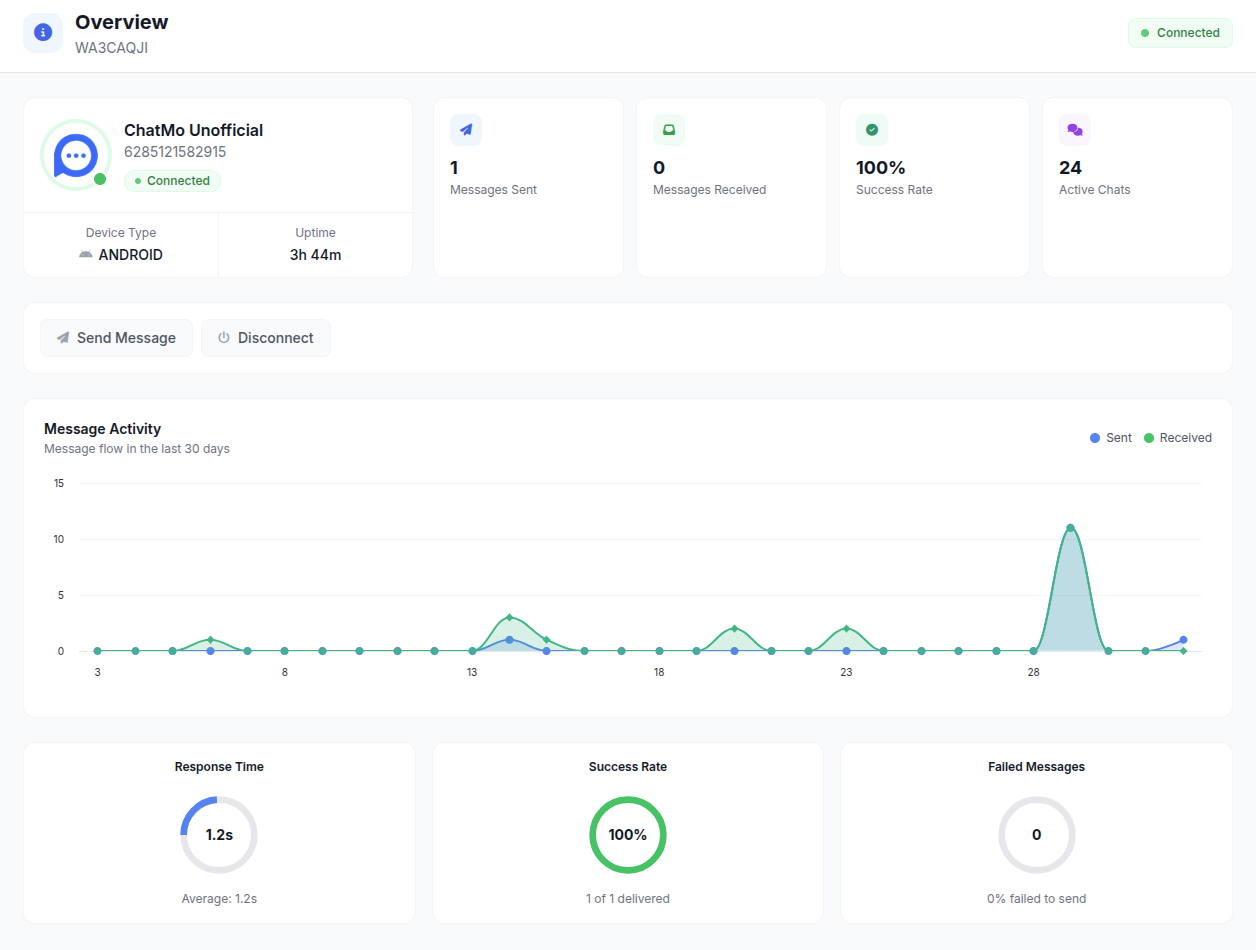
If your AI agent answers chats on the Unofficial channel, the reply pattern matters. A reply that appears less than a second after the customer types looks like a bot, and that kind of pattern is easier to flag as unnatural. ChatMo has a Reply Delay setting that makes the AI wait a few seconds before replying, like a human admin reading and typing.
To turn it on:
Open AI Agent and select the agent attached to your WhatsApp Unofficial channel.
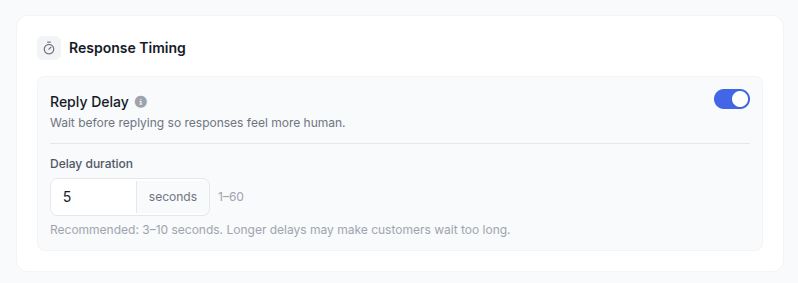
Go to the AI Settings tab and find the Response Timing section.
Turn on Reply Delay and set the duration. We recommend 3 to 10 seconds; longer delays can keep customers waiting too long.
Click Save. The setting applies to the next chats right away.
Reply Delay has a second benefit: messages a customer sends in a row are answered together in one reply. Say a customer types "hi", "quick question", then "how much is the premium package?" within five seconds. Without a delay, the AI may reply three times. With an 8-second Reply Delay, the AI waits until the customer finishes and replies once with a complete answer. The chat feels more natural, and fewer messages leave your number.
What about Multiple Chat Bubbles? In Strategy 1, replies on the Unofficial channel are not billed per message, so Multiple Chat Bubbles can stay on. Splitting a long answer into 2-3 short messages actually makes the chat feel more human. Keep in mind that AI Settings apply to every channel that uses that agent.
Benefits and risks of Strategy 1
Benefits: replies do not use your WABA quota, customers keep chatting in WhatsApp as usual, and broadcasts stay safe on the official lane.
Risks: WhatsApp Unofficial uses the linked-device path, which Meta does not officially support. Accounts can still be restricted if it is used for bulk sending, so never broadcast from the Unofficial channel; use it only to answer incoming chats.
Operations: the phone running the WhatsApp Business App must stay active and be opened regularly so the linked device stays connected.
Tip: reply naturally, like a person would. Avoid sending identical messages to many numbers from the Unofficial channel, and keep every bulk message on WABA.
Strategy 2: Keep WABA, move the chat to ChatMo Webchat
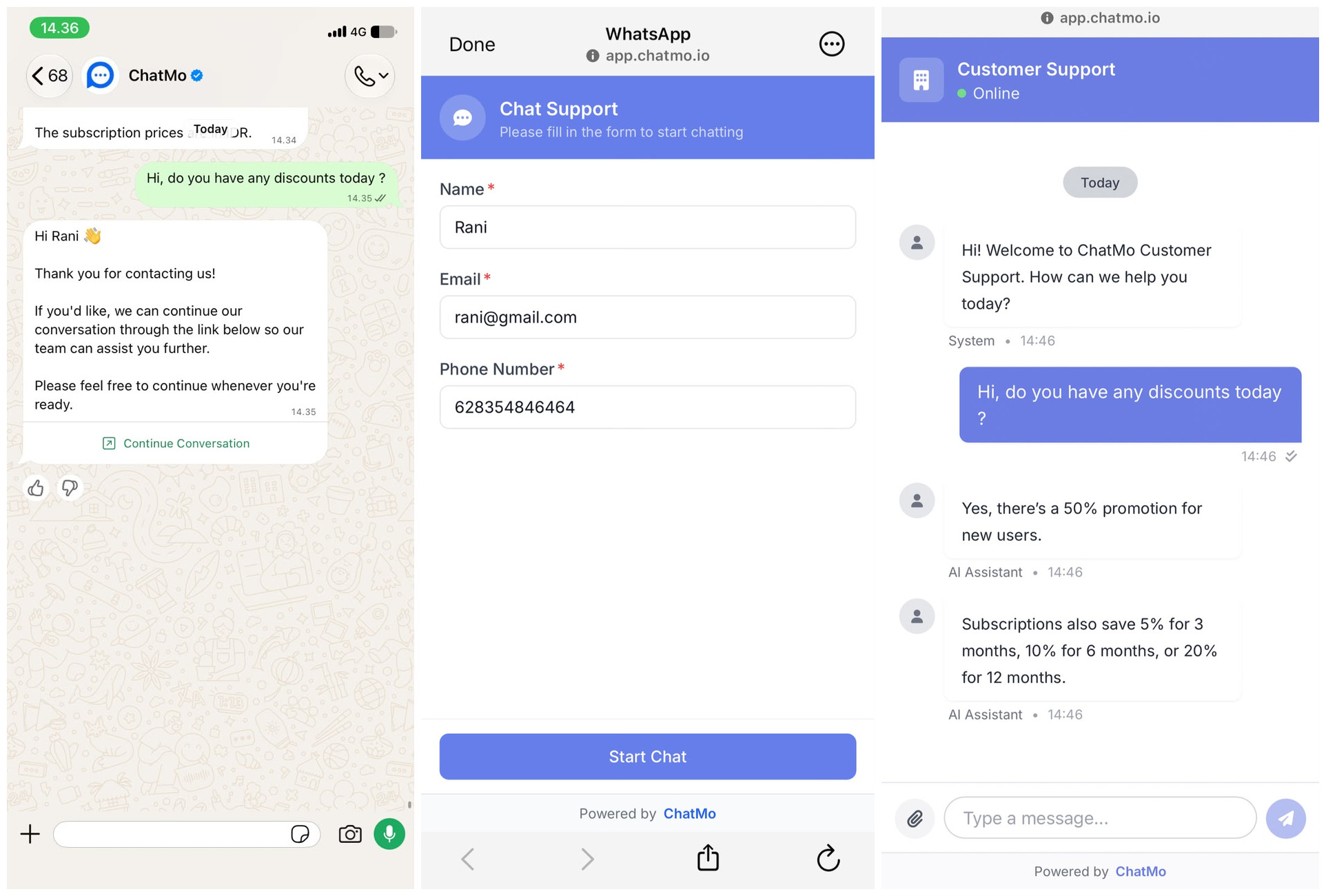
If you want to stay 100% on official channels, the second strategy fits better. You keep WABA, but when a chat comes in, the customer is invited to continue in ChatMo Webchat: a browser-based chat page opened from a link, with no app to install and no per-message fee.
This way, one WABA conversation needs only one message (the redirect with the link). Everything after that, including AI agent and human agent replies, happens in webchat.
How to set up Strategy 2 in ChatMo
Open Channels, then Webchat, create a new webchat widget and set its name, colors and welcome message.
Connect the widget to the same AI agent you use on WhatsApp so answers stay consistent.
Copy the webchat link (it looks like
https://app.chatmo.io/webchat?widget_id=YOUR_WIDGET_ID).On the WABA channel, create an automatic reply (through the AI agent or a Workflow) that sends one message with that link whenever a new conversation starts.
Turn on human handoff in webchat so complex questions still reach your team in the same ChatMo inbox.
Example redirect message
Hi, thanks for contacting Our Store! To help you faster with our catalog, stock checks and order status, please continue the chat here: https://app.chatmo.io/webchat?widget_id=YOUR_WIDGET_ID
Customer journey simulation
A customer sends "Hi, how much is the premium package?" to your WhatsApp business number.
ChatMo replies automatically, once, with the redirect message and webchat link (1 WABA message).
The customer taps the link, the webchat page opens in their phone browser, and the AI agent picks up the conversation.
If they need a person, the AI agent hands off to your team. The whole conversation is logged in the ChatMo inbox.
Save more: turn off Multiple Chat Bubbles for AI replies on WABA
Not every customer will open the webchat link. Some will keep replying in WhatsApp, and your AI agent answers them through WABA. This is where the bubble setting matters. When Multiple Chat Bubbles is on, one AI answer can be split into 1 to 3 chat bubbles. Under per-message pricing, every bubble counts as one billable message, so a single answer can cost up to three times as much.
To turn it off:
Open AI Agent and select the agent that answers chats on your WABA channel.
Go to the AI Settings tab and find the Response Style section.
Turn off the Multiple Chat Bubbles toggle.
While you are there, turn on Reply Delay in the Response Timing section so messages sent in a row get one reply.
Click Save. From now on every AI answer is sent whole, in just 1 bubble.
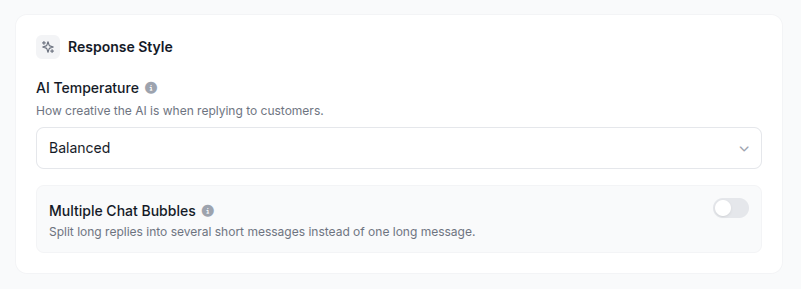
Simulation for 5,000 AI answers a month on WABA:
Tip: Multiple Chat Bubbles applies to every channel that uses the agent, including webchat. If you want webchat to keep using several bubbles (webchat has no per-message fee), create a separate agent: one for WABA with bubbles off, and one for webchat with bubbles on.
Strategy 2 savings simulation
Strategy 1 vs Strategy 2
Which strategy fits your business?
Choose Strategy 1 if you receive a lot of chats, your customers live in WhatsApp, and you are disciplined about only replying (never broadcasting) from the Unofficial channel.
Choose Strategy 2 if compliance and account safety come first, or your conversations tend to be long, such as consultations, catalogs and troubleshooting.
Combine both if you run several numbers: your main number uses Strategy 2, while a high-volume support number uses Strategy 1.
More ways to keep WABA costs under control
Check AI Settings on every AI agent that replies through WABA: turn off Multiple Chat Bubbles and turn on Reply Delay, so one answer is only one billable message.
Track message costs in the ChatMo Message Cost report and set a cost threshold alert per channel to avoid end-of-month surprises.
Segment your broadcasts to relevant contacts only. A broadcast to 10,000 uninterested contacts still counts as 10,000 messages.
Combine information into one clear message instead of several short messages in a row.
Other Meta rules you should know
A payment method is required. Meta requires an active payment method on the WhatsApp Business account (or through your BSP) by 30 September 2026. Without one, service messages stop being delivered from 1 October 2026.
Every bubble counts as one message. One reply split into three bubbles counts as three messages, including messages with images or documents.
The free allowance is per number, not per account. A business with several WABA numbers gets 1,000 free service messages for each number, and the allowance resets monthly without rolling over.
Volume discounts for utility and authentication. These two categories get cheaper in tiers at high volume. Volume is counted per business portfolio and resets every month. Marketing has no volume discount.
A price cap for marketing. Through the Marketing Messages API, businesses can set a maximum price per delivered marketing message.
Messages from the WhatsApp Business app stay free. On a number using Coexistence, replies typed directly in the app have no API charge. This is the basis of Strategy 1.
Conclusion
Per-message pricing gives every WhatsApp reply a price tag. By separating the broadcast lane (WABA) from the conversation lane (WhatsApp Unofficial), or by moving conversations to Webchat, you can cut customer service costs sharply without slowing down your response time. Both run from one ChatMo inbox with your AI agent and your team.
Want to work out the cheapest setup for your chat volume? Book a demo with the ChatMo team, explore ChatMo Webchat, or see ChatMo pricing.
Frequently asked questions
How much does the WhatsApp Business API cost per message from October 2026?
For Indonesia: marketing templates IDR 586.33 (USD 0.0411), utility and authentication templates IDR 356.65 (USD 0.0250), and service messages IDR 356.65 after 1,000 free per number per month. Rates exclude tax; check Meta's official rate card.
Are chats from Click-to-WhatsApp ads free?
Yes. When a customer starts a chat from a Click-to-WhatsApp ad or the WhatsApp button on a Facebook Page and the business replies within 24 hours, every message is free for 72 hours, including marketing templates.
Is the 1,000 free message quota per number or per account?
Per WABA number, and only for service messages (replies within 24 hours). The allowance resets every month without rolling over. Marketing, utility and authentication templates are charged from the first message.
Is it safe to use WhatsApp Unofficial to answer chats?
The risk is low when it is only used to answer incoming chats naturally. Turn on Reply Delay in AI Settings so the AI does not answer instantly like a bot. The risk of account restrictions rises when it is used for bulk sending, so keep every broadcast on WABA.
How do I make AI agent answers on WABA use only 1 message?
Open AI Agent, select the agent that replies on WABA, go to the AI Settings tab and turn off Multiple Chat Bubbles in the Response Style section. Every AI answer is then sent as 1 bubble, so it counts as only 1 billable message.
Will customers move from WhatsApp to webchat?
Most will, as long as the link opens straight in the phone browser with no app to install and they get an answer right away. A clear redirect message and a fast AI agent help keep conversion up.
Can I use Strategy 1 and Strategy 2 together?
Yes. A business with several numbers can run Strategy 2 on its main number and Strategy 1 on a high-volume support number, all managed from one ChatMo inbox.
About the author
Antonio Kurniawan
Product & Customer Success
The ChatMo product and customer success team helps Indonesian businesses run WhatsApp, Instagram and webchat conversations with AI agents and shared inboxes.