How to Sell Digital Products Through a Telegram Bot: Flow, Payments, Automatic Delivery and Buyer Support
A Telegram bot can be a digital product shop open 24 hours: showing a catalog, accepting payment and delivering files automatically. Learn a tidy sales flow, Telegram's Stars payment rule for digital goods, how to deliver products safely and how to support buyers who need help.

Antonio Kurniawan
Product & Customer Success

On this page
- Digital products that suit a bot
- A tidy sales flow
- Payment rules on Telegram
- Delivering products safely
- Reducing piracy
- Supporting buyers with AI and human agents
- Promoting your sales bot
- Measuring your bot shop's performance
- Writing convincing digital product descriptions
- Refund policy and support
- Affiliate and reseller programs
- Example: a photo preset creator
- Staying in touch after the purchase
- Common mistakes
- Summary
Key takeaways
- Telegram bots suit selling digital products such as e-books, templates, presets, courses and paid community access.
- According to Telegram's official documentation, payments for digital goods inside Telegram must use Telegram Stars.
- A tidy flow: catalog, product details, payment, automatic delivery and confirmation.
- Protect products with limited links, account-based access or watermarks to reduce piracy.
- Provide a path to a person for payment problems, broken files or licensing questions.
Selling digital products through a Telegram bot lets your shop stay open 24 hours without replying to every buyer by hand. The bot shows a catalog, explains product details, accepts payment, then delivers the file or access automatically once payment is confirmed. One important rule to understand from the start: according to Telegram's official documentation, transactions for digital goods and services made inside Telegram must use Telegram Stars. Alongside the automated flow, provide a path to a human agent for issues the bot cannot resolve, such as failed payments or files that will not open.
This guide covers suitable products, a tidy sales flow, payment rules, how to deliver products safely, how to reduce piracy and how to support buyers who need help.
Digital products that suit a bot
Telegram bots suit products that can be sent through chat or delivered as access:
E-books and guides, such as recipes, business guides or study materials.
Templates, such as social media designs, presentations, CVs or finance spreadsheets.
Presets and creative assets, such as photo presets, sound effects or fonts.
Online courses, with video lessons delivered in stages or access to a learning platform.
Paid community access, such as private groups or channels for members.
Content subscriptions, such as weekly market analysis or monthly classes.
Products that need long consultations before purchase, such as custom services, usually still need a conversation with an agent, although a bot can help at the start.
A tidy sales flow
A good flow keeps buyers from getting confused and cuts repeated questions. An example:
Greeting and main menu. When the buyer taps Start, the bot greets them and shows options: Browse Catalog, Best Sellers, FAQ and Talk to Our Team.
Catalog. The bot shows a product list with names, prices and short descriptions, with buttons to see details.
Product details. Show what is included, file formats, a sample or preview, the usage licence and the price.
Payment. The buyer taps buy and completes payment.
Automatic delivery. Once payment is confirmed, the bot sends the file, a download link or an access invite.
Confirmation and help. The bot sends a thank-you message, how to use the product and how to contact the team if there is a problem.
Every step should have a back-to-menu button and a talk-to-our-team button, so buyers never feel stuck.
Payment rules on Telegram
Telegram's Bot Payments API documentation states that transactions for digital goods and services inside Telegram must use Telegram Stars. Users can buy Stars through in-app purchases on their devices or through Telegram's official bot. For physical goods, bots can still use the payment providers Telegram supports.
A few things to keep in mind:
Set prices in Stars, considering any fees and the exchange rate at withdrawal.
Explain how to pay with Stars in the product description, because some buyers may never have used them.
Check the latest rules in Telegram's documentation, because digital payment policies can change.
Some sellers choose to sell through their own website and use the bot only for customer service and access delivery. That is a different route from paying inside Telegram, and you need to make sure it complies with Telegram's current terms.

Delivering products safely
Automatic delivery is the bot's main advantage, but it needs to be set up safely:
Deliver right after payment confirmation. Never send files before the system has actually confirmed payment.
Use limited links. For large files, send download links with an expiry or download limit instead of permanent files that are easy to forward.
Give account-based access. For courses, give access to a learning platform with the buyer's account rather than video files that can be shared.
Single-use invites. For paid groups or channels, use invite links that work only once or require approval.
Keep transaction records. Record who bought what and when, so you can resend files if buyers lose them and verify claims.
Reducing piracy
Digital products are easy to reshare. Nothing fully prevents piracy, but a few steps reduce it:
Watermarks with the buyer's name or email on every page of an e-book or template.
A clear licence, such as personal or commercial use, stated in the description and inside the file.
Regular updates sent only to registered buyers, so pirated versions quickly go out of date.
Value beyond the file, such as a community, Q&A sessions or support, which cannot be pirated.
Supporting buyers with AI and human agents
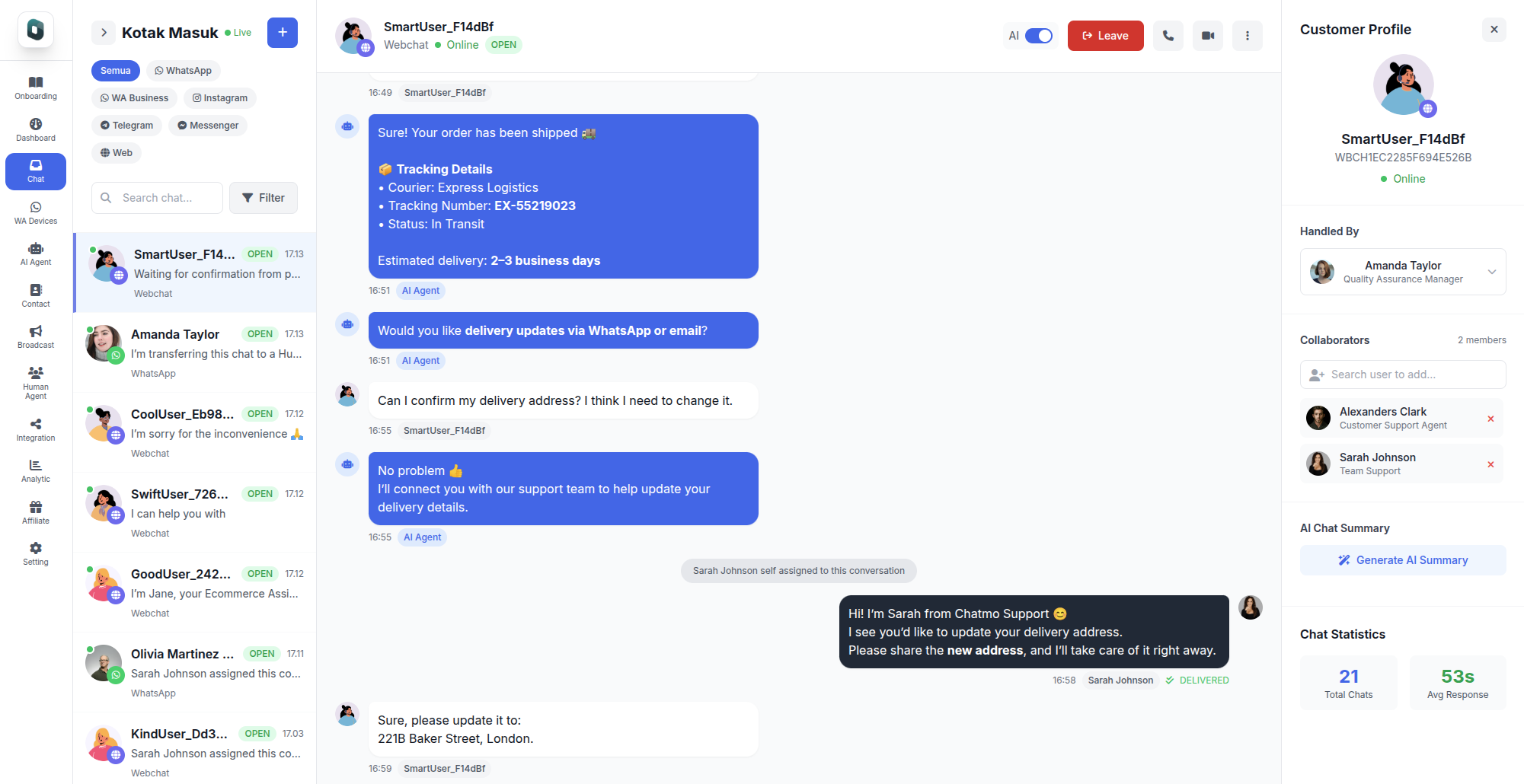
A bot with fixed menus suits the standard flow, but buyers often have unexpected questions: "Can this template be opened in Canva?", "Is this e-book suitable for beginners?" or "I've paid but haven't received the file." An AI agent can answer product questions based on information you provide, while human agents handle payment and technical issues.
In ChatMo, a Telegram bot connects with a token from BotFather, and conversations with the bot are managed in a shared inbox. The AI agent answers common questions about products, file formats and licences, then hands the chat to an agent when a buyer reports a payment problem or needs special help. Note that the Stars payment flow and automatic file delivery inside Telegram are run by your sales bot; the shared inbox is used for customer service conversations. The bot setup guide is in how to create a Telegram bot for customer service.
Promoting your sales bot
A bot nobody knows about gets no buyers. Promote the bot link in:
Your Telegram channel, with product posts ending in a button to the bot.
Community groups, through a pinned message.
Social media, such as your Instagram and TikTok bios.
Free samples, such as a mini e-book or free template with a link to the bot for the full version.
The guide to building a channel is in how to create a Telegram channel for business.
Measuring your bot shop's performance
Writing convincing digital product descriptions
Buyers of digital products cannot touch the item, so descriptions and previews carry a lot of weight. Explain concretely what the buyer gets: the number of e-book pages, the number of templates and their formats, the app needed to open the files and the file size. Include real samples, such as the first pages of an e-book, before-and-after images for presets or a short video of a template in use.
Also state who the product is for and who it is not for. A line such as "Ideal for beginners editing photos on their phone, less suitable for professional desktop software users" helps buyers decide and reduces refund requests from wrong purchases.
Refund policy and support
Digital products are hard to return once downloaded, but a clear refund policy still builds trust. Define refund conditions from the start, such as corrupted files or files that do not match the description, and state them in the product details and confirmation message. When a file will not open, the fix is usually resending it or pointing to the right app, not a refund.
Also set a realistic support window, such as replies within one working day. Buyers who know when they will be helped are much calmer, and agents do not feel they must be on call all the time.
Affiliate and reseller programs
Many digital product sellers grow sales through affiliates, people who promote the product for a commission. A bot can help by giving each affiliate a unique code or link and recording purchases made with it. Start with happy buyers or small creators with a relevant audience, because recommendations from people who actually use the product are usually trusted more.
Example: a photo preset creator
A photographer selling photo presets used to take orders through Instagram DMs, send bank details, check transfers and deliver files by hand. During the holiday season, she was overwhelmed and many buyers waited for hours.
She built a Telegram bot with a preset catalog, before-and-after previews and in-Telegram payment following the Stars rule. Files are delivered automatically once payment is confirmed, along with an installation guide. Questions such as how to install the presets in a particular app are answered by an AI agent, and only special cases reach her. Her Telegram channel shares sample edits and announces new presets with a button to the bot.
Staying in touch after the purchase
Digital product buyers are your next buyers. A few days after a purchase, send a follow-up asking whether the product helped and offering support if they are stuck. Share free updates for products they already own, and let them know first when a relevant new product launches. Because a bot can only message users who started a conversation, buyers who purchased through the bot can be contacted again, but do it sparingly so it does not feel like spam.
Common mistakes
Ignoring Telegram's payment rules for digital goods. The bot can run into trouble if it does not follow the policy.
Sending files before payment is confirmed. A risk of losses and fraud.
No product preview. Buyers hesitate to buy digital products they cannot see first.
No path to a person. Buyers with payment problems feel abandoned.
Permanent files with no protection. Products spread easily without permission.
Summary
Telegram bots suit e-books, templates, presets, courses and paid community access.
Payments for digital goods inside Telegram must use Telegram Stars, according to the official documentation.
Build a tidy flow from catalog to automatic delivery and confirmation.
Protect products with limited links, account access, watermarks and a clear licence.
Combine an AI agent for common questions with human agents for payment and technical issues.
Frequently asked questions
Which digital products suit selling through a Telegram bot?
E-books, design templates, photo presets, music or sound files, online courses, paid group or channel access and content subscriptions.
How do I accept payment for digital products in a Telegram bot?
According to Telegram's Bot Payments API documentation, transactions for digital goods and services inside Telegram must use Telegram Stars. For physical goods, bots can use the payment providers Telegram supports.
Can a Telegram bot deliver files automatically after payment?
Yes. Once payment is confirmed, the bot can send a file, a download link or an invite to a private group or channel automatically.
How do I stop digital products being shared without permission?
Use download links with an expiry or download limit, give account-based access for courses, add watermarks with the buyer's identity and include a clear usage licence.
Do sellers still need human customer support?
Yes. The bot handles the standard flow, but issues such as failed payments, files that will not open or licensing questions still need a human agent.
About the author
Antonio Kurniawan
Product & Customer Success
The ChatMo product and customer success team helps Indonesian businesses run WhatsApp, Instagram and webchat conversations with AI agents and shared inboxes.