WhatsApp AI Chatbot for Customer Service: How It Works, Use Cases and No-Code Setup
A WhatsApp AI chatbot reads customer questions in everyday language, finds answers in your business documents, runs tasks such as shipping quotes or bookings, and hands chats to an agent when needed. Here is how it works, the 2026 policy and how to build one.

Antonio Kurniawan
Product & Customer Success
On this page
- Menu bot vs AI chatbot
- How does an AI chatbot work?
- WhatsApp's 2026 AI policy: what is allowed?
- AI chatbot use cases in customer service
- How to build a WhatsApp AI chatbot without code in ChatMo
- Building a knowledge base that makes your AI accurate
- When should the AI hand a chat to a person?
- How to measure an AI chatbot's success
- Example: before and after an AI agent
- Common mistakes
- Conclusion
Key takeaways
- AI chatbots understand free-form sentences and answer from your business knowledge base, unlike menu bots that only match numbers or keywords.
- Since 15 January 2026 Meta bans general-purpose AI chatbots on the WhatsApp Business Platform, but AI serving your own customers is still allowed.
- Answer quality depends on a tidy knowledge base: one topic per section, question-and-answer format and exact figures.
- The AI should hand chats to a person for complaints, sensitive questions, price negotiations or when it cannot find the answer.
- Measure success with resolution rate, handoff rate, first reply time and chat conversion.
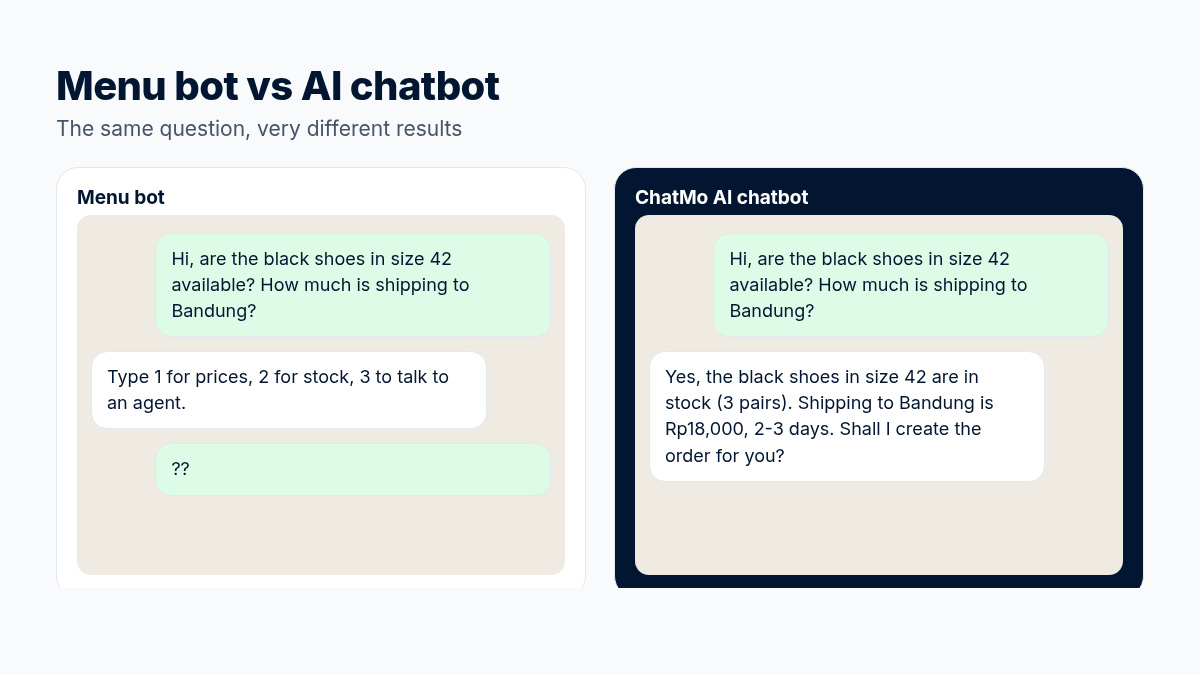
A WhatsApp AI chatbot for customer service is an automated assistant that reads customer questions in everyday language, looks up the answer in your business documents (FAQs, catalog, SOPs) and replies in seconds, around the clock. Unlike the old menu bots that tell customers to "type 1 for prices", an AI chatbot understands free-form sentences, can run tasks such as shipping quotes or bookings, and hands the chat to a human agent when a question is beyond it. In ChatMo you can build an AI agent like this without code in an afternoon.
This article covers how AI chatbots work, how they differ from rule-based bots, Meta's latest policy on AI in WhatsApp, use cases, how to build one, and how to measure whether your AI is really helping.
Menu bot vs AI chatbot
You do not have to pick one. Many businesses use a workflow for fixed paths (for example choosing a clinic branch) and an AI agent for the open conversation after that.
How does an AI chatbot work?
A customer sends a message to your WhatsApp business number, such as "hi, are the black shoes in size 42 still available? how much is shipping to Bandung?".
The AI understands the intent: two questions, stock and shipping.
The AI looks up the answer in your knowledge base: catalog, price list, return policy.
The AI runs a tool if needed, such as calculating shipping to the destination city or creating an order.
The AI writes the reply in your brand's tone and sends it.
When unsure or asked to, the AI hands the chat to a human agent with the full history, so the customer never has to repeat themselves.
WhatsApp's 2026 AI policy: what is allowed?
Since 15 January 2026, Meta has banned general-purpose AI chatbots (assistants you can ask anything, like WhatsApp versions of popular AI assistants) from using the WhatsApp Business Platform as their main service. What is still allowed is AI that serves your own business: answering product questions, helping with orders, checking delivery status, booking appointments and other customer service.
In other words, AI agents for customer service remain safe to use. Just keep your AI focused on business topics and have it politely decline unrelated requests such as "write me a poem" or "do my homework".
Good practice: write the topic limits into your AI agent's instructions. For example: "Only answer questions about Our Store's products, orders and services. For anything else, politely say you can only help with Our Store."
AI chatbot use cases in customer service
Answering FAQs: opening hours, branch addresses, payment methods, return and warranty policies.
Product recommendations: "my skin is oily, which one suits me?" answered from product descriptions.
Shipping quotes and orders: calculating shipping to the destination and creating an order with a payment link.
Appointment booking: matching free slots on the team calendar and sending a confirmation.
Lead qualification: asking about needs, budget and location, then labeling the lead and passing it to the right salesperson.
Automatic follow-ups: reaching back out to customers who went quiet after asking for a price.
How to build a WhatsApp AI chatbot without code in ChatMo
Connect a channel. Link WhatsApp Official or WhatsApp Unofficial from Integrations. The same AI agent can also serve Instagram, Facebook Messenger, Telegram and webchat.
Create an AI agent. Open AI Agent, give it a name and write its persona: who it is, its tone of voice and its limits.
Fill the knowledge base. Upload FAQs, catalogs, price lists and SOPs, or add your website link. The tidier the documents, the more accurate the answers.
Turn on the tools you need, such as shipping quotes, order creation or calendar booking.
Set up human handoff. Decide when the AI should stop: when a customer complains, asks for a person, or asks something outside the knowledge base.
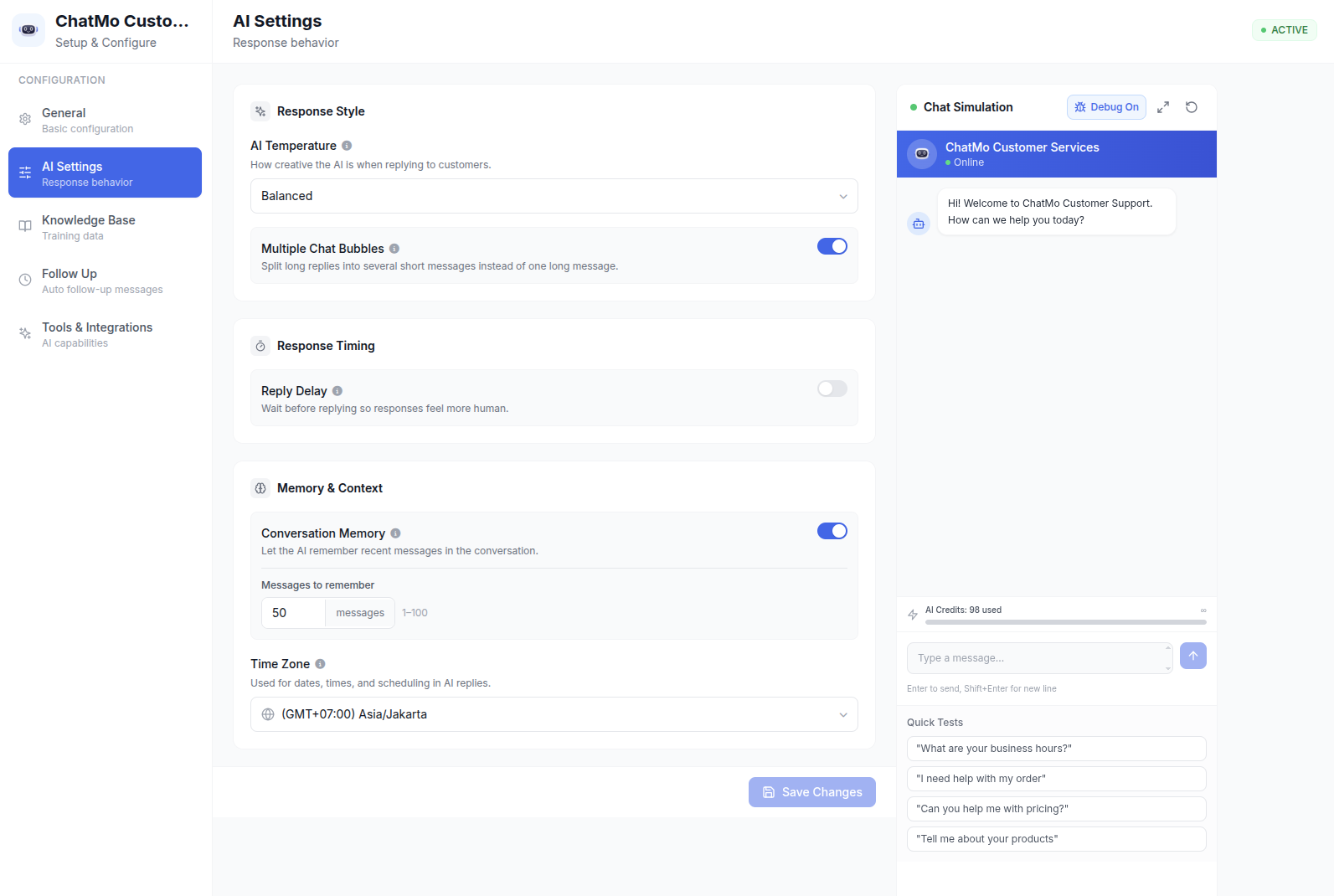
Tune AI Settings. Set a Reply Delay so replies feel natural, choose whether answers are split into several bubbles, and decide how much chat history the AI remembers.
Test in the chat simulator with 20-30 real customer questions before connecting it to a channel.
An example of a good persona instruction
You are Mila, Our Store's friendly, to-the-point customer service agent. Reply in casual English, no more than 3 sentences per reply. Only use information from the knowledge base. If you cannot find a price or stock level, do not guess; say the team will check and hand the chat to an agent. If the customer is angry or asks for a refund, hand the chat to an agent.
Instructions like this tell the AI when to answer and when to stop. "Do not guess" matters: it stops the AI from inventing prices.
Building a knowledge base that makes your AI accurate
The quality of AI answers depends almost entirely on the documents you provide. Principles that help:
One topic per section. Split documents into clear sections: products, prices, shipping, payment, returns, warranty. The AI finds the right answer more easily.
Write in question-and-answer form. "How long is shipping outside Java? 3-7 working days" is easier to use than a long paragraph.
Include exact figures: prices, sizes, opening hours, return deadlines. Avoid "around" when you know the exact number.
Mark what must not be promised. For example, special discounts can only come from an agent, or delivery estimates are not guarantees.
Add a date and an owner to each document. When prices change, you know which document to update and who is responsible.
When should the AI hand a chat to a person?
Timely handoff actually makes customers trust your AI more. Set the AI to stop and call an agent when:
The customer complains, is angry or asks for a refund.
The question involves health, legal or financial matters that need professional judgment.
The customer wants to negotiate a price, place a bulk order or get a custom B2B quote.
The answer is not in the knowledge base after one clarifying question.
The customer explicitly asks to talk to a person.
In ChatMo you can also choose whether the AI stops completely after handoff or stays active, and whether the handoff notice is shown to the customer.
How to measure an AI chatbot's success
In ChatMo, the AI Agent report shows how many conversations the AI handled, how many went to a person, and AI credit usage, so you can see the impact week by week.
Example: before and after an AI agent
A beauty clinic receives about 80 chats a day. Before AI, two agents took turns replying from 09:00 to 21:00. Late-night chats waited until morning, even though many prospective patients ask after work hours. The questions repeated, too: treatment prices, doctor schedules and branch locations.
After adding an AI agent with a knowledge base of treatments, prices, doctor schedules and branch addresses:
Price and location questions are answered in seconds, even at 23:00.
The AI offers consultation slots from the free calendar times and sends a confirmation.
Medical questions, such as side effects or specific skin conditions, go straight to an agent with a "medical consultation" label.
Agents now focus on patients ready to book and on following up with returning patients.
What made this work was not the AI's sophistication alone but a clear split of work: AI for definite information, people for decisions that need empathy and expertise.
Common mistakes
A messy knowledge base. Documents that contradict each other make AI answers inconsistent. Consolidate and update them regularly.
No way out to a person. Customers stuck with a bot get frustrated. Always provide handoff.
Letting the AI answer off-topic requests, which also goes against WhatsApp's 2026 policy.
Going live without testing. Test with real questions, including hard ones and sloppy ones.
Never reviewing it. Read 20 AI conversations every week and fix documents based on weak answers.
Save costs: on the WhatsApp API, turn off Multiple Chat Bubbles so each AI answer counts as one message. We explain why in how to cut WABA costs.
Conclusion
A WhatsApp AI chatbot helps your support team answer faster without hiring more people, as long as it is built on a tidy knowledge base, given clear topic limits and always has a way out to a person. Start with the questions you get most, measure results every week, and gradually expand to tasks like orders and bookings.
Want to try an AI agent for your business? See ChatMo AI Agents or book a demo.
Frequently asked questions
What is the difference between an AI chatbot and a regular WhatsApp bot?
Regular bots follow menus and keywords such as "type 1". AI chatbots understand free-form sentences, answer from business documents and can run tasks like shipping quotes or bookings.
Are AI chatbots on WhatsApp still allowed after the 2026 policy?
Yes, as long as the AI serves your own business, such as answering product, order and booking questions. What is banned is general-purpose AI assistants as the main service.
Do I need to code to build a WhatsApp AI chatbot?
No. In ChatMo you write a persona, upload knowledge documents, turn on tools, set up handoff and connect the AI agent to your channels.
How do I stop an AI chatbot from making things up?
Limit the AI to your knowledge base, instruct it not to guess prices or stock, and have it hand the chat to an agent when it cannot find the answer.
What share of chats can AI handle?
A sensible first target is 30-50% of chats resolved without a person in the first month, rising as you improve the knowledge base every week.
About the author
Antonio Kurniawan
Product & Customer Success
The ChatMo product and customer success team helps Indonesian businesses run WhatsApp, Instagram and webchat conversations with AI agents and shared inboxes.