How to Take Orders and Payments on WhatsApp Without Manual Bookkeeping
Many shops still record WhatsApp orders in a notebook or spreadsheet and check transfers one by one. Learn a tidy order flow in chat, from asking about the need and sending a breakdown to sharing a payment link, confirming and shipping.

Antonio Kurniawan
Product & Customer Success

On this page
- Why WhatsApp orders get messy
- Stage 1: understand the need and point to products
- Stage 2: collect details in a consistent format
- Stage 3: send the full breakdown in one message
- Stage 4: use a payment link
- Stage 5: confirm and share shipping updates
- Status labels: a work map for the team
- Reminding customers who have not paid
- Handling cancellations and order changes
- Splitting work between agents
- Example: a coffee equipment store
- Handling custom orders and pre-orders
- Linking orders to customer data
- Measuring the health of your order flow
- Common mistakes
- Summary
Key takeaways
- A tidy WhatsApp order follows five stages: need, breakdown, payment, confirmation and shipping.
- One complete breakdown message (products, total, shipping, payment method, delivery date) speeds up the customer's decision.
- Payment links reduce manual transfer checks and wrong amounts.
- Status labels such as Awaiting Payment and Shipped show the team which orders need attention.
- A polite reminder to customers who have not paid often saves many orders.
A tidy way to take orders and payments on WhatsApp comes down to five stages: understand what the customer needs, send a complete order breakdown in one message, share a payment link with the exact amount, confirm as soon as payment arrives, then share shipping updates. Each stage gets a status label in the conversation, so the team knows which orders await payment, which are ready to ship and which need a reminder. With this flow, manual notebook records and one-by-one bank statement checks shrink dramatically.
This guide explains each stage with example messages, how to split work between agents and the mistakes that most often make orders vanish halfway.
Why WhatsApp orders get messy
WhatsApp is very convenient for customers, but without a clear flow, the business side gets overwhelmed quickly:
Order details are scattered across dozens of chats, and agents scroll back to find an address or a variant.
Transfer amounts do not match, for example when customers forget shipping or round the amount.
Payment proofs pile up and have to be matched against bank statements by hand.
Status is unclear. Which orders are paid, which are shipped, which have not been processed?
Unpaid customers are forgotten, even though many of them are still interested.
Stage 1: understand the need and point to products
Do not send a price list straight away. Ask one or two questions to understand the need, then point to the right product. If you have a WhatsApp catalog, send the product link so the customer sees the photo, price and description together. Here is how to build one: WhatsApp Business catalog.
Stage 2: collect details in a consistent format
Once the customer is ready to order, send an order format as a quick reply:
Great, please fill in these details:
Name:
Phone number:
Full address (with district and postcode):
Product and variant:
Quantity:
Shipping: regular / same day
The same format for every customer keeps details easy to read and copy into your shipping system. Save it as a quick reply so agents never retype it.
Stage 3: send the full breakdown in one message
This stage matters most. A breakdown spread across several messages confuses customers and delays decisions. Put everything in one message:
Thanks Dimas, here's your order:
1x Canvas Backpack, Black: Rp289,000
1x Leather Wallet, Brown: Rp149,000
Regular shipping to Semarang: Rp22,000
Total: Rp460,000
Pay through the link below (bank transfer, e-wallet or QRIS). Your order ships within 24 hours of payment.
This breakdown answers every question that usually comes next: how much is shipping, how can I pay and when will it ship.
Stage 4: use a payment link
A payment link is the biggest upgrade over manual transfers:
In ChatMo, agents can create an order from the dashboard and generate a Xendit payment link to send to the customer. The payment status is recorded in the order details, so agents do not need to ask for transfer proof or check bank statements by hand.
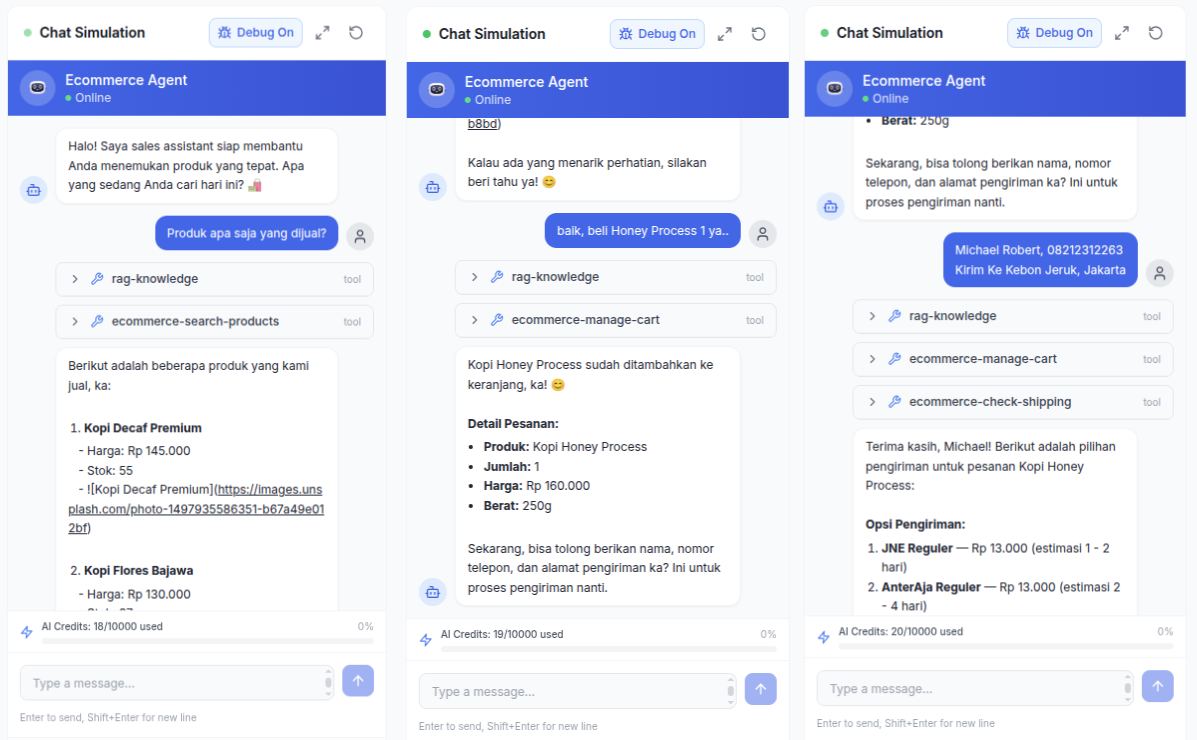
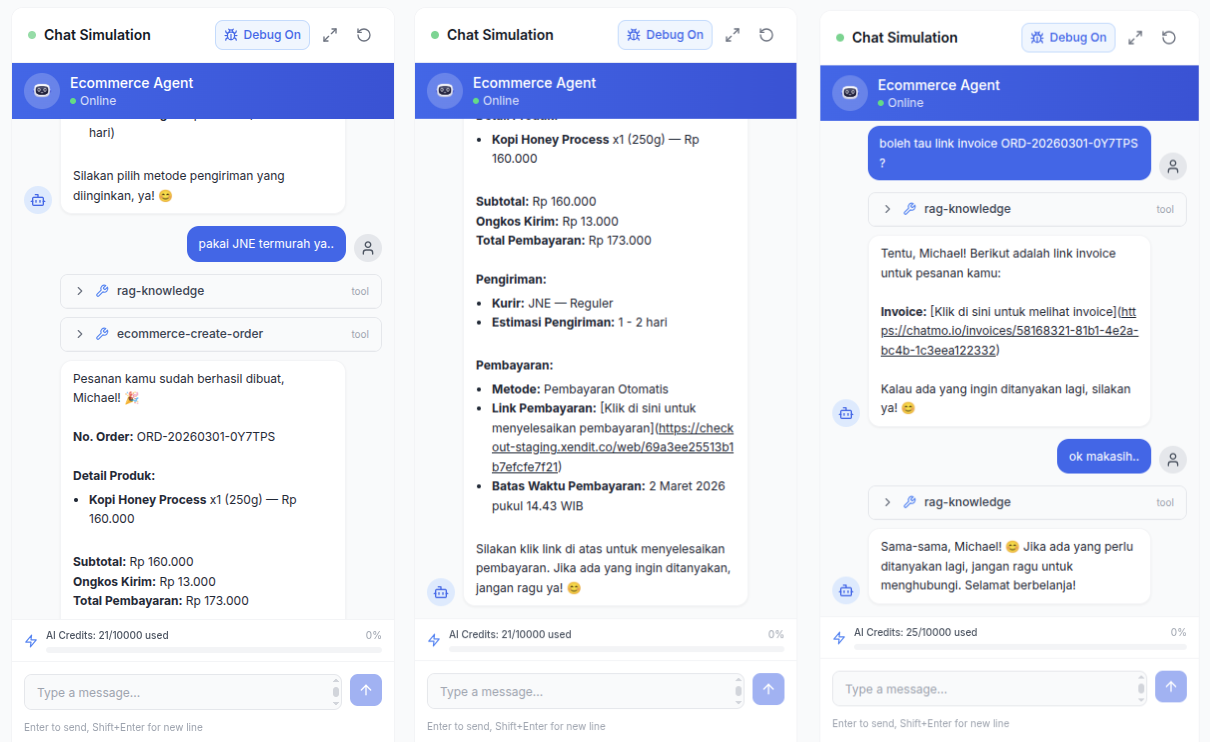
Stage 5: confirm and share shipping updates
As soon as payment arrives, send a short confirmation:
We've received your payment, Dimas. Your order is being packed and ships today. We'll send the tracking number once the parcel is with the courier.
Then send the tracking number when the parcel ships. This small message dramatically cuts the "has my order been processed?" questions that flood the chat. If shipping happens more than 24 hours after the customer's last message and you use the WhatsApp Business API, send the update with a utility template. Examples are in WhatsApp Business message template examples.

Status labels: a work map for the team
Labels turn your chat list into a task list. Simple, effective labels:
Product Question, the customer is still asking and has not ordered.
Awaiting Payment, the breakdown and link have been sent.
Paid, ready to pack.
Shipped, the tracking number has been sent.
Complaint, a problem that needs handling.
Every morning, the team filters Awaiting Payment to send reminders and Paid to make sure every order is packed.
Reminding customers who have not paid
Customers who received a breakdown but have not paid are your biggest opportunity. Some forgot, some are unsure, some are waiting for payday. One polite reminder is often enough:
Hi Dimas, we're holding your backpack order until tonight. If you have any questions about size or payment, just let us know.
Send the reminder within 24 hours so it stays inside the service window. Do not send reminders every hour; once or twice is enough. More follow-up guidance is in how to follow up with customers on WhatsApp.
Handling cancellations and order changes
Customers sometimes want to change a size, add a product or cancel after the breakdown is sent. Set clear rules and communicate them kindly. If payment has not been made, send a new breakdown and a new payment link, then cancel the old link so it is not paid twice. If payment has arrived but the item has not shipped, record the change in an internal note and state any price difference in one message. If the item has shipped, point the customer to your returns process.
Above all, record every change in the same conversation. Another agent opening the chat tomorrow morning should understand what happened without asking the customer again.
Splitting work between agents
When orders pile up, split work by stage:
Sales agents handle the need, the breakdown and the payment link.
Warehouse or shipping agents handle Paid orders until the tracking number is sent.
After-sales agents handle Complaint labels and returns.
In a shared inbox, chats move from a sales agent to a shipping agent with internal notes attached, so nobody needs to ask the customer again.
Example: a coffee equipment store
A coffee equipment store in Yogyakarta receives about 80 WhatsApp orders a day. Two agents used to record orders in a spreadsheet, ask for transfer proofs and match bank statements every afternoon. Wrong amounts and missed orders happened almost every week.
They changed the flow: the order format became a quick reply, breakdowns went out in one message and every order got a payment link. Status labels were used for each stage, and reminders went out every day at 3 pm to customers labelled Awaiting Payment. Bank statement matching almost disappeared because payment status is recorded automatically, and agents now spend that time answering product questions faster.
Handling custom orders and pre-orders
Not every order ends with a single breakdown. Custom products such as birthday cakes, uniforms or furniture often need several rounds of discussion before a final price is agreed. For these, add two steps to your flow. First, summarise the agreement in one message before sending the payment link, such as size, color, wording and completion date, and ask the customer to reply "agreed". Second, if you take a deposit, create two separate payment links, one for the deposit and one for the balance, and include the due date.
Pre-orders also need more frequent updates. Customers who pay upfront for goods that ship in three weeks feel reassured by regular news, such as when production starts, when stock reaches the warehouse and when it ships. Add a dedicated label such as "Pre-order October Batch" so updates can go to every customer in the same batch at once.
Linking orders to customer data
Every completed order is valuable data: who bought, which product, how much and when. It helps you offer complementary products, remind customers to reorder consumables and recognise loyal customers who deserve special treatment.
Make a habit of recording key details in the contact profile, such as clothing size, a regular address or product preferences. When the same customer returns next month, any agent can serve them without asking for the basics again. In a shared inbox, notes like these live on the contact and are visible to every agent who handles that customer.
Measuring the health of your order flow
Once the flow is running, track a few simple numbers every week to see where orders leak. First, the share of conversations that reach the breakdown stage. If it is low, agents may be slow to answer product questions or their recommendations miss the mark. Second, the share of breakdowns that end in payment. If it is low, check whether shipping is too expensive, payment methods too few or reminders never sent. Third, the average time from payment to tracking number. Customers who wait too long ask repeatedly and leave bad reviews.
You do not need a complex system to calculate these. With consistent status labels, count the conversations under each label at the end of the week and compare them with the week before.
Common mistakes
Sending the breakdown in pieces. Customers wait through several messages before knowing what to pay.
Forgetting shipping costs. Customers are surprised by the final total and cancel.
Accepting transfers to only one bank. Customers with other banks delay payment.
No status labels. Paid orders can be missed in packing.
Never sending reminders. Many orders that could have been saved simply disappear.
Summary
Follow five stages: need, details, breakdown, payment, confirmation and shipping.
Send the full breakdown in one message and use payment links.
Label every chat with its status so the team knows what to do.
Remind unpaid customers politely within 24 hours.
Split work between agents by order stage.
Frequently asked questions
How do I take orders on WhatsApp in an organised way?
Use a consistent order format, send a full breakdown in one message, share a payment link, confirm once payment arrives and add a status label to every conversation.
What are the benefits of payment links over manual transfers?
Payment links show the exact amount, support several payment methods and their status can be checked automatically, so agents do not need to match bank statements one by one.
How do I chase customers who have not paid on WhatsApp?
Send one polite reminder within 24 hours with the order breakdown and the payment link. After 24 hours, use an approved WhatsApp template if you are on the WhatsApp Business API.
Can several agents manage WhatsApp orders at once?
Yes, with a shared inbox that assigns chats to agents, labels order status and keeps internal notes so no order gets lost.
What order format should customers fill in?
At least name, phone number, full address, product and variant, quantity and shipping choice. Send this format as a quick reply so customers only need to fill it in.
About the author
Antonio Kurniawan
Product & Customer Success
The ChatMo product and customer success team helps Indonesian businesses run WhatsApp, Instagram and webchat conversations with AI agents and shared inboxes.