How to Create a Telegram Channel for Business and Grow Subscribers Who Actually Buy
A Telegram channel is a broadcast medium with unlimited subscribers, ideal for offers, product updates and educational content. Learn how to create a public or private channel, set up admins, schedule posts, open discussions, grow subscribers and steer readers toward a purchase.

Antonio Kurniawan
Product & Customer Success
On this page
- When does a business need a Telegram channel?
- Steps to create a channel
- Public or private channel?
- Important settings after creating the channel
- Content ideas for a business channel
- Growing subscribers the right way
- Turning channel readers into buyers
- Reading channel statistics
- Writing posts people read to the end
- Private channels for loyal customers
- Protecting your channel's reputation and security
- Example: a design template shop
- Choosing the right posting times
- Common mistakes
- Summary
Key takeaways
- A Telegram channel is a one-way broadcast with unlimited subscribers, suited to announcements, offers and regular content.
- Public channels have a searchable t.me link; private channels can only be joined through an invite link.
- Set up admins with task-based permissions, schedule posts and link a discussion group if you want comments.
- Quality subscribers come from consistent, useful content, not from buying subscribers.
- Every promotional post should invite readers into a private conversation, for example through a bot or an admin account.
Creating a Telegram channel for business is simple: open Telegram, tap the new message icon, choose New Channel, add a name, description and photo, then decide whether the channel is public with a searchable t.me link or private with an invite link. A channel is a one-way broadcast with unlimited subscribers, which makes it ideal for offers, product updates and regular educational content. The challenge is not creating the channel but making it useful: consistent content, relevant subscribers and a clear path from posts to private conversations, where sales happen.
This guide covers the setup steps, important settings, how to grow subscribers properly, content ideas and how to turn channel readers into buyers.
When does a business need a Telegram channel?
A channel helps most when your business regularly has news to share and your audience is comfortable on Telegram. Examples include digital product shops releasing new templates or e-books, courses and tutoring services sharing short lessons and class schedules, gadget or gaming shops with frequent restocks and offers, and information providers such as market analysis or industry news.
If your customers mostly use WhatsApp and rarely open Telegram, a channel may not be a top priority. The full picture of channels, groups, bots and Telegram Business accounts is in Telegram for business.
Steps to create a channel
Open Telegram on your phone or desktop.
Tap the new message icon, then choose New Channel.
Enter the channel name matching your brand, such as "Senja Coffee Official".
Write a description explaining what subscribers will get and how to contact your business.
Upload a profile photo, usually your logo.
Choose the channel type: public with a username and t.me link, or private with an invite link.
Add initial subscribers from your contacts, or skip and share the link later.
Public or private channel?
Many businesses start with a public channel to reach an audience, then create a separate private channel for special customers who get more exclusive news or offers.
Important settings after creating the channel
Admins and permissions. Add admins with their own Telegram accounts and give rights based on their tasks, such as posting only or also editing channel info. Do not give everyone the right to add admins.
Admin signatures. Turn on if you want each post to show the name of the admin who wrote it, useful for larger teams.
Discussion group. Link the channel to a discussion group so subscribers can comment under each post. It makes the channel feel more alive but needs moderation.
Reactions. Choose which reactions are allowed so subscribers can respond quickly without commenting.
Scheduled posts. Prepare a week of content and schedule it to publish at the right times.
Silent messages. Send posts without a notification sound for non-urgent content so subscribers do not feel disturbed.

Content ideas for a business channel
A channel full of promotions quickly loses attention. Mix several content types:
Short education: tips for using your product, buying guides or answers to common questions.
New products and restocks: with photos or short videos and clear prices.
Subscriber-only offers: codes or special prices shared only in the channel.
Behind the scenes: production, stock preparation or team stories.
Customer testimonials: screenshots of reviews or photos customers send, with permission.
Polls: asking subscribers' preferences for your next product.
Set a rhythm you can keep, such as one post a day or three a week. Consistency matters more than a high frequency that only lasts two weeks.
Growing subscribers the right way
A large subscriber count means nothing if those people are not interested in your products. Avoid buying subscribers: fake accounts do not read or buy, and they distort your channel's performance. Focus on ways that bring relevant subscribers:
Put the channel link everywhere: your website, social media bios, email signature, packaging and receipts.
Give a strong reason to join, such as "Restock news an hour early and subscriber-only promo codes."
Invite customers after a purchase. Happy buyers usually want to hear about new arrivals.
Partner with other channels whose audiences are relevant, for example cross-promoting with channels that are not direct competitors.
Use QR codes in your physical store or at events.
Turning channel readers into buyers
A channel builds interest, but sales happen in private conversations. Every promotional post should invite readers into a conversation: "Ask about stock and order via @senjacoffee_bot" or "Tap the button below to chat with our team."
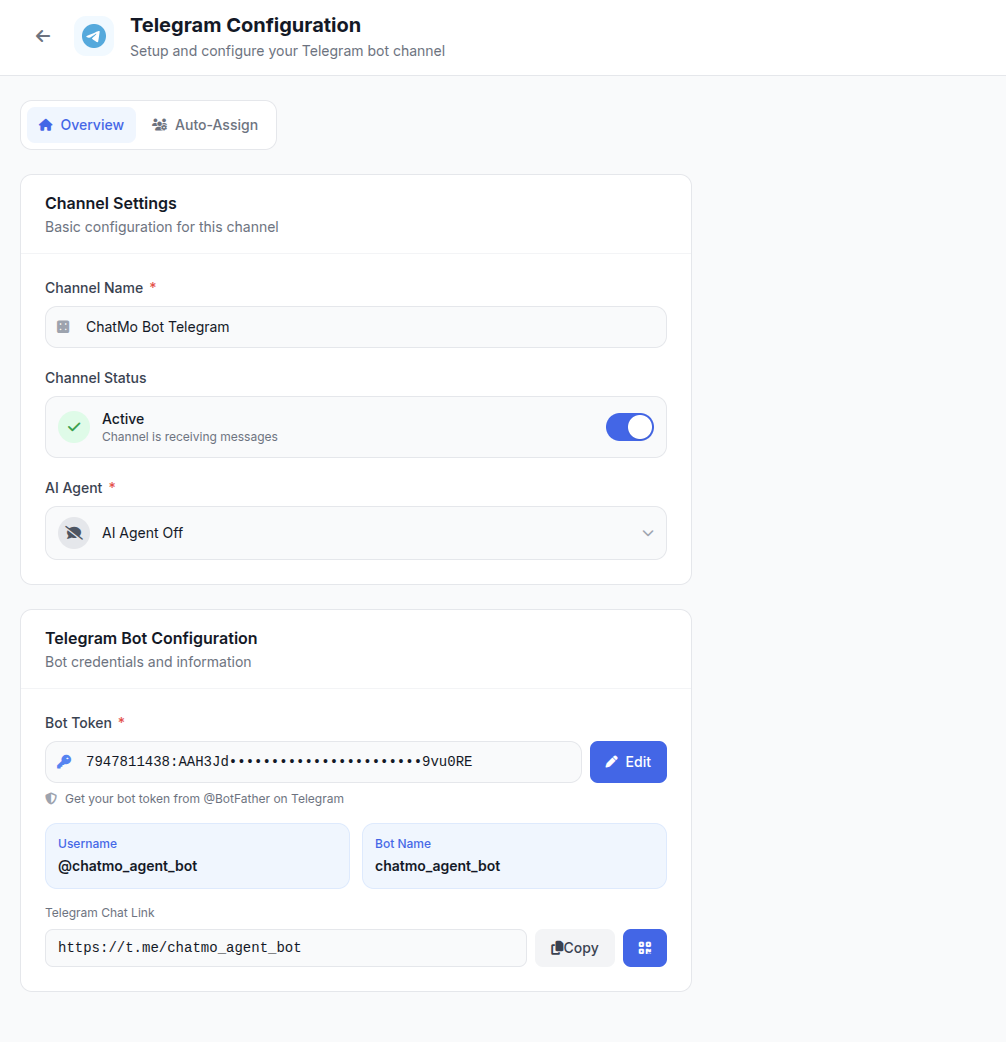
A bot is the most practical conversation entry point because many agents can handle it at once. In ChatMo, a Telegram bot connects with a token from BotFather, and every message to the bot lands in the same shared inbox as WhatsApp, Instagram and Facebook. Chats can be assigned automatically, labelled and answered by an AI agent after hours. The bot setup guide is in how to create a Telegram bot for customer service.
Reading channel statistics
Once a channel reaches a certain number of subscribers, Telegram provides statistics such as subscriber growth, views per post and where new subscribers came from. Even before that, every post shows its view count.
Use this data for simple decisions: which post types get the most views, what time posts are read fastest and whether any post made many subscribers leave. Also connect it to the number of bot chats after each promotional post, so you know which posts actually drive sales conversations.
Writing posts people read to the end
Channel subscribers receive many messages every day from different channels. Long, unstructured posts are often read only as far as the first sentence. Start with a line that states the benefit or main news straight away, such as "Gayo coffee beans restocked today, 40 bags available." Use short paragraphs, bold for key details such as price and deadlines, and one clear call to action at the end.
An image or short video makes a post stand out in the chat list. For products, one clear photo often works better than an album of many photos. If you post through a bot, add a button under the post that opens the bot or product page, so subscribers can continue with a single tap.
Private channels for loyal customers
Alongside a public channel, many businesses create a private channel for customers who have bought before or members of a loyalty program. The content is more exclusive: special prices, early access to new products or content not shared publicly. A private channel also makes customers feel valued, which encourages repeat purchases.
Manage invite links carefully. Create invite links you can revoke if they spread too widely, or use links that require admin approval so only eligible customers can join. Review members regularly and remove suspicious accounts.
Protecting your channel's reputation and security
Business channels with many subscribers are frequent targets for impersonators. Fake accounts can create channels with similar names and photos to scam customers, for example offering fake promotions and asking for transfers. List your official channel username on your website and social media, and remind subscribers regularly that admins will never ask for transfers through private messages from unknown accounts. Turn on two-step verification for every admin account so the channel cannot be taken over easily.
Example: a design template shop
A digital design template shop created a public channel to share free templates every week and news of new paid templates. Every paid template post ends with an invitation to message the bot to buy or ask about licences.
Within a few months, the channel grew with subscribers who genuinely needed templates, because the channel link was included in every free template file. Purchase questions arrive in the bot and are handled by the team through the shared inbox, while an AI agent answers common questions about file formats and licences at night.
Choosing the right posting times
Posting time affects how quickly posts are read. For working audiences, mornings before office hours, lunchtime and evenings after 7 pm usually work best. For students, afternoons and evenings are often busier. Test a few times over two to three weeks, compare views in the first hour and settle on the schedule that fits best. Avoid posting late at night with sound notifications, because subscribers may feel disturbed and mute the channel.
Common mistakes
Buying subscribers. The number rises but nobody reads or buys.
Posting only promotions. Subscribers get bored and mute or leave the channel.
No invitation to a conversation. Interest never becomes a sale.
Admins sharing one account. Hard to track who posted what and risky when someone leaves.
Inconsistent posting. A channel that goes quiet for weeks is forgotten.
Summary
Create a channel from New Channel and choose public or private based on your goal.
Set up admins, a discussion group, reactions and scheduled posts.
Mix educational content, new products, exclusive offers and testimonials.
Grow subscribers in relevant ways rather than buying numbers.
Steer readers into private conversations through a bot connected to a shared inbox.
Frequently asked questions
How do I create a Telegram channel?
Open Telegram, tap the new message icon, choose New Channel, add a name, description and photo, then decide whether the channel is public with a t.me link or private with an invite link.
What is the difference between public and private Telegram channels?
Public channels have a username and a t.me link anyone can search for. Private channels can only be joined through an invite link you share.
Is there a subscriber limit for Telegram channels?
No. Telegram channels can have an unlimited number of subscribers, which makes them suitable for broadcasting to large audiences.
How can subscribers comment on channel posts?
Link the channel to a discussion group. Every channel post appears in that group, and subscribers can comment under it.
How do I grow a Telegram channel for business?
Promote the channel link on your website, social media, emails and packaging, give a strong reason to join such as exclusive news, post consistently and partner with relevant channels.
About the author
Antonio Kurniawan
Product & Customer Success
The ChatMo product and customer success team helps Indonesian businesses run WhatsApp, Instagram and webchat conversations with AI agents and shared inboxes.