WhatsApp CRM: How to Manage Leads From the First Chat to the Close
A WhatsApp CRM records every contact, conversation, sales stage and follow-up, so leads never get lost in an agent's phone. Learn the components of a WhatsApp CRM, how to design a pipeline, how to set it up in ChatMo and which metrics to track.

Antonio Kurniawan
Product & Customer Success
On this page
- Problems that appear without a CRM
- The main components of a WhatsApp CRM
- Designing your sales stages (pipeline)
- How to build a WhatsApp CRM in ChatMo
- Example journey: from ad to payment
- Segmentation for your next sales
- WhatsApp CRM metrics to watch
- Example labels and custom fields for three industries
- Connecting your WhatsApp CRM to other systems
- Team habits that make a CRM work
- Is your business ready for a WhatsApp CRM?
- Common mistakes
- Keeping contact data clean
- Conclusion
Key takeaways
- A WhatsApp CRM brings together contact profiles, labels, custom fields, lead owners, a pipeline, notes, follow-ups and reports.
- A good pipeline has 5-7 stages with clear definitions and criteria for moving on.
- Auto-assign and access limits make sure every lead has one owner.
- An AI agent can do first-pass qualification and add labels before a lead reaches sales.
- Track response time to new leads, conversion per stage, win rate per salesperson and sales per lead source.
A WhatsApp CRM is a system that records every contact and WhatsApp conversation your business has, together with the sales stage, lead owner, notes, follow-up tasks and the final outcome. The goal is simple: no more leads lost in an agent's phone, every salesperson knows who to contact today, and managers can see how many chats actually turn into sales. For businesses that sell through chat, a WhatsApp CRM usually pays off faster than a traditional CRM built around email and phone calls.
This article covers the components of a WhatsApp CRM, how to design sales stages, how to set it up in ChatMo, an example lead journey from ad to payment, and the metrics to review every week.
Problems that appear without a CRM
Scattered leads. A prospect who asked last week is never contacted again because new chats bury them.
Unclear ownership. Two salespeople contact the same person, or nobody contacts them at all.
Lost context. When a salesperson goes on leave or resigns, the conversation history and promises to customers go with them.
Nothing to measure. Managers do not know which ads, salespeople or products bring the most sales.
Blind broadcasts. Without stage and interest data, promotions go to everyone and block rates rise.
The main components of a WhatsApp CRM

Designing your sales stages (pipeline)
A good pipeline has few stages with clear definitions. Five to seven stages are usually enough. An example for a business that sells through chat:
Tip: write down the definition of each stage and share it with the whole team. Without shared definitions, salesperson A treats "negotiation" the way salesperson B treats "quote", and your reports stop meaning anything.
How to build a WhatsApp CRM in ChatMo
Connect your channels. Link WhatsApp Official or WhatsApp Unofficial, plus Instagram, Facebook and webchat if needed. Every conversation lands in one inbox.
Import existing contacts from Excel or CSV, then tidy up numbers and names.
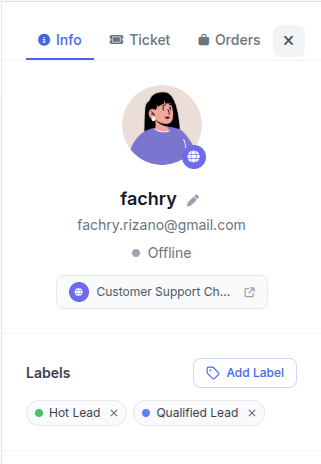
Create labels for stages, product interest and lead source. Use a label list the team agrees on.
Add custom fields for data that matters to your business, such as budget, city or event date.
Set up auto-assign so new leads rotate between salespeople or go to the one with the lightest load, and limit each salesperson to their own leads.
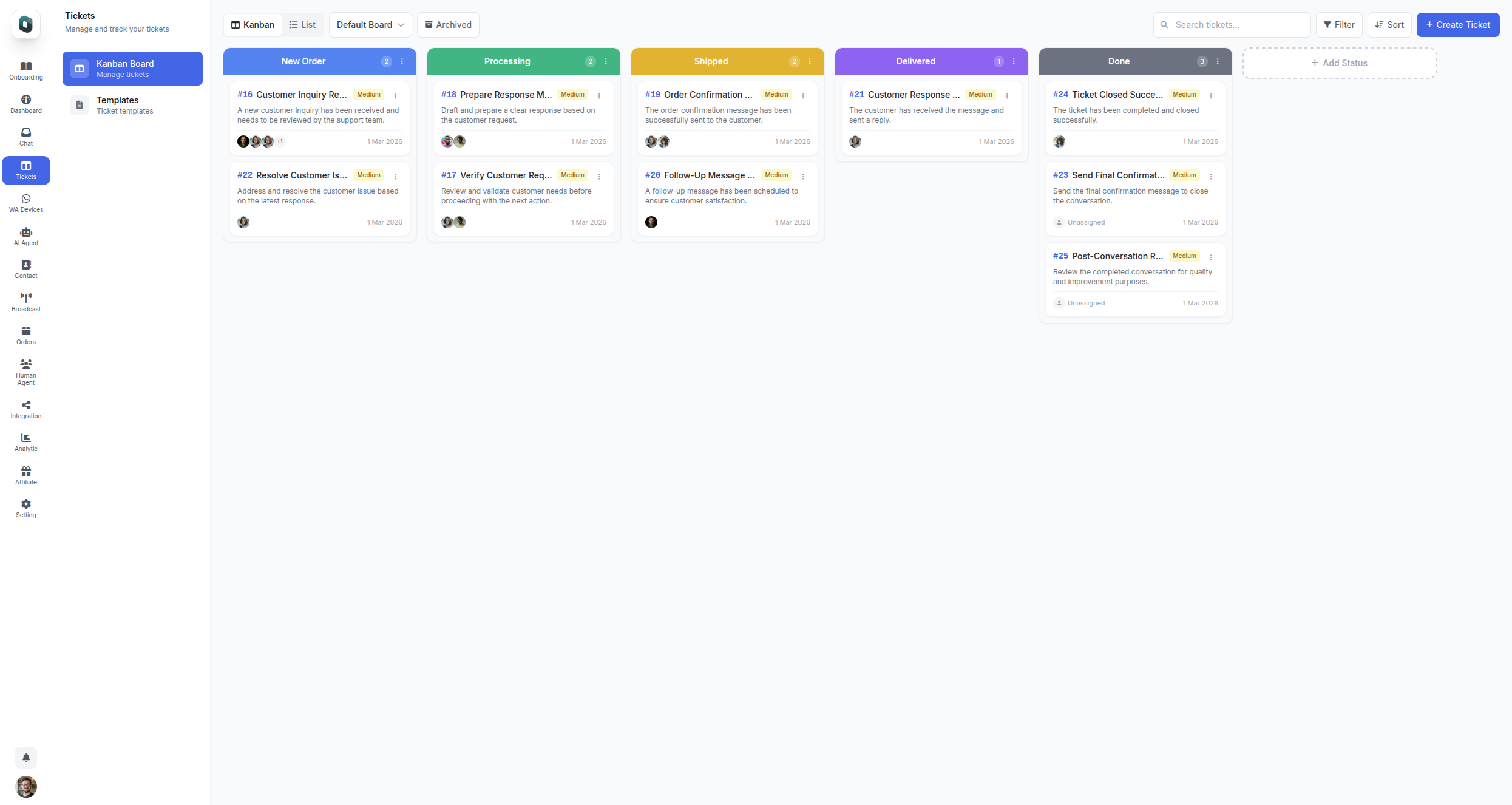
Use a Ticket Board as your pipeline, a kanban with a column for each sales stage and a card for every opportunity.
Add an AI agent for first-pass qualification: it asks about needs, budget and location, then labels the lead automatically before handing it to sales.
Turn on automatic follow-up for leads who stop replying.
Send orders and payment links straight from the conversation, so the "awaiting payment" stage is tracked properly.
Example journey: from ad to payment
A prospect taps a Click-to-WhatsApp ad for a wedding organizer package.
The AI agent greets them and asks for the event date, guest count, city and rough budget, fills the custom fields and adds the labels "qualification" and "October wedding ad".
Auto-assign routes the chat to the salesperson on duty, who sees all the data without asking again.
The salesperson sends a proposal and moves the card to "Quote sent".
The prospect goes quiet for two days. An automatic follow-up checks in with a relevant question.
Once they agree, the salesperson sends a deposit payment link from the conversation. When it is paid, the card moves to "Won".
Every step is recorded, so managers can see how long a lead takes on average from ad to payment, and at which stage most leads drop off.
Segmentation for your next sales
Clean CRM data makes broadcasts far more targeted. With contact filters based on labels and custom fields, you can build segments such as:
Leads at "quote sent" more than 7 days ago who have not bought.
Customers who bought the basic package 6 months ago, to offer an upgrade.
Contacts in a specific city, for a local event invitation.
Relevant segments lower block rates and message costs. See how to send WhatsApp broadcasts without getting banned.
WhatsApp CRM metrics to watch
Example labels and custom fields for three industries
Start with a few labels and fields. Only add new ones when the team genuinely needs them to make decisions or build segments.
Connecting your WhatsApp CRM to other systems
If you already use other systems, such as an ERP, a point-of-sale app or a company CRM, conversation data can flow into them. ChatMo workflows have a webhook action that sends contact data and labels to your system when a condition is met, for example when a lead chooses "request a quote". Sales keeps working in the chat inbox while your other systems stay up to date.
Team habits that make a CRM work
Update labels at the end of every conversation. A CRM is only as accurate as the data that goes in.
Write internal notes for important promises and agreements.
Never use personal numbers to serve business customers.
Review the pipeline together every week: stuck leads, missed follow-ups and loss reasons.
Is your business ready for a WhatsApp CRM?
More than 30 new leads a week arrive through chat.
More than one person handles sales.
Your sales process takes more than one conversation, such as a site visit, a quote and a negotiation.
Managers want conversion by lead source and by salesperson.
You want to send promotions to specific segments, not to every contact.
If three or more of these apply, a WhatsApp CRM will almost certainly save your team time and reduce lost leads.
Common mistakes
Too many stages and labels, so the team stops updating them.
A CRM separate from where chats happen, so sales has to copy data by hand.
Not recording loss reasons, even though they are the best input for improving your offer.
Measuring only chat volume, not the sales it produces.
Keeping contact data clean
A CRM is only as accurate as the data inside it. Messy data makes segments miss, sends broadcasts to the wrong people and makes sales reports hard to trust. A few simple habits keep data tidy:
One number format. Store numbers with the country code, such as 62812xxx, so the same person does not appear as duplicate contacts.
Merge duplicates that already exist, especially customers who reach you from several channels.
Standard label names. Agree on an official label list and who may add new labels, so you do not end up with "VIP", "vip" and "VIP customer" at once.
Required custom fields only for data you actually use, such as city or product of interest. Too many fields make the team stop filling them in.
Record consent to receive promotional messages, and respect opt-out requests.
Schedule a short data clean-up every month. Twenty minutes tidying labels and duplicates is much lighter than fixing data that has been messy for a year.
Conclusion
A WhatsApp CRM turns your chat inbox into a measurable sales engine. Start with contact profiles, labels and a simple pipeline, assign leads automatically, let AI do first-pass qualification, and never skip follow-up. Within a few weeks, you will know exactly which channels, salespeople and offers bring the most revenue.
Want your inbox, CRM, pipeline and payment links in one place? Book a ChatMo demo.
Frequently asked questions
What is a WhatsApp CRM?
A system that records your business's WhatsApp contacts and conversations together with the sales stage, lead owner, notes, follow-ups and final outcome.
How is a WhatsApp CRM different from the WhatsApp Business app?
The app only offers simple labels on one phone. A WhatsApp CRM adds a pipeline, lead assignment across a team, custom fields, automatic follow-ups and sales reports.
How many pipeline stages are ideal?
Five to seven stages are usually enough, such as new lead, qualification, quote sent, negotiation, awaiting payment and won or lost.
How do I build a sales pipeline in ChatMo?
Use a kanban Ticket Board with a column for each sales stage, combined with labels and custom fields on contact profiles.
Can a WhatsApp CRM connect to other systems?
Yes. ChatMo workflows have a webhook action that sends contact data and labels to other systems such as an ERP or company CRM.
About the author
Antonio Kurniawan
Product & Customer Success
The ChatMo product and customer success team helps Indonesian businesses run WhatsApp, Instagram and webchat conversations with AI agents and shared inboxes.