One WhatsApp Number for Multiple Agents: How a Team Can Share It Without Chaos
A single WhatsApp number can serve a whole support team without double replies or missed chats. Learn the limits of the WhatsApp Business app, why growing teams move to a shared inbox, and how to split chats fairly between agents.

Antonio Kurniawan
Product & Customer Success

On this page
- Why businesses choose one number instead of many
- Option 1: linked devices on the WhatsApp Business app
- Option 2: WhatsApp Business API with a shared inbox
- Signs your team needs a multi-agent setup
- How to split chats fairly
- Working rules that prevent double replies
- Quick reply templates for the team
- Letting agents see only their own chats
- Combining an AI agent with your human team
- Measuring whether it works
- Handling shifts and working hours
- Common mistakes when sharing one number
- Example: a baby products store with 5 agents
- Getting started this week
Key takeaways
- One WhatsApp number can serve many agents, but the WhatsApp Business app supports only a few linked devices and has no chat assignment.
- The real problem for a shared number is ownership, not access: who replies and who follows up.
- A shared inbox on the WhatsApp Business API gives every agent their own login, automatic assignment, labels and internal notes.
- Round-robin suits teams of equal agents; least-assigned-first is fairer when conversation length varies a lot.
- Track first response time and chats per agent every week to keep the workload balanced.
One WhatsApp number can be shared by many agents in two ways: link several devices to the WhatsApp Business app, or connect the number to the WhatsApp Business API and use a shared inbox. The first option is fine for two or three people. Once the team grows, the problem is no longer access but ownership: who is handling which chat. A shared inbox fixes that with a login per agent, automatic chat assignment, labels and internal notes.
This guide covers when the regular app is still enough, the signs that your team needs a multi-agent setup, and a few simple working rules so no chat gets answered twice or not at all.
Why businesses choose one number instead of many
Many shops and clinics start by giving every agent their own number. It looks tidy, but customers do not know which number to message, chat history ends up spread across many phones, and when an agent leaves, their customer contacts leave too.
A single official number keeps things simple:
Customers save one contact, the same one printed on packaging, ads and the website.
The conversation history belongs to the business, not to individuals.
The number can be verified and used for broadcasts, Click to WhatsApp ads and approved templates.
Team performance can be measured from one data source.
The challenge is letting everyone use that number without stepping on each other.
Option 1: linked devices on the WhatsApp Business app
The WhatsApp Business app lets one account run on a few linked devices, for example the main phone plus an agent's laptop through WhatsApp Web or the desktop app. For a small business with two or three agents, this is the fastest and free option.
Problems appear as chat volume grows:
No chat owner. Every agent sees the same chats. Two people can type a reply at the same time, or everyone assumes someone else will answer.
Confusing read status. As soon as one agent opens a chat, it no longer looks unread to the others.
No internal notes. Discussions about a customer move to an internal group, away from the conversation itself.
No per-agent reporting. You cannot see who is slow or who is overloaded.
Limited devices. The main phone also needs to come online regularly so linked devices stay signed in.
We compared the app and the API in detail in WhatsApp Business app vs API.
Option 2: WhatsApp Business API with a shared inbox
The WhatsApp Business API has no app of its own. The number is connected to a platform such as ChatMo, and every agent signs in to the same dashboard with their own account. This is what people usually mean by WhatsApp multi-agent.
If your number already runs on the app, it can be migrated to the API. The steps are in What is the WhatsApp Business API.
Signs your team needs a multi-agent setup
Not every business needs to switch today. Watch for these signs:
More than three people reply to chats on a typical day.
Customers have complained about getting two replies with different answers.
Agents keep asking in the team group, "Is anyone handling this chat?"
Chats spike during promotions or lunch hours and many get missed.
The owner cannot say how long customers wait, on average, for a reply.
If two or more of these happen regularly, the cost of missed chats is usually already higher than the cost of a platform.

How to split chats fairly
The core of a multi-agent setup is assignment: every conversation has one owner. There are three common patterns.
Round-robin
New chats are handed out in turn: agent A, B, C, then back to A. It suits teams with similar skills and similar questions, such as a fashion store where most chats are about sizes and stock.
Least-assigned-first
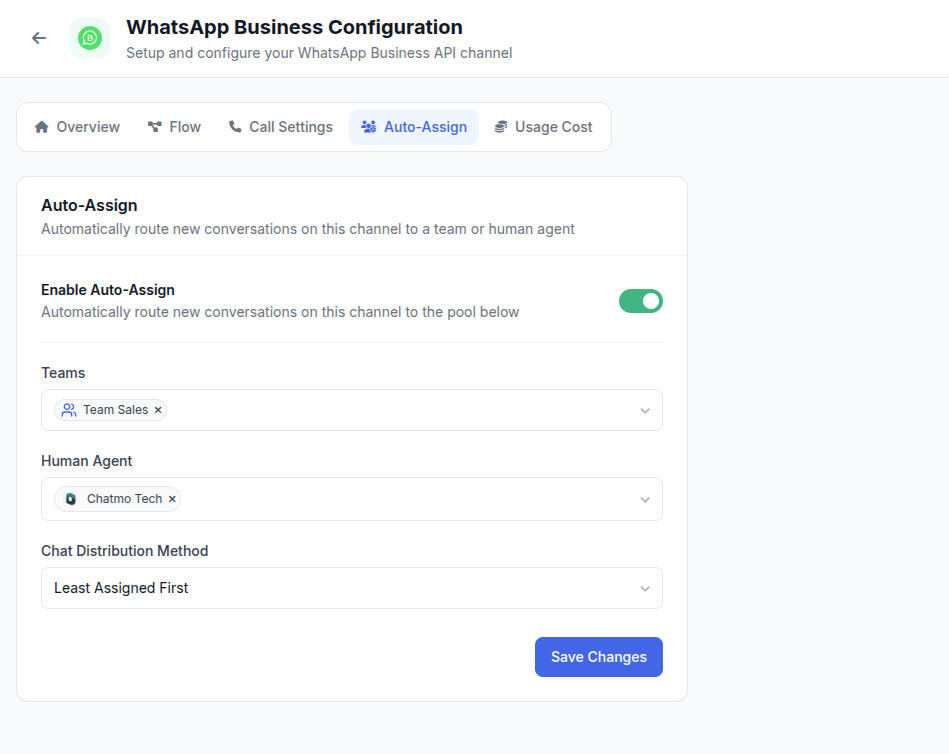
New chats go to the agent who currently holds the fewest active chats. This is fairer when conversation length varies a lot. One agent can be tied up in a long complaint for an hour while another closes five short chats.
By team
Chats are routed to a team first, for example Sales or After Sales, and then split within the team. This works when questions are very different from each other. Routing can use a menu choice at the start of the chat or keywords in the first message.
In ChatMo, automatic assignment is set per channel. You choose the target (a team or specific agents) and the method (least-assigned-first or round-robin), and every new chat is assigned without agents having to grab it.
Working rules that prevent double replies
The system is only half the answer. The other half is a team agreement. These rules are simple and easy to keep:
Whoever owns the chat replies. Others can read and add internal notes, but they do not reply directly.
Hand over, do not abandon. If an agent goes home or takes a long break, unfinished chats are reassigned to a colleague instead of being left open.
Keep statuses honest. Finished chats are resolved; chats waiting on the customer are marked pending. The active list then always reflects the work that is really left.
Use agreed labels. For example: Product Question, Order, Complaint, Hot Lead. Keep it to about 8 to 12 labels so people actually use them.
Say your name in the first reply. "Hi Rina, this is Dimas from the support team." Customers feel served by a person, and colleagues know who is on it.
Quick reply templates for the team
Consistent replies make customers feel they are dealing with one business, whichever agent answers. Prepare quick replies for the most common questions, for example:
Hi, thanks for contacting Sekar Batik. I'm Ayu and I'll be helping you today. Could you share your order number or the product you're asking about?
Thanks for waiting. I'm passing this chat to my colleague Bimo from the shipping team so you get the most accurate answer. He'll be with you shortly.
In ChatMo, agents type / in the reply box to pick a quick reply, including ones with attachments such as a PDF catalog. More example phrases for different situations are in customer service chat script examples.
Letting agents see only their own chats
In larger teams, not every agent needs to see every conversation. New hires, part-timers or partner teams only need the chats assigned to them. It cuts distraction and also protects customer data.
ChatMo has a per-user setting that limits certain agents to chats assigned to them or to their team. The account owner still sees everything.
Combining an AI agent with your human team
Peak hours and evenings are when chats are most often missed. An AI agent can answer routine questions such as price, stock, opening hours or order status, then hand the chat to an agent when the customer needs a person, for example for a complaint or a negotiation.
The key is a clear handoff rule: when the AI stops, and which team receives the chat. We go deeper in WhatsApp AI chatbot for customer service.
Measuring whether it works
After two weeks, check these numbers every week:
A fuller list of metrics is in customer service KPIs.
Handling shifts and working hours
Teams that serve customers from morning to night usually work in shifts, and shift changes are exactly when chats get dropped. The morning agent leaves with 15 unfinished chats, the evening agent has no context, and the customer has to explain everything again.
Three habits help:
Hand over 10 minutes before the shift ends. The leaving agent reassigns active chats to the next shift instead of simply closing the laptop.
Write a short internal note on every reassigned chat, such as "Invoice sent, waiting for transfer proof" or "Asked for a photo of the damaged item, not received yet".
Never leave a chat without a status. Chats waiting on the customer are marked pending, so the next agent knows they do not need a reply right now.
Outside working hours, make sure an automatic message or an AI agent states your service hours honestly, for example "Our team is online from 8 am to 9 pm. We'll reply to your message first thing tomorrow morning." Customers are far more patient when they know when to expect an answer.
Common mistakes when sharing one number
We see these mistakes again and again in businesses that have just started sharing a number:
Sharing one login with every agent. If everyone uses the same account, you lose track of who replied what, and it is hard to remove access when someone leaves.
Too many labels. The team creates 40 labels in the first week and then nobody uses them. Start small and add labels only when they are really needed.
Routing everything to one senior agent. The senior agent gets overwhelmed and new agents never learn. Spread routine chats across everyone and escalate the hard cases.
No owner for old chats. Unresolved chats pile up and make the workload look heavier than it is. Set aside 15 minutes at the end of the day to tidy up statuses.
Changing numbers without notice. If you move to a new number, old customers will keep messaging the old one. Whenever possible, migrate the same number to the API.
Example: a baby products store with 5 agents
A baby products store in Bandung receives about 400 chats a day from ads and marketplaces. Five agents used to share one phone and two laptops running WhatsApp Web. Their biggest problems: morning chats piled up, and some customers got two replies quoting different shipping costs.
After moving to the WhatsApp Business API with a shared inbox, they created two teams: Sales (3 agents) and Shipping (2 agents). New chats go to Sales using least-assigned-first. Tracking and return questions are reassigned to Shipping. An AI agent answers stock questions after hours and passes complaints to the Shipping team the next morning.
Within a month, first response time dropped from an average of 40 minutes to about 6 minutes, and double replies stopped because every chat had a clear owner.
Getting started this week
Count how many agents reply each day and how many chats come in.
Decide whether linked devices are still enough or it is time to move to the API.
Set up a simple team structure and choose an assignment method.
Agree on 8 to 12 labels and the 10 quick replies you use most.
Review response time and workload per agent every Monday.
Sharing one number across a team is not about handing out a password or adding phones. What keeps a team organised is that every chat has an owner, every agent has their own account, and everyone follows the same rules.
Frequently asked questions
Can one WhatsApp number be used by more than one person?
Yes. The WhatsApp Business app supports a few linked devices, while the WhatsApp Business API connected to a shared inbox such as ChatMo can be used by many agents, each with their own account.
How many agents can share one WhatsApp number?
In the WhatsApp Business app the limit is the number of linked devices. On the WhatsApp Business API WhatsApp sets no agent limit; the number of seats depends on your inbox platform plan.
How do I stop two agents replying to the same chat?
Use chat assignment so every conversation has one owner. Other agents can still read it, but only the owner replies unless the chat is reassigned.
Do customers notice that different agents are replying?
Customers still see one number and one business name. Many teams add the agent's first name at the end of a message so the conversation feels personal and is easy to pick up.
Can a number used in the WhatsApp app be moved to the API?
Yes, by migrating the number to the WhatsApp Business API through an official provider. Back up your chat history first, because the move affects the app on the phone.
About the author
Antonio Kurniawan
Product & Customer Success
The ChatMo product and customer success team helps Indonesian businesses run WhatsApp, Instagram and webchat conversations with AI agents and shared inboxes.