Live Chat Pre-Chat Forms: What to Ask So You Capture Leads Without Driving Visitors Away
A pre-chat form helps your team know visitors and follow up on leads, but a long form makes people give up on asking. Learn when a pre-chat form is needed, which fields to include, how to write clear labels and how to use the data to serve visitors faster.

Antonio Kurniawan
Product & Customer Success

On this page
- Why pre-chat forms are useful
- When you do not need a pre-chat form
- Fields worth asking for
- Example pre-chat forms by industry
- Writing clear labels and supporting text
- Using form data to serve faster
- Privacy and compliance
- Measuring the impact of a pre-chat form
- Forms on mobile: an often forgotten challenge
- Connecting form data with your CRM and reports
- Example: an interior design service
- Testing different form versions
- Common mistakes
- Summary
Key takeaways
- A pre-chat form collects basic details before the conversation starts, so the team can follow up even if the visitor leaves the site.
- The more required fields, the more visitors give up; start with two or three.
- A name and one contact method such as WhatsApp or email are usually enough; add a needs question only if it truly helps routing.
- Explain how the data will be used and never ask for sensitive data in the form.
- Use form data to greet visitors by name, route them to the right team and follow up when they go offline.
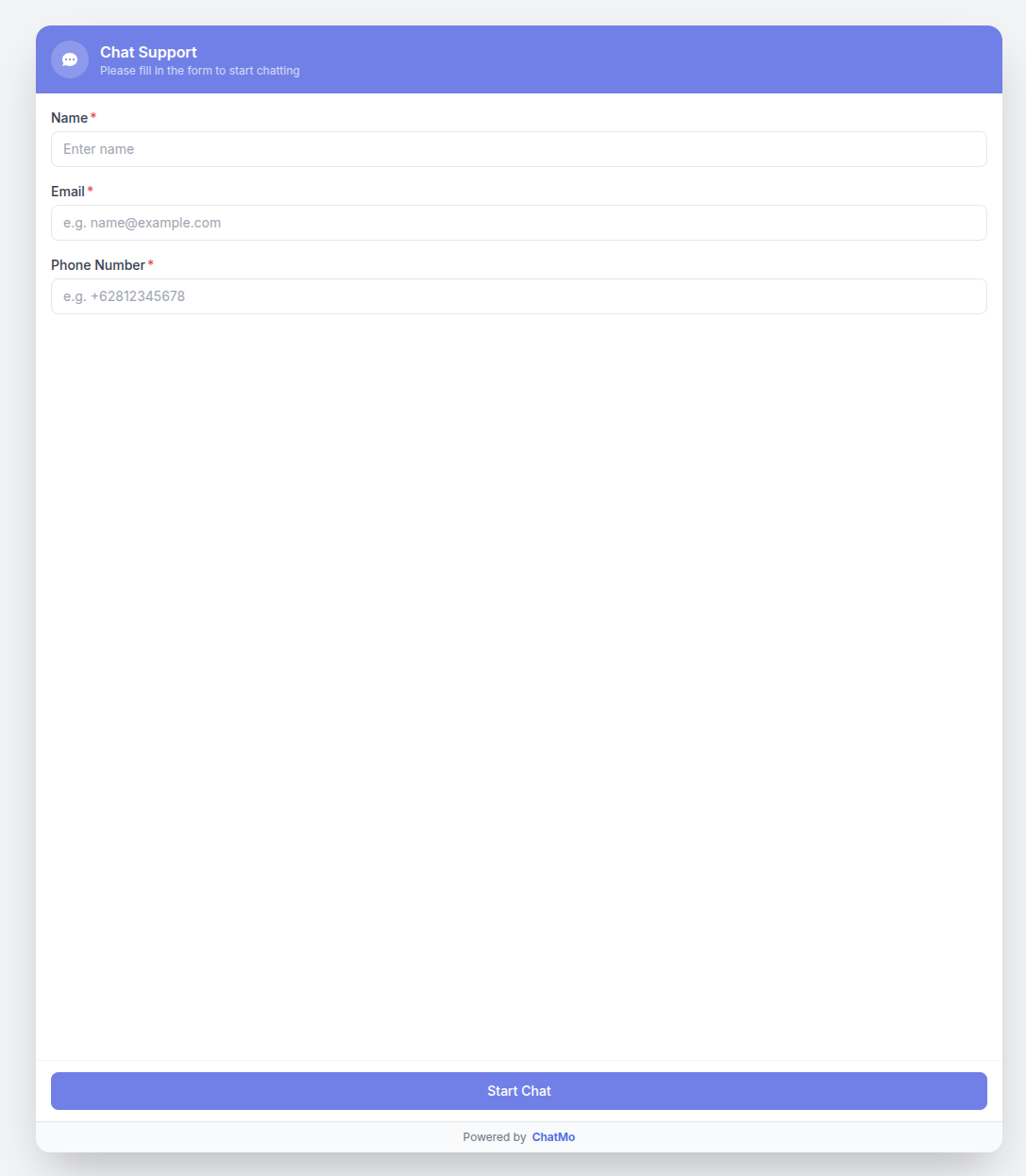
A live chat pre-chat form is a short form shown before a website visitor starts a conversation. Its job is simple but important: the team knows who is asking, chats can be routed to the right person and leads can still be followed up after the visitor closes the site. The catch is that every extra field gives visitors a reason to give up. Effective forms usually ask only for a name and one contact method, such as a WhatsApp number or email, plus one needs question if it genuinely helps. Also explain how the data will be used so visitors feel safe filling it in.
This guide covers when a pre-chat form is needed, which fields to include, examples for different industries, how to write clear labels and how to use form data for service and follow-up.
Why pre-chat forms are useful
Without a form, a live chat conversation starts from zero. The agent does not know the visitor's name, has no way to reach them if they leave before getting a reply and has to ask about their needs from scratch. A pre-chat form solves several problems at once:
Leads are not lost. If visitors close the site before an agent replies, the team can still reach them on the WhatsApp number or email provided.
More personal greetings. Agents or AI can greet visitors by name from the first message.
Better routing. Sales, technical support or billing questions can go to the right team.
Data for review. You learn which topics come up most and from which pages.
When you do not need a pre-chat form
A form is not always right. Consider making it very short or not using it if:
Your site handles quick questions that need no follow-up, such as opening hours or location.
Your team is always online and can reply within seconds.
You see many visitors open the chat window and close it as soon as they see the form.
In these cases, let visitors ask straight away, then ask for contact details mid-conversation when it becomes relevant, such as "Could I have your WhatsApp number so we can send you a full quote?"
Fields worth asking for
The practical rule: every field needs a clear reason. If the data is not used to serve or follow up, do not ask for it.
Example pre-chat forms by industry
Online store: name, WhatsApp number and a topic choice (Product Question, Order Status, Returns). The topic lets order status chats go straight to the after-sales team.
Clinic or salon: name, WhatsApp number and the service of interest. With this, agents can offer appointment slots right away without starting from scratch.
Courses and education: the parent's or student's name, WhatsApp number and the student's level or age. The team can recommend the right program immediately.
Software or B2B services: name, work email, company name and team size. This helps the sales team prioritise leads.
Property: name, WhatsApp number and the type of property sought. Agents can send relevant options straight away.
Writing clear labels and supporting text
Visitors are more willing to fill in a form when they know why. Add one supporting sentence above the form, for example:
Fill in these quick details so we can reply faster. Your WhatsApp number is only used to send our answer if you've closed this page.
Use clear labels with an example inside the field, such as "WhatsApp number (e.g. 0812...)". Mark required fields clearly and leave the rest optional.

Using form data to serve faster
Form data is most useful when it is used immediately, not just stored:
Greet by name. "Hi Rina, thanks for contacting us. About your order status, could you share your order number?"
Route to the right team. "Billing" goes to finance, "Product Question" to sales.
Answer with context. If the visitor chose a particular service, the AI or agent can give pricing and schedules for that service straight away.
Follow up when the visitor goes offline. If the visitor leaves before getting a reply, the team can continue on WhatsApp with context: "Hi Rina, you asked about our facial packages on our website earlier. Here's the information."
In ChatMo, the webchat widget includes pre-chat form field settings, and the details visitors enter are stored with the conversation in the shared inbox. Agents and AI agents can see the visitor's name and contact from the first message, and conversations can be assigned automatically to the right team.
Privacy and compliance
Data collected through a pre-chat form is personal data. A few principles to follow:
Ask only for what you need. Data you do not use should not be collected.
Explain the purpose. Supporting text on the form helps visitors understand how their data is used.
Limit access. Only the team members who need it should see visitor data.
Never ask for sensitive data. Card numbers, PINs or passwords must never be requested in a form or chat.
Respect opt-out requests. If a visitor does not want to be contacted again, record it and comply.
In Indonesia, personal data handling is also governed by the Personal Data Protection Law. Practical guidance for customer service teams is in customer chat data and Indonesia's PDP Law.
Measuring the impact of a pre-chat form
After adding or changing a form, compare a few numbers over two to four weeks:
If many visitors stop at the form, reduce required fields. If chat volume holds steady while followed-up leads rise, your form is working well.
Forms on mobile: an often forgotten challenge
Most website visitors in Indonesia browse on their phones. A form that looks compact on a laptop can feel long and tiring on a small screen, especially when the keyboard covers half the view. Test your pre-chat form on a phone before going live. Make sure the phone field brings up a numeric keyboard, the start chat button is within thumb reach and error messages appear clearly if the number format is wrong.
Avoid fields that need a lot of typing, such as a full address or a long description, in the form. Questions like that are more comfortable inside the conversation, once the visitor is engaged and feels helped. Button or list choices, such as the question topic, are much easier to fill in on a phone than free-text fields.
Connecting form data with your CRM and reports
Pre-chat form data is most valuable when stored as part of the contact profile, not just inside one conversation. Then, when the same visitor returns next week on WhatsApp or Instagram, the team knows they once asked on the website about a particular service. Use labels to mark the source, such as "Website - Pricing Page", so you can see which pages generate the most leads.
Review this data monthly. The topics most often chosen in the form show information that may not be clear enough on your website. If many visitors pick "Pricing", consider showing a price range on your service pages. A well-managed pre-chat form does not just collect contacts; it also feeds back ideas to improve your website.
Example: an interior design service
An interior design service in Jakarta added live chat with a six-field required form: name, email, phone number, address, room type and budget. Few visitors completed it, and most closed the chat window as soon as they saw it.
They cut the form to two required fields, name and WhatsApp number, plus an optional room type choice. Budget and address questions moved into the conversation, asked by an AI agent after the visitor described their needs. Chats started rose sharply, and because the WhatsApp number was always filled in, the team could still send quotes to visitors who left the site before the conversation ended.
Testing different form versions
No form is perfect for every business. The best way to find the right version is to experiment. Run one version for two weeks, record how many visitors complete the form and how many leads are followed up successfully, then try another version with a small change, such as making email optional instead of required or rewriting the supporting text. Compare the results and keep the version that best balances chat volume and lead quality. Change one thing at a time so you know which change made the difference.
Common mistakes
Too many required fields. Visitors give up before the conversation starts.
Not explaining why data is needed. Visitors hesitate to share their phone number.
Not using form data. Agents still ask for the name and needs from scratch.
Asking for sensitive data. It damages trust and carries legal risk.
Never measuring. You cannot tell whether the form helps or hinders.
Summary
A pre-chat form helps identify visitors, route chats and follow up on leads.
Start with two or three fields: name, contact and topic if needed.
Explain the purpose of the data and never ask for sensitive data.
Use the data to greet by name, route chats and follow up when visitors go offline.
Measure the impact and cut fields if many visitors stop at the form.
Frequently asked questions
What is a pre-chat form?
A pre-chat form is a short form shown before a website visitor starts a live chat, usually asking for a name, a contact method and sometimes the topic of their question.
Does live chat require a pre-chat form?
No. A pre-chat form helps when you need to follow up on leads or route chats to specific teams. For sites that prioritise easy questions, the form can be very short or switched off.
Which fields should a pre-chat form include?
A name and one contact method, such as a WhatsApp number or email, are usually enough. Add a topic or needs question only if it helps route the chat to the right team.
Does a pre-chat form reduce the number of chats?
It can, especially with too many required fields. A short form with a clear reason usually keeps chat volume while improving lead quality.
How do I keep pre-chat form data private?
Ask only for what you need, explain how it will be used, store it in a system with limited access and never ask for sensitive data such as card numbers or passwords.
About the author
Antonio Kurniawan
Product & Customer Success
The ChatMo product and customer success team helps Indonesian businesses run WhatsApp, Instagram and webchat conversations with AI agents and shared inboxes.