WhatsApp Business App vs API: Differences, Costs and When to Upgrade
The WhatsApp Business app is free and suits one or two people, while the WhatsApp Business API supports many agents, AI automation, broadcasts to thousands and reports. This article compares the two and helps you decide when to upgrade.

Antonio Kurniawan
Product & Customer Success

On this page
- Comparison at a glance
- Strengths and limits of the WhatsApp Business App
- Strengths and limits of the WhatsApp Business API
- What does each one cost?
- When should you upgrade to the API?
- Can you use the app and the API on the same number?
- App features that change on the API, and their replacements
- Example: an online store with 120 chats a day
- How to move from the app to the API without losing customers
- So which one should you choose?
Key takeaways
- The WhatsApp Business app is free and suits businesses with fewer than 50 chats a day handled by one person.
- The WhatsApp Business API adds a shared inbox, automatic assignment, AI agents, official broadcasts and performance reports.
- Broadcast lists in the app are capped at 256 contacts and only reach people who saved your number.
- If you tick three or more items on the checklist, the API is usually already cheaper than staying on the app.
- Coexistence lets you run the app and the API on the same number at the same time.
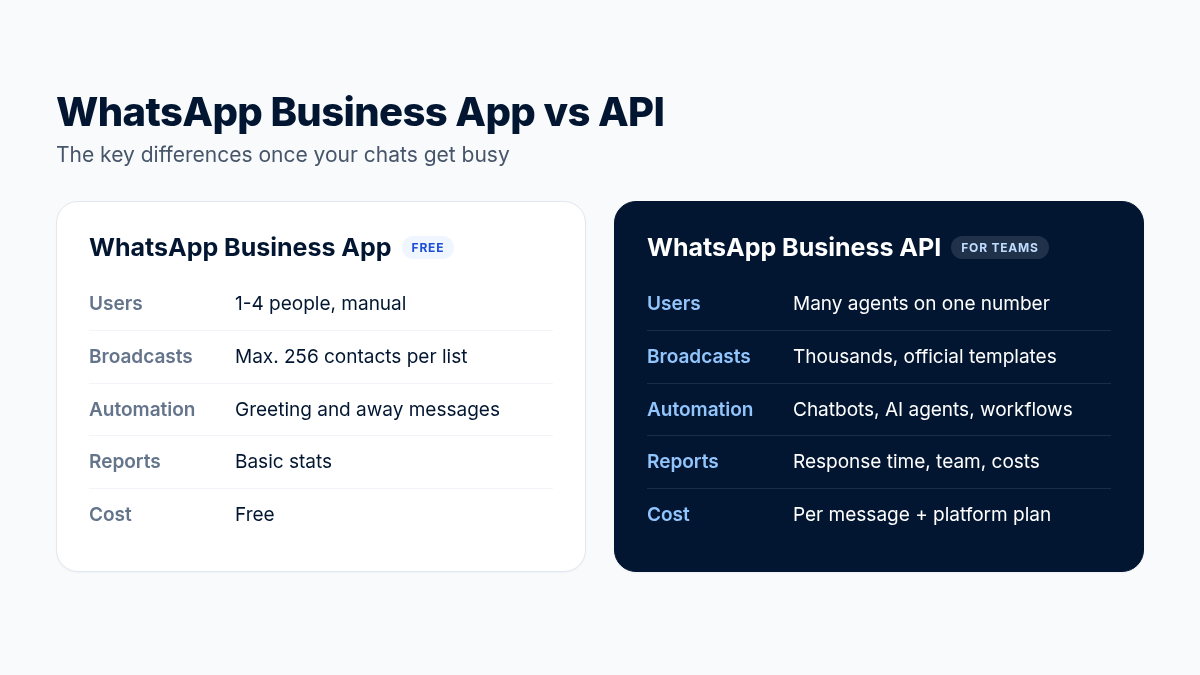
The main difference between the WhatsApp Business App and the WhatsApp Business API is scale. The WhatsApp Business app is free, runs on a phone, and suits one or two people replying by hand. The WhatsApp Business API runs through software, supports many agents on one number, automation with chatbots or AI, broadcasts to thousands of contacts and integrations with other systems, with per-message fees from Meta. If your chats have outgrown what one phone can handle, that is the clearest sign to consider the API.
This article helps you decide calmly: a feature-by-feature comparison, the costs to plan for, when to upgrade, and how to use both on the same number.
Comparison at a glance
Strengths and limits of the WhatsApp Business App
For a business that is just starting out, the WhatsApp Business app already does a lot. You get a business profile (address, opening hours, website), a product catalog, labels to tag chats, slash-command quick replies and away messages outside business hours. All of it is free.
Problems usually show up as the business grows:
One number, many hands. Linked devices help, but there is no chat assignment. Two agents can answer the same customer, or nobody answers because each assumes someone else did.
Scattered chat history. When an agent leaves or a phone is lost, the context of customer conversations goes with it.
Limited broadcasts. Broadcast lists hold 256 contacts each and only reach people who saved your number. Working around this with unofficial apps puts your number at risk of a ban.
Nothing to measure. How long do customers wait for a reply on average? Which agent closes the most? The app cannot tell you.
Strengths and limits of the WhatsApp Business API
The API is built for businesses that use WhatsApp as a main sales and support channel. The benefits you feel most:
A shared team inbox. Every chat has an owner, a status (open, pending, resolved) and internal notes.
Automatic assignment. New chats go to agents in rotation or to the agent with the lightest load.
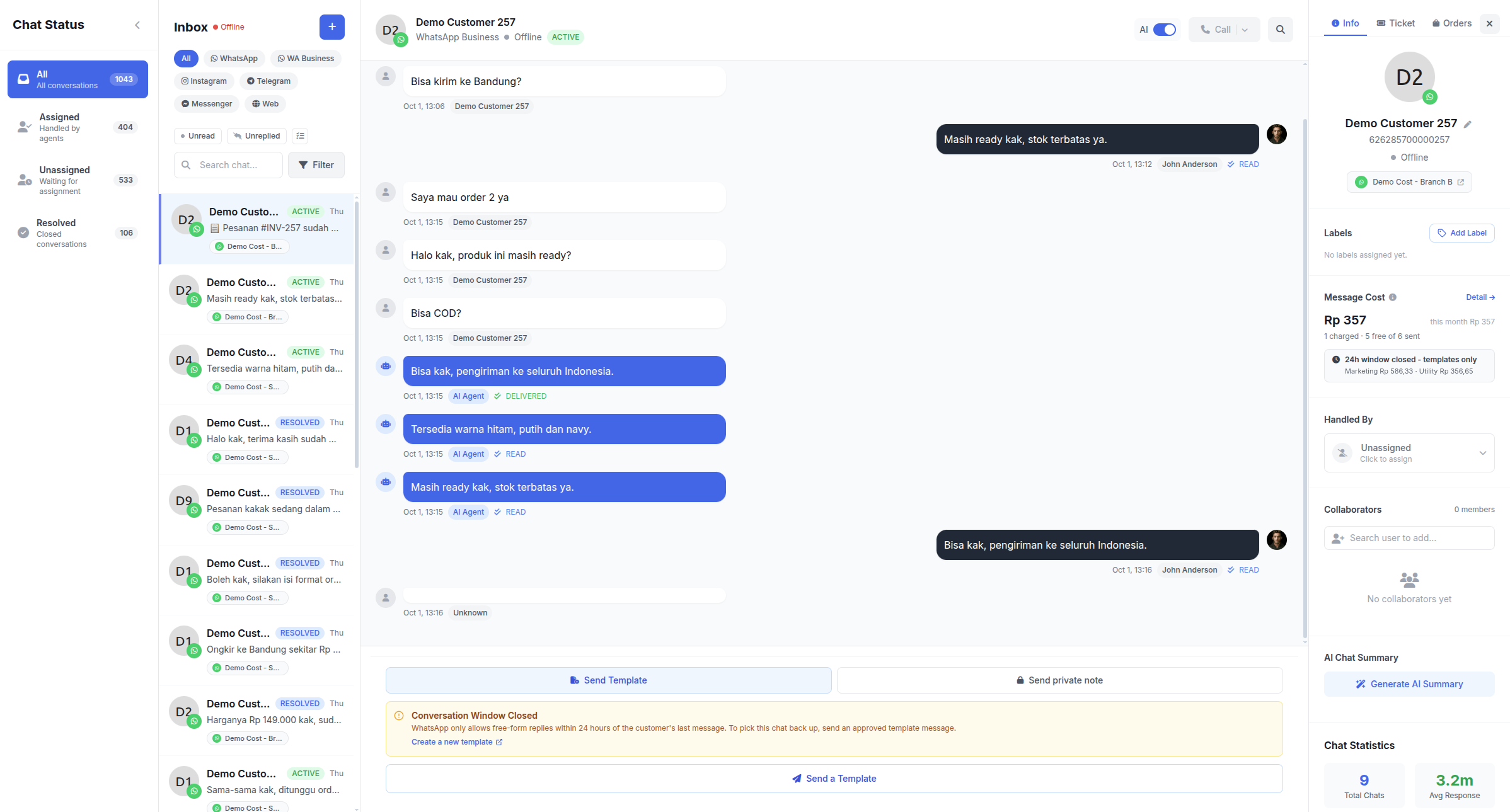
24/7 automation. An AI agent answers repeat questions from your business documents and hands over to a person when needed.
Official large-scale broadcasts with Meta-approved templates and delivered, read and replied reports.
Know the limits from the start as well:
Per-message fees from Meta, separate from the platform fee. See the simulation in WhatsApp API per-message pricing.
The 24-hour rule. After 24 hours since the customer's last message, you can only send approved templates.
No WhatsApp groups through the API, and some app features such as Status are not available.
Gradual sending limits for new numbers, starting around 250 customers a day for messages you start.
What does each one cost?
The WhatsApp Business app is free. Its hidden cost is your team's time: copying data into spreadsheets, answering the same questions again and again, and chats missed because nobody was watching.
The WhatsApp API has two cost components: Meta message fees (per message, varying by category and country) and a platform subscription for the inbox, chatbot and broadcasts. To judge whether the API pays off, compare those costs with the extra agent salary you no longer need because AI handles part of the chats, and with the sales you stop losing because replies come faster.
A simple example: if an AI agent resolves 40% of 3,000 monthly chats without human help, your team is freed from about 1,200 conversations. That time can go to the chats closest to a sale.
When should you upgrade to the API?
Use this checklist. If you tick three or more, the API is probably already cheaper than staying on the app:
More than 50 chats a day, or big spikes during promotions.
More than two people need to reply from the same number.
Customers have complained that nobody answered them.
You regularly send updates to hundreds of customers (promotions, invoices, deliveries).
You run Click to WhatsApp ads and want to know which ads bring chats and sales.
Management wants team performance reports they can rely on.
Can you use the app and the API on the same number?
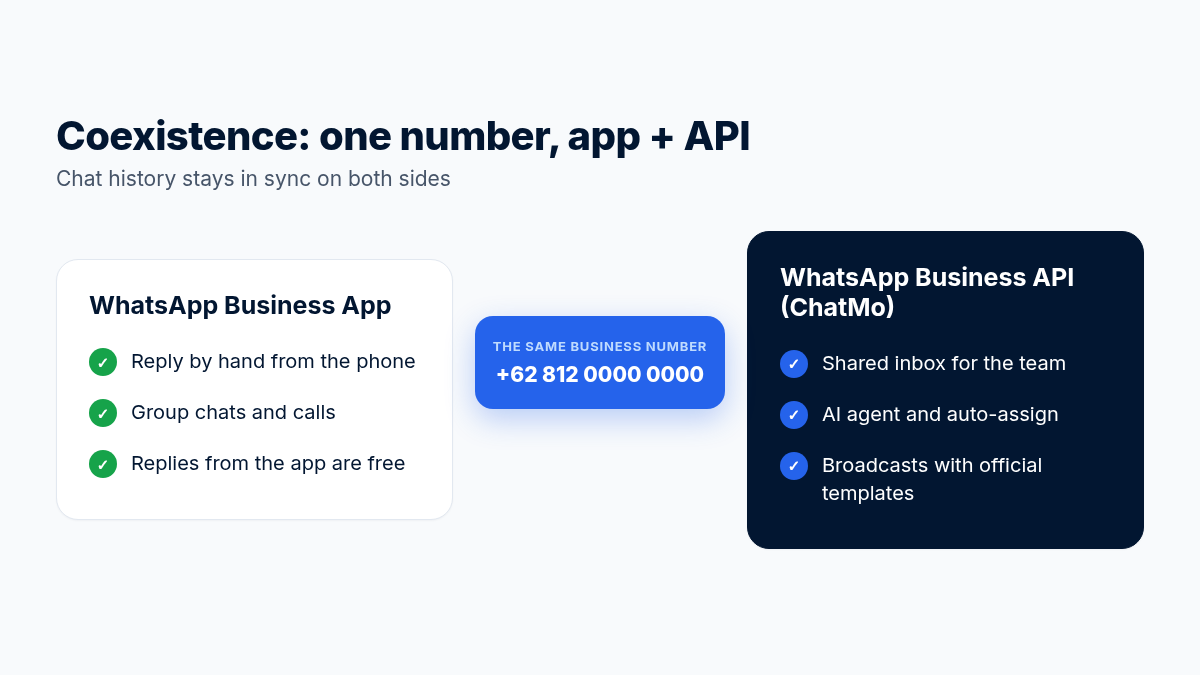
Yes. Meta's Coexistence feature lets a number that is already active in the WhatsApp Business app connect to the API without deleting the app account. Chat history stays, and messages from the app sync to the platform.
Things to know when using Coexistence:
The WhatsApp Business app must be up to date and the number already in active use in the app.
Broadcasts from the app are turned off; broadcasts go through the API.
Group chats stay in the app only, and some message types such as view-once messages are not supported.
Messages sent from the app do not trigger platform automations, because they count as manual replies.
In ChatMo, the same number can even run as two channels: WhatsApp Official for broadcasts and templates, and WhatsApp Unofficial (QR scan) to answer incoming chats. We explain this strategy in full in how to cut WABA costs.
App features that change on the API, and their replacements
Example: an online store with 120 chats a day
Picture an online fashion store with three agents sharing one number in the WhatsApp Business app. About 120 chats arrive every day, doubling during date-themed sales. Their problems: two agents sometimes answer the same customer, late-night chats wait until morning, and the owner cannot tell which agent closes the most.
After moving to the WhatsApp API with a shared inbox, the way they work changes:
New chats rotate between the three agents, so double replies stop.
An AI agent answers size, material and shipping questions at night, then flags chats ready to pay for the morning shift.
Order confirmations and tracking numbers go out automatically as templates, with no manual copying.
The owner sees a weekly report: average response time, chats per agent and how many chats the AI handled.
Results like these are not instant; it usually takes two to four weeks to tidy the knowledge base and team habits. But from the first week, fewer chats slip through because every chat has a clear owner.
How to move from the app to the API without losing customers
Pick the number. Use the number customers already know (with Coexistence) or a new number just for the API. A familiar number is usually safer for sales.
Prepare your Meta Business and verification documents so you can raise sending limits and apply for the verified badge soon.
Connect the number in ChatMo from Integrations, then invite your team and set each person's role.
Move your team's know-how into the system: common quick replies, FAQs and product documents for the AI agent.
Create 3-5 core templates: welcome, order confirmation, payment reminder and follow-up.
Test with a small group of customers for a week before sending a big broadcast.
So which one should you choose?
Choose the WhatsApp Business app if your business is small, you get fewer than 50 chats a day and one person replies.
Choose the WhatsApp Business API if chats are busy, a team handles them, and you need automation, official broadcasts and reports.
Use both with Coexistence if you want to keep the app on your phone while your team gets API features.
Not sure which fits your chat volume? Book a ChatMo demo, or start with our complete WhatsApp Business API guide.
Frequently asked questions
Is the WhatsApp Business API free?
No. There are Meta message fees charged per message and a platform subscription. The WhatsApp Business app itself is free.
What is the maximum number of broadcast contacts in the WhatsApp Business app?
Each broadcast list holds up to 256 contacts, and messages only reach contacts who saved your number.
When should a business move to the WhatsApp API?
When you get more than 50 chats a day, more than two people reply from one number, chats get missed, or you need regular broadcasts and team performance reports.
Do I lose old chats when moving to the API?
With Coexistence, your app chat history stays and new messages sync to the platform. Without it, the number must be removed from the app, so the history does not move over.
Can the WhatsApp API be used for groups?
No. WhatsApp groups are only available in the app. The API focuses on conversations between a business and its customers.
About the author
Antonio Kurniawan
Product & Customer Success
The ChatMo product and customer success team helps Indonesian businesses run WhatsApp, Instagram and webchat conversations with AI agents and shared inboxes.