What Is the WhatsApp Business API? Features, Costs and How to Sign Up (2026 Guide)
The WhatsApp Business API is WhatsApp for businesses that connects to software, so one number can be shared by many agents, answered automatically by AI and used to broadcast to thousands of contacts. This guide covers features, costs, requirements and signup.

Antonio Kurniawan
Product & Customer Success

On this page
- What is the WhatsApp Business API?
- Who should use the WhatsApp Business API?
- Key WhatsApp Business API features
- How much does the WhatsApp Business API cost?
- WhatsApp Business API requirements
- How to sign up for the WhatsApp Business API in ChatMo
- Sending limits and quality rating
- WhatsApp API use cases across industries
- How to choose a WhatsApp API provider (BSP)
- Common mistakes when starting with the WhatsApp API
- Conclusion
Key takeaways
- The WhatsApp Business API (WhatsApp Business Platform) runs through software, not a phone app, so many agents can share one number.
- Free-form messages can only be sent within 24 hours of the customer's last message; after that, businesses must use Meta-approved templates.
- Costs combine Meta message fees (per message, by category) and a platform subscription.
- Main requirements: a Meta Business account, a dedicated business number, a website and legal documents for business verification.
- New numbers start at a limit of about 250 customers a day for business-initiated messages, rising after verification and with healthy quality.
The WhatsApp Business API (officially the WhatsApp Business Platform) is WhatsApp for businesses that connects to software instead of a single phone. With the API, one WhatsApp number can be shared by many agents at once, answer automatically with a chatbot or AI agent, broadcast to thousands of contacts without the 256-recipient cap, and connect to your CRM. To get it, a business needs a Meta Business account, a dedicated phone number, and registration through Meta or an official Business Solution Provider such as ChatMo.
This guide covers what business owners ask most before moving to the WhatsApp API: how it differs from the regular WhatsApp Business app, which features you get, what it costs, and how to sign up from scratch.

What is the WhatsApp Business API?
Meta offers three kinds of WhatsApp: WhatsApp Messenger for personal use, the WhatsApp Business App for small businesses, and the WhatsApp Business Platform (API) for businesses that need scale. The first two run directly on a phone. The third has no app of its own: messages flow through servers and appear in software such as the ChatMo inbox.
Because it is not tied to a device, the API unlocks things the app cannot do:
Dozens of agents reply from the same number, each from their own laptop.
Chats are assigned automatically to agents who are online, so no customer slips through.
A chatbot or AI agent replies around the clock and hands over to a person when needed.
It integrates with other systems: your CRM, online store, payment system or internal apps through webhooks.
Cloud API vs On-Premises API
There used to be two versions: the On-Premises API (you run the server) and the Cloud API (Meta runs it). Meta has retired the On-Premises API, so almost every business now uses the Cloud API. For you, that is good news: no servers to maintain, faster activation, and new features straight from Meta.
Who should use the WhatsApp Business API?
Not every business needs the API on day one. Signs it is time to move:
You get more than 50-100 chats a day and one phone can no longer keep up.
More than two people need to reply from the same number.
You want to broadcast to hundreds or thousands of customers regularly: promotions, payment reminders or delivery updates.
Customers keep asking the same questions and you want AI to answer them automatically.
Management needs reports: response times, chats per agent and conversion.
If only one or two of these apply, the WhatsApp Business app may still be enough. We compare both in detail in WhatsApp Business App vs API.
Key WhatsApp Business API features
Message templates and the 24-hour service window
This is the rule that confuses new users most. The WhatsApp API has two kinds of outgoing messages:
Free-form (session) messages: any content, but only within 24 hours of the customer's last message. This is what you use when replying to chats.
Template messages: messages whose format Meta has approved. You must use one when you message a customer first, or when more than 24 hours have passed since they last replied.
Templates come in three categories: Marketing (promotions, offers), Utility (order confirmations, payment reminders, delivery updates) and Authentication (OTP codes). The category sets the price, so choose honestly. A promotional template registered as Utility is usually rejected or recategorized by Meta.
Tip: build templates with variables such as the customer's name and order number. One template can then be used thousands of times and still feel personal.
How much does the WhatsApp Business API cost?
WhatsApp API costs have two parts that people often mix up:
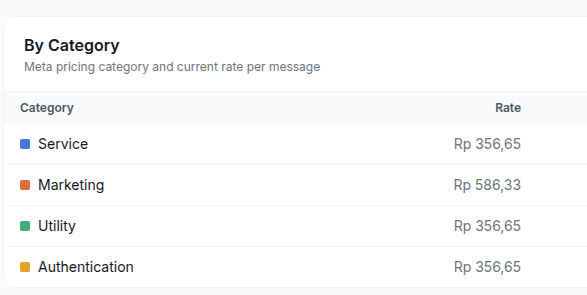
Meta fees: charged on messages the business sends, varying by message category and recipient country. The model has changed several times: per conversation until mid-2025, then per template message from July 2025. From 1 October 2026, regular replies (service messages) are charged too, at IDR 356.65 per message after 1,000 free per number per month, while marketing templates cost IDR 586.33 each. The full simulation is in our article on WhatsApp API per-message pricing and how to cut it.
Platform fees: the software subscription you use to manage chats (inbox, chatbot, broadcasts, reports). In ChatMo this follows your subscription plan, not the number of messages.
Because Meta's rates can change, always check the official rate card before budgeting and watch usage from your dashboard. ChatMo shows estimated message costs per channel so Meta's bill is no longer an end-of-month surprise.
WhatsApp Business API requirements
A Meta Business account (business portfolio). You can create one for free at business.facebook.com.
A phone number that can receive an SMS or call for verification. A number still active in the WhatsApp app must be removed from the app first, unless you use Coexistence (app and API on the same number).
A website or business page that explains what you do. Meta uses it when reviewing your account.
Legal documents for business verification, such as your business registration and tax number. Verification is not required to start, but it is required to raise your sending limit and apply for the verified badge.
A display name that matches your business. Names that are too generic or unrelated to your brand can be rejected.
How to sign up for the WhatsApp Business API in ChatMo
ChatMo uses Meta's official signup flow (Embedded Signup), so there are no long forms and no waiting on a sales team. The steps:
Create a ChatMo account, open Channel and choose WhatsApp Official.
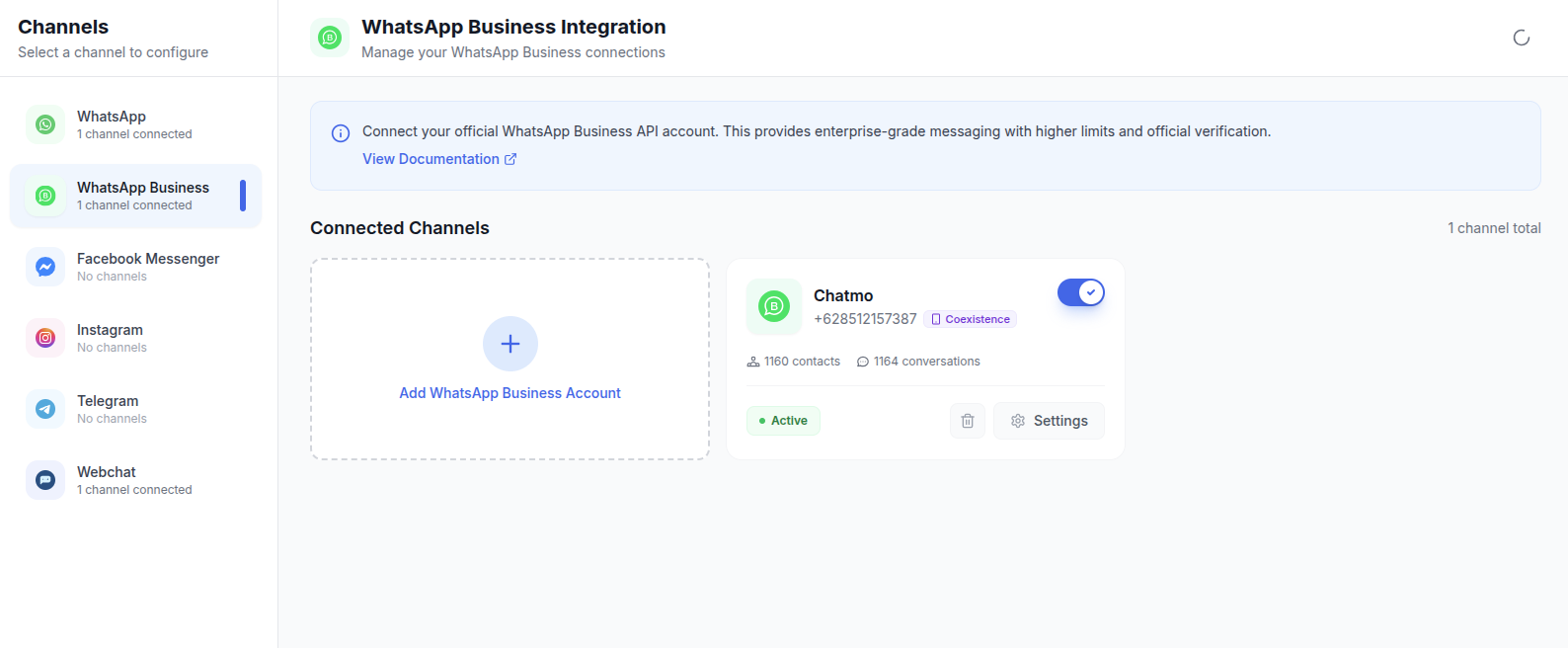
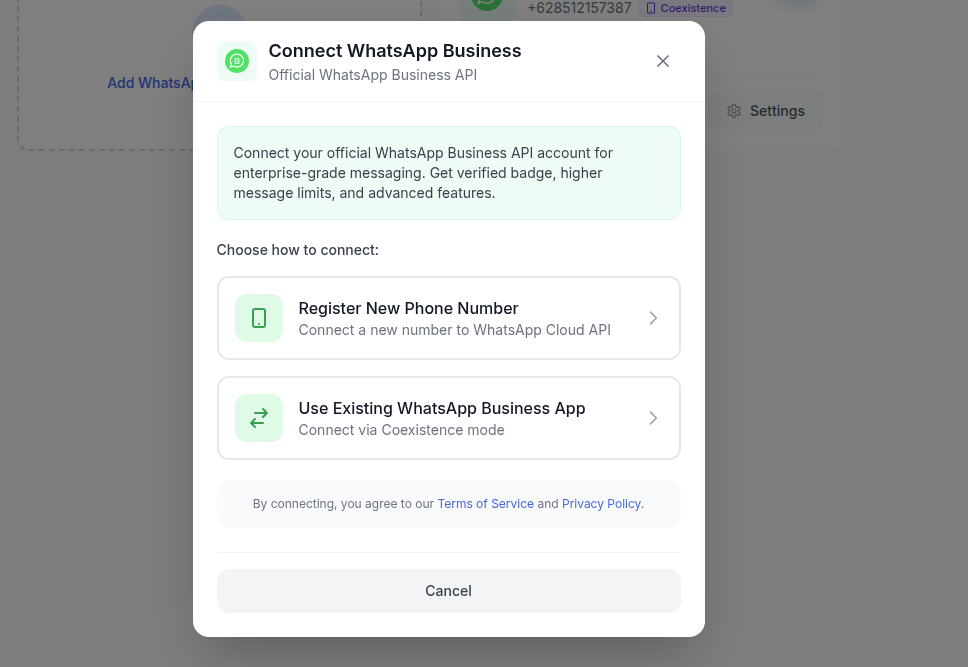
Click : Add WhatsApp Business Account and then choose : Register New Phone Number log in with the Facebook account that is an admin of your Meta Business.
Choose or create a business portfolio, then create a WhatsApp Business Account (WABA).
Enter your business phone number and display name, then verify it with the code sent by SMS or call.
Once connected, the number appears as a channel in ChatMo. Set up auto-assign, your AI agent and your first templates.
The connection itself usually takes minutes. What takes time is Meta's business verification, which can run several working days depending on your documents. While you wait, you can already receive and answer chats.
Sending limits and quality rating
A new number cannot message hundreds of thousands of people right away. Meta sets a messaging limit: how many unique customers you can contact first (with a template) in 24 hours. New numbers usually start at 250 customers a day. Once the business is verified and message quality stays healthy, the limit moves up. Since late 2025 limits are counted per business portfolio, so adding another number does not automatically double your capacity.
The limit is protected by a quality rating (green, yellow, red) based on how recipients react. Lots of blocks or reports lower your quality and can restrict sending. We cover how to keep quality high in how to send WhatsApp broadcasts without getting banned.
Note: the messaging limit only applies to conversations you start. Replying to customers is not limited, so your support channel keeps working even before your broadcast limit grows.
WhatsApp API use cases across industries
To make it concrete, these are the patterns we see most among ChatMo customers:
Online stores and D2C brands: an AI agent answers questions on stock, sizes and shipping; Utility templates send order confirmations and tracking numbers; Marketing broadcasts announce restocks and flash sales to past buyers.
Clinics and healthcare: patients book through chat, the system sends a reminder the day before with a confirm button, and staff only handle medical questions that need a person.
Property and automotive: leads from Click to WhatsApp ads land in the inbox, are assigned to sales in rotation, and each salesperson only sees their own leads.
Education and courses: schedules, invoices and class announcements go out as templates, while prospective students get answers from an AI trained on brochures and FAQs.
Travel and events: e-tickets, schedule changes and check-in reminders are sent automatically, while custom questions go to the team.
The pattern is the same: repetitive, predictable messages are automated, while conversations that need judgment stay with people who have the full context in front of them.
How to choose a WhatsApp API provider (BSP)
Because you use the WhatsApp API through software, your provider shapes your team's day-to-day experience. Questions worth asking before you subscribe:
Are Meta's message fees billed separately and transparently? Some providers add a markup per message. Make sure you can see estimated costs per channel.
How long does activation take? With Embedded Signup, a number can be connected the same day. Be wary of manual processes that take weeks.
Does the inbox support other channels? Your customers also ask on Instagram and your website. One inbox for every channel saves your team time.
How flexible are the AI and automation? Can the AI learn from your own documents, run tasks and hand over to a person?
Is there a mobile app and performance reporting? Field teams and managers need both.
What is technical support like? Choose a provider with a local team you can reach in your language and time zone.
Common mistakes when starting with the WhatsApp API
Using the owner's personal number. Once on the API, that number can no longer be used in the regular app (unless you use Coexistence). Use a dedicated business number.
Broadcasting to an old database right away. Contacts who never agreed to hear from you tend to block. Start with active customers.
Overly promotional templates. All caps, too many emojis and suspicious links get templates rejected or messages reported.
No plan for when agents are offline. Set up an AI agent or business-hours auto-reply so late-night chats still get answered.
Conclusion
The WhatsApp Business API fits businesses whose chats are already busy, handled by more than one person, and in need of automation and large-scale broadcasts. Signing up is much easier now with the Cloud API and Embedded Signup, while costs need watching because they are charged per message. The keys: use a dedicated business number, verify your Meta Business early, and build healthy sending habits.
Ready to try it? Book a ChatMo demo and our team will help you connect your first WhatsApp API number, or compare ChatMo pricing plans first.
Frequently asked questions
What is the difference between the WhatsApp Business API and the WhatsApp Business app?
The WhatsApp Business app is free and runs on a phone for one or two people. The WhatsApp Business API runs through software and supports many agents on one number, chatbots or AI, large broadcasts and integrations, with per-message fees from Meta.
Can an individual sign up for the WhatsApp Business API?
You can start with a Meta Business account, but to raise sending limits and apply for the verified badge the business must pass verification with legal documents such as a business registration and tax number.
How long does WhatsApp Business API signup take?
Connecting a number with Embedded Signup usually takes minutes. Meta business verification can take several working days depending on your documents.
Can I use my existing WhatsApp number for the API?
Yes. Remove the number from the WhatsApp app first, or connect it with Coexistence so the app and the API keep working on the same number.
Is replying to customers limited by the messaging limit?
No. The messaging limit only applies to conversations the business starts with a template. Replying to customer messages is not limited.
About the author
Antonio Kurniawan
Product & Customer Success
The ChatMo product and customer success team helps Indonesian businesses run WhatsApp, Instagram and webchat conversations with AI agents and shared inboxes.