How to Send WhatsApp Broadcasts Without Getting Banned: 7 Rules, 2026 Limits and Templates
WhatsApp broadcasts are safest through the WhatsApp Business API with official templates, sent only to opted-in, segmented contacts at a sensible frequency. This article covers the rules, 2026 sending limits, broadcast steps and template examples.

Antonio Kurniawan
Product & Customer Success
On this page
- Why do WhatsApp numbers get banned when broadcasting?
- Broadcasts in the app vs broadcasts on the WhatsApp API
- 7 rules for safe WhatsApp broadcasts
- Understanding messaging limits and quality rating
- How to send a safe WhatsApp broadcast in ChatMo
- Template examples: safe vs risky
- 5 types of broadcasts that rarely get blocked
- How to measure broadcast success
- Checklist before you hit send
- If your number's quality drops, do this
- Conclusion
Key takeaways
- Numbers get limited or banned mainly because many recipients block or report messages, not because of message volume alone.
- For more than a few hundred contacts, official broadcasts are only possible through the WhatsApp Business API with Meta-approved templates.
- Message only opted-in contacts, segment, personalize, and keep marketing to about 2-4 messages per customer per month.
- New numbers start at a messaging limit of about 250 customers a day, protected by a green, yellow or red quality rating.
- When quality drops, pause marketing broadcasts and clean out inactive contacts instead of switching to another number.
The safest way to send WhatsApp broadcasts without getting banned is to send through the WhatsApp Business API with official templates, only to contacts who agreed to hear from you, with content that fits each segment and at a sensible frequency. Numbers almost never get blocked because of message volume alone; they get blocked because many recipients block or report the messages. So the key is not a "trick" but making sure every message is one the recipient expects.
This article covers why numbers get limited or banned, the broadcast rules on WhatsApp, how to send a safe broadcast step by step, examples of good and risky templates, and what to do if your number's quality starts to drop.
Why do WhatsApp numbers get banned when broadcasting?
WhatsApp judges senders by how recipients react. The signals that matter most:
Blocks and reports. The strongest negative signal. Just a few percent of recipients blocking one send can lower your number's quality.
Messages to people who do not know you. Bought databases, scraped contacts or numbers taken from groups are the most common source of blocks.
Identical content sent repeatedly in a short time from the regular app or unofficial tools. That pattern is easy to recognize as spam.
Modified WhatsApp apps or unofficial blast tools. Besides breaking the terms, the account can be banned permanently without warning.
Broadcasts in the app vs broadcasts on the WhatsApp API
For sends above a few hundred contacts, the API is the only official way. Make sure you understand the WhatsApp Business API basics before you start.
7 rules for safe WhatsApp broadcasts
1. Only message contacts who opted in
Opt-in means the customer agreed to receive WhatsApp messages from you: ticking a consent box at checkout, filling in a form, or messaging you first. Keep a record of that consent. Bought databases almost always lead to blocks.
2. Segment instead of sending to everyone
A baby product promotion means nothing to a customer who bought office supplies. Group contacts by label, purchase history, city or interest. A broadcast to the right 2,000 people nearly always sells more than one to 20,000 random people, and costs far less in message fees.
3. Choose the honest template category
Promotions belong in Marketing. Order confirmations, invoices and delivery updates belong in Utility. A promotional template registered as Utility gets rejected or recategorized, and repeated violations can restrict your account.
4. Personalize and give context
Use the recipient's name and the reason you are writing. "Hi Rina, the shoe size you asked about last week is back in stock" gets blocked far less often than "HUGE SALE TODAY!!!".
5. Watch your frequency
For marketing messages, 2-4 per customer per month is generally a safe ceiling. Beyond that, block rates climb fast. Meta also caps how many marketing messages a person receives from businesses, so excessive messages may not be delivered at all.
6. Offer a way to unsubscribe
Add a quick reply button such as "Stop promos". Customers who can opt out easily do not need to hit block, and that protects your number's quality.
7. Send at reasonable hours
Avoid late nights and early mornings. In Indonesia, 10:00-12:00 and 18:30-20:30 WIB usually see the best read and reply rates, but test with your own audience.
Tip: before a big broadcast, send to 5-10% of the segment first. If replies look good and blocks do not spike, send to the rest.
Understanding messaging limits and quality rating
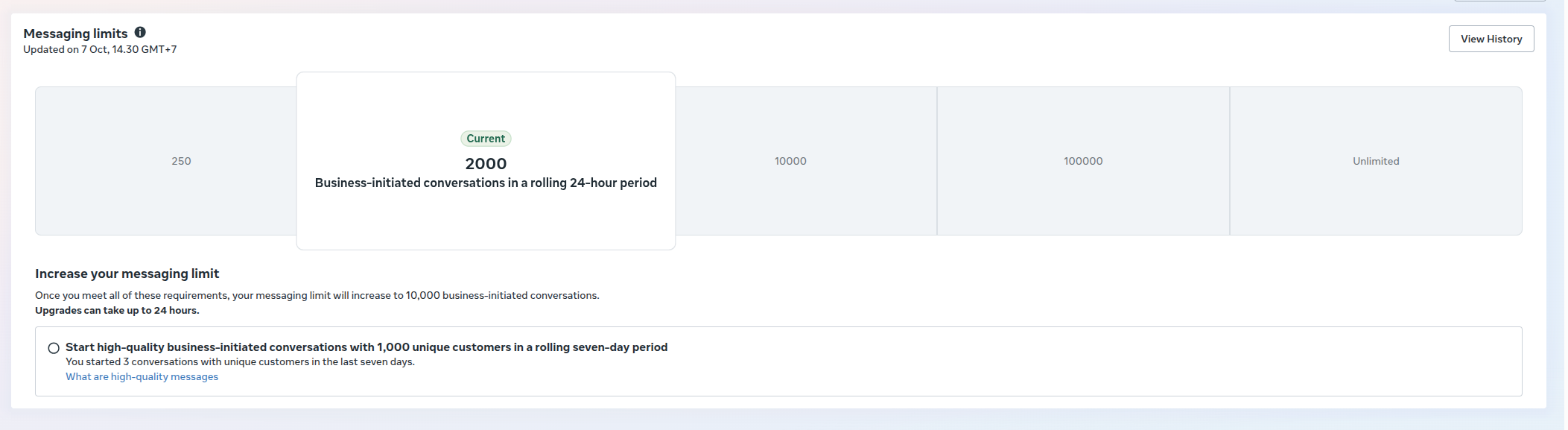
Every business on the WhatsApp API has a messaging limit: the number of unique customers it can contact first in 24 hours. New numbers usually start at 250 customers a day and move up after the business is verified and quality stays healthy. Under Meta's 2026 policy updates, verified businesses can move straight to a 100,000-a-day tier, and limits are counted per business portfolio rather than per number.
The quality rating is shown as a color:
Green: good quality, the limit can grow.
Yellow: negative signals are building. Lower your frequency and fix segmentation.
Red: low quality. The limit can drop and marketing templates can be paused for a while.
How to send a safe WhatsApp broadcast in ChatMo
Clean up your contacts. Import contacts from CSV or Excel, label them (for example "bought in the last 3 months" or "October ad leads") and make sure the consent field is filled in.
Build a segment. Combine filters such as label, city and last purchase date so the message only reaches relevant people.
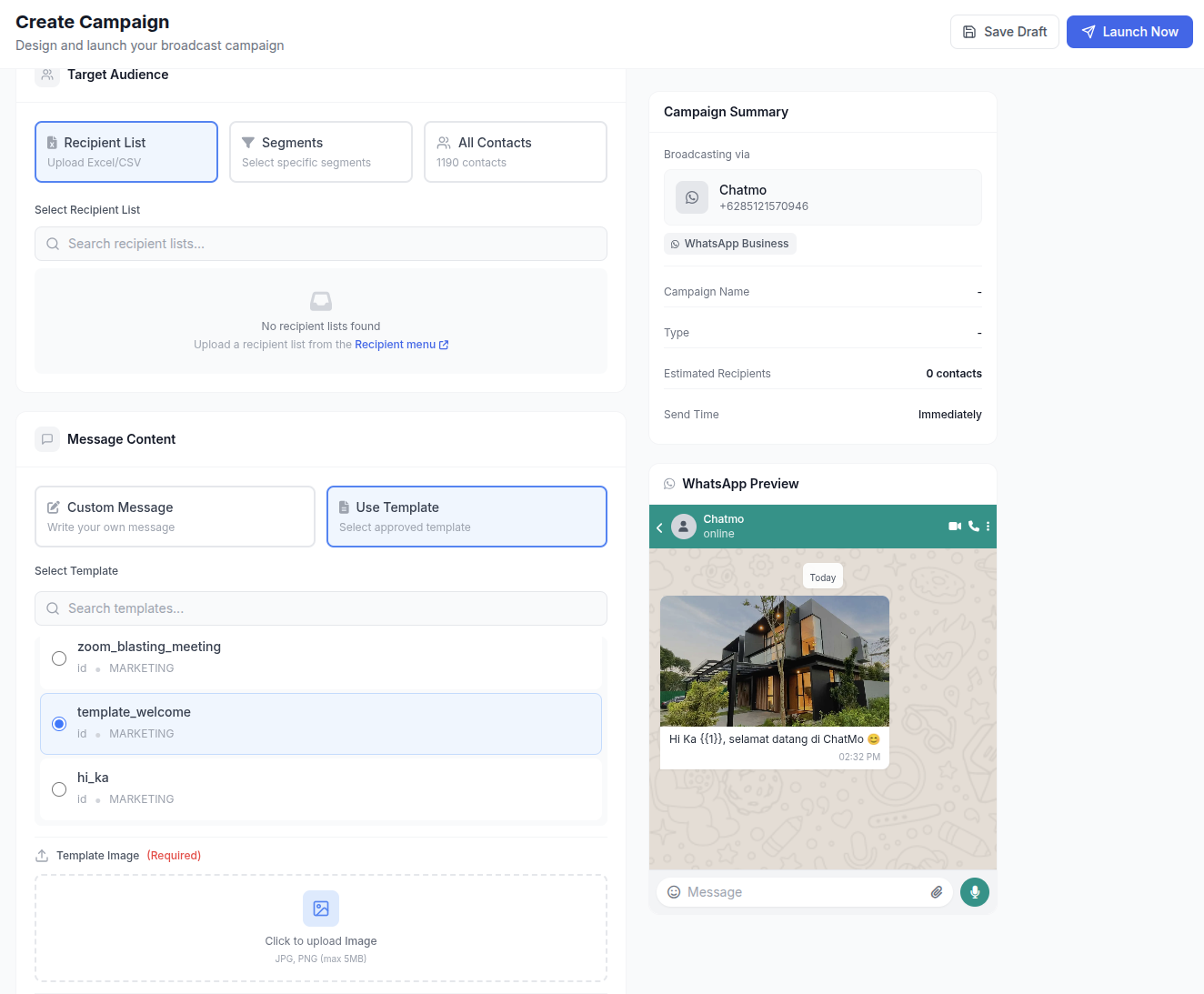
Prepare a template. Create a template in the WhatsApp templates menu, fill in variables, add buttons and submit it for Meta's approval. Approval is usually quick, but allow up to 24 hours.
Create the broadcast. In Broadcast, choose your WhatsApp Official channel, the segment and the template, then map the variables to contact data.
Schedule it. Pick a send time that suits your customers' habits.
Track results. Check delivered, read, replied and failed counts. Customer replies land in the team inbox, where your AI agent or agents can answer right away.
Template examples: safe vs risky
A safe example (Utility):
Hi {{1}}, order #{{2}} has shipped with {{3}}. Tracking number: {{4}}. Reply to this message if you have any questions.
A safe example (Marketing):
Hi {{1}}, thanks for shopping with Our Store last month. Customers get 15% off the new collection until Sunday. Want us to send the catalog? [Button: See catalog] [Button: Stop promos]
A risky example:
CRAZY SALE!!! 90% OFF TODAY ONLY!!! CLICK NOW bit.ly/xxxx
All caps, inflated promises and short links that hide the destination are the combination Meta rejects or recipients report most often.
5 types of broadcasts that rarely get blocked
Safe broadcasts are usually the most useful ones for the recipient. These five consistently get high reply rates and few blocks:
Welcome messages for new contacts. Sent right after a customer signs up or buys for the first time, with a thank-you and how to get help.
Reminders about an unfinished cart or quote. "Hi Budi, the sofa you asked about yesterday is still available. Want us to work out shipping?" Relevant because it follows the customer's own action.
Restock alerts for products people asked about. Send only to contacts labeled as interested in that product.
Useful reminders: service schedules, subscription renewals, class schedules or invoices coming due. These usually fall under Utility.
Win-back messages for past customers with a clear offer and a stop button. Send to people who bought before, not to your whole database.
How to measure broadcast success
Log the results of every broadcast in one simple table. After 4-6 sends you will see a pattern: the segments, times and message styles that work best for your business.
Checklist before you hit send
Every recipient opted in and the content is relevant to them.
The template category matches the content (Marketing or Utility).
The first sentence includes a name or personal context.
There is a button or another way to stop receiving promotions.
Links use your own domain, not anonymous link shorteners.
The number of recipients is under today's messaging limit.
Your team or AI agent is ready for the spike in replies after sending.
You have budgeted the message cost. See the WhatsApp API per-message cost simulation.
If your number's quality drops, do this
Pause marketing broadcasts for a few days.
Review your latest broadcasts: which segments responded least or unsubscribed most.
Remove contacts who have not read a message in the last 3-6 months.
Restart with your most relevant message to your most active customers, at a lower frequency.
Do not move broadcasts to another number or to unofficial WhatsApp when quality drops. The same message pattern will produce the same blocks, and the second number will be at risk too.
Conclusion
Safe WhatsApp broadcasting is not about gaming the system; it is about sending messages people actually want. Use the WhatsApp API with official templates, message only opted-in contacts, segment, watch your frequency and offer a way out. With these habits your sending limit grows on its own and your message costs stay under control.
Want to try broadcasts with segmentation and full reports? See ChatMo Broadcast Campaigns or book a demo.
Frequently asked questions
Why does a WhatsApp number get banned after a broadcast?
Usually because many recipients block or report the messages, messages go to contacts who never agreed, or the broadcast was sent with unofficial tools.
How many WhatsApp broadcast messages are safe per day?
On the WhatsApp API, the ceiling follows your messaging limit, starting around 250 customers a day for new numbers and rising after verification. Relevance and opt-in matter more than volume.
Do WhatsApp broadcasts have to use templates?
On the WhatsApp Business API, yes. Messages the business starts, or sends more than 24 hours after the customer's last message, must use Meta-approved templates.
How often can I send promotional broadcasts?
As a rule of thumb, 2-4 marketing messages per customer per month. Beyond that, block rates usually climb sharply.
What should I do if my quality rating turns red?
Pause marketing broadcasts, review the segments and content of your latest sends, remove inactive contacts, then restart with your most active customers at a lower frequency.
About the author
Antonio Kurniawan
Product & Customer Success
The ChatMo product and customer success team helps Indonesian businesses run WhatsApp, Instagram and webchat conversations with AI agents and shared inboxes.