Website Live Chat for Business: Benefits, Must-Have Features and How to Install It
Website live chat answers visitors while they are still weighing a purchase, without leaving the page. Learn when live chat beats a WhatsApp button, the features you need, how to install ChatMo webchat and how to measure it.

Antonio Kurniawan
Product & Customer Success

On this page
- Live chat, WhatsApp button or contact form?
- Benefits of live chat for business
- Features your website live chat needs
- How to install the ChatMo webchat widget
- Live chat greeting examples
- Opening the chat automatically: when it helps and when it does not
- Combining AI and people in live chat
- Example: an online furniture store
- Security and privacy in live chat
- How to measure live chat results
- Common mistakes
- Live chat for B2B and service businesses
- Building a knowledge base for live chat AI
- Conclusion
Key takeaways
- Live chat answers visitors while they are still on the page, which a contact form cannot do.
- Live chat suits visitors not ready to share a WhatsApp number and carries no per-message fee.
- Must-have features: team inbox connection, an AI agent, human handoff, file sharing and a standalone chat page link.
- AI as the first responder and people as the closers is the most effective pattern.
- Measure chats per 1,000 visitors, first reply time, leads collected and conversion of visitors who chat.
Website live chat is a small chat window in the corner of your website that lets visitors ask questions and get answers right away, from an agent or an AI agent, without leaving the page. Compared with a contact form answered hours later, live chat catches visitors while they are still weighing a purchase. For businesses in Indonesia, live chat works best when it feeds the same inbox as WhatsApp and Instagram, so the team never has to open a separate app.
This article covers when live chat beats a WhatsApp button, the features you need, how to install the ChatMo webchat widget, greeting message examples and how to measure results.
Live chat, WhatsApp button or contact form?
Live chat suits visitors who are not ready to share a WhatsApp number, desktop visitors, and businesses that want to keep message costs down. A WhatsApp button is still useful for customers who prefer continuing on their phone. Many businesses use both. Creating a WhatsApp button is covered in WhatsApp links and QR codes for business.

Benefits of live chat for business
Rescues hesitant buyers. Small questions about size, shipping or warranty are often why people leave a page. Live chat answers them on the spot.
Captures leads who are not ready yet. Visitors can ask without giving a phone number, then leave an email or WhatsApp number once they feel helped.
Reduces phone and email load. One agent can handle several chats at once, which is impossible on the phone.
Valuable question data. Chat history shows what confuses visitors, material for improving product pages and FAQs.
Features your website live chat needs
Connection to the team inbox alongside WhatsApp, Instagram and other channels.
An AI agent that answers from your business documents when agents are offline or busy.
Human handoff with the full history.
Customizable appearance: colors, logo, agent name and photo, position and widget size.
Two-way files and images, such as product photos or transfer receipts.
A direct link to a full chat page that you can share on WhatsApp, email or a QR code.
Lightweight, so it does not slow your website down.
How to install the ChatMo webchat widget
Open Channel, choose Webchat and create a new widget.
Set the look: agent name, role and photo, company logo, header and chat bubble colors, position (bottom right or left) and widget size. If needed, add fields visitors fill in before chatting, such as name and WhatsApp number.
Choose the AI agent that will reply, or send chats straight to the team.
Copy the install code and paste it on every page of your website, usually before the closing body tag, or through the custom code settings of a CMS such as WordPress.
Open your website and send a test message. It appears in the ChatMo inbox like a chat from any other channel.
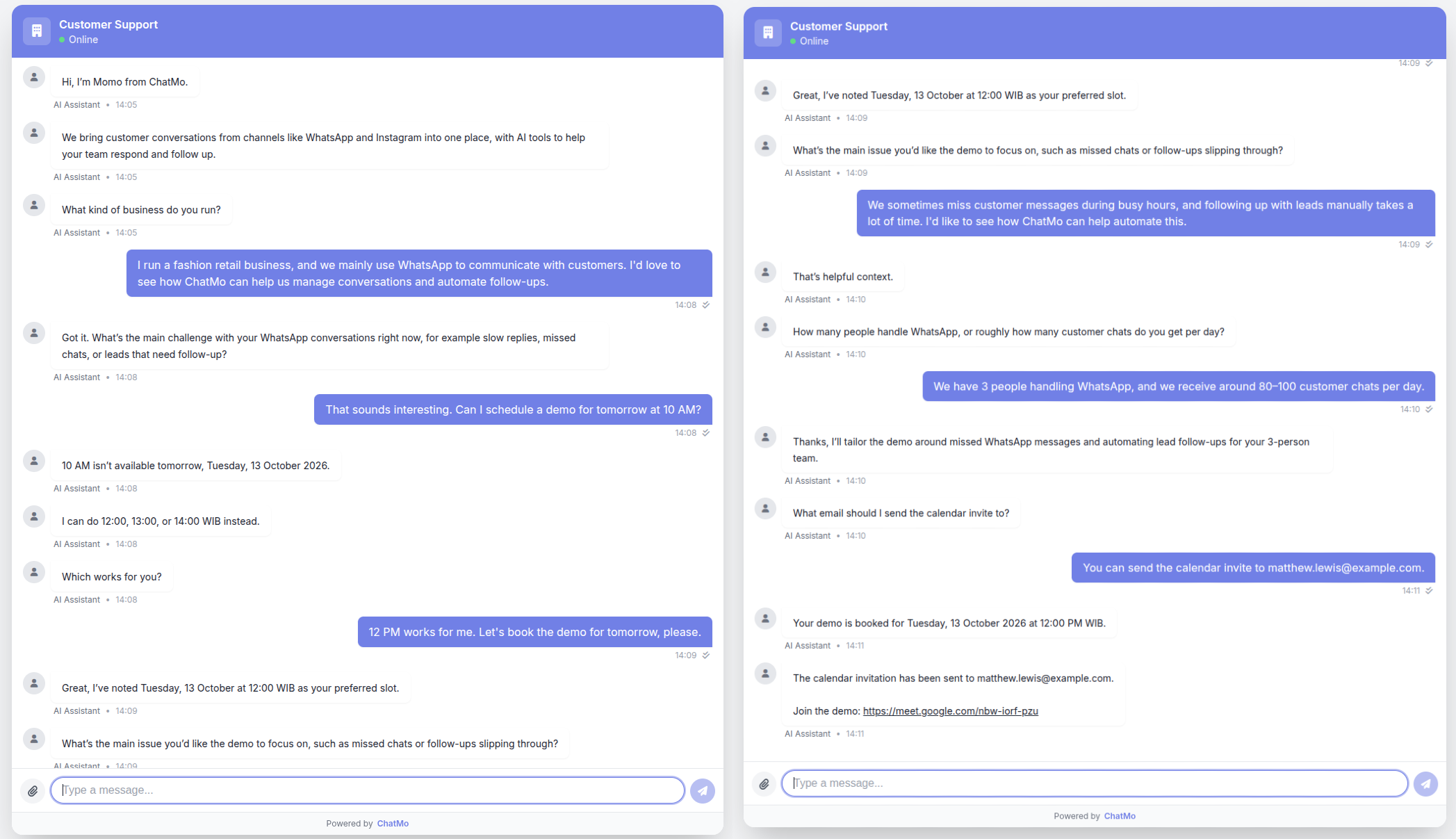
Tip: besides the website widget, ChatMo webchat has its own chat page link. It is useful to share on WhatsApp as a place to continue long consultations with no per-message fee. We explain the strategy in how to cut WABA costs.
Live chat greeting examples
Use these as the first greeting from your AI agent or agents, adapted to the page where the visitor starts the chat.
Home page: "Hi! How can we help? Ask us anything about products, shipping or payment."
Pricing page: "Not sure which plan fits? Tell us about your team and we will recommend one in a minute."
Product page: "Need help choosing a size? Send your height and weight and we will find the right fit."
Checkout page: "Having trouble with payment? We are here to help right now."
Outside business hours: "Our team is offline, but our virtual assistant can still answer. Leave your email if you would like us to contact you tomorrow."
Opening the chat automatically: when it helps and when it does not
In ChatMo, the Auto-Open Chat option opens the chat window by itself when a visitor lands on your website. It works well on pages built for conversation, such as campaign or consultation pages. On a general website, let visitors open the chat themselves so it does not feel intrusive.
Turn it on for campaign landing pages whose goal is to start a conversation.
Turn it off for catalog sites or blogs, especially on mobile where screen space is tight.
Turn on sound notifications if your team monitors chats from the same website, so new messages are not missed.

Combining AI and people in live chat
The most effective pattern is AI as the first responder and people as the closers. The AI answers repeat questions in seconds, collects key details such as name, needs and contact, then calls an agent when the visitor is ready to buy or needs special help. The full history is kept, so the agent never has to ask again.
If the visitor leaves a WhatsApp number, the team can continue on WhatsApp and the whole history stays in one contact profile. That is the core of omnichannel chat.
Example: an online furniture store
An online furniture store had plenty of visitors on its sofa pages, but few purchases. Reading the chat history showed three questions coming up again and again: which size fits the room, shipping costs outside the city, and installment options.
The AI knowledge base was filled with a size table, shipping costs by region and a list of installment methods.
The webchat widget went on every product page with the AI agent as the first responder.
Serious visitors were asked to leave a WhatsApp number, and sales continued with room photos and a quote.
The biggest change was not just the number of chats but lead quality: sales now receives prospects who already know the size, shipping cost and payment method, so conversations get to a transaction much faster.
Security and privacy in live chat
Never ask for sensitive data such as PINs, OTPs or full card numbers over chat.
Limit team access by role, so customer data is only visible to those who need it.
Show your privacy policy on the website, including how chat history is stored and used.
Be careful with attachments from unknown visitors, and use a platform that stores files securely.
How to measure live chat results
Common mistakes
The widget is live but nobody answers. An AI agent or a clear offline message is better than leaving visitors waiting.
A pre-chat form that is too long. Ask for a name at most, or simply let visitors ask.
The widget covers important buttons on mobile, such as the buy button or the menu.
Different answers on live chat and WhatsApp because they use different information sources. Use one knowledge base for every channel.
Live chat for B2B and service businesses
Live chat is not only for online stores. For B2B, software or professional services, it works as the entry point for consultations. Visitors on the pricing page usually want to know which plan fits, whether there is a trial and how long implementation takes. An AI agent can answer these basics, ask about team size and needs, then offer a demo slot. Qualified leads go to sales with a conversation summary, so the first demo call starts with what matters.
Building a knowledge base for live chat AI
The quality of AI answers in live chat depends almost entirely on the material you give it. Website visitors usually ask very specific questions about the page they are reading, so build the knowledge base from their point of view:
Gather the top 30 questions from chat history, email and social media comments. Real questions are more useful than an FAQ written from the company's point of view.
Write short, definite answers, with numbers: prices, durations, requirements and deadlines.
Add links to the relevant pages so the AI can point visitors to product details, pricing or an order form.
Set limits on what the AI should not answer, such as special price negotiations or complaints, and route those to an agent.
Review every week. Read the conversations handed to agents and add answers for questions that were not covered.
After a few weeks, the share of chats resolved without an agent usually rises on its own as the knowledge base fills out.
Conclusion
Website live chat bridges hesitant visitors and a team ready to help. Install a widget connected to your team inbox, add an AI agent so replies are always instant, tailor the greeting for each page, and measure results all the way to sales.
Want live chat connected to WhatsApp and Instagram in one inbox? See ChatMo Webchat or book a demo.
Frequently asked questions
What is website live chat?
A chat window on your website that lets visitors ask questions and get answers from an agent or AI agent without leaving the page.
Is live chat or a WhatsApp button better on a website?
They complement each other. Live chat suits visitors who do not want to share a number and desktop visitors, while a WhatsApp button suits those who prefer continuing on their phone.
How do I install ChatMo live chat on my website?
Create a widget under Integrations, then Webchat, set the look and AI agent, copy the install code, then paste it on every page or through your CMS code settings.
Does website live chat have a per-message cost?
Unlike the WhatsApp API, webchat has no per-message fee from a channel provider.
Can AI answer live chat?
Yes. An AI agent answers from your business knowledge base and hands the chat to an agent with the full history when needed.
About the author
Antonio Kurniawan
Product & Customer Success
The ChatMo product and customer success team helps Indonesian businesses run WhatsApp, Instagram and webchat conversations with AI agents and shared inboxes.