Omnichannel Chat for Business: Manage WhatsApp, Instagram and Live Chat from One Inbox
Omnichannel chat brings conversations from WhatsApp, Instagram, Facebook Messenger, Telegram, email and website live chat into one inbox with connected customer profiles. Here is how it differs from multichannel, the must-have features, rollout steps and metrics.

Antonio Kurniawan
Product & Customer Success

On this page
- Omnichannel vs multichannel
- Signs your business needs omnichannel
- Must-have features in an omnichannel platform
- Which channels should you bring together?
- How to roll out omnichannel in ChatMo
- Example of a cross-channel customer journey
- Setting team roles and access
- Metrics to measure results
- Common mistakes when rolling out omnichannel
- What does omnichannel cost?
- Checklist for choosing an omnichannel platform
- Conclusion
Key takeaways
- Omnichannel differs from multichannel because customer data and history are connected in one profile, not split per app.
- Must-have features: a shared inbox, cross-channel customer profiles, automatic assignment, an AI agent on every channel and central reports.
- Start with your two busiest channels, usually WhatsApp and Instagram, and add more gradually.
- Set roles and access so salespeople only see the chats assigned to them.
- Measure results with first response time, resolution time, missed chats, chats per agent and conversion per channel.
Omnichannel chat means managing every customer conversation from WhatsApp, Instagram, Facebook Messenger, Telegram, email and website live chat in one shared inbox, with one customer profile and a connected history. Your team stops switching between apps, chats are assigned automatically to the right agent, and customers never repeat themselves when they switch channels. For any business receiving chats on more than two channels, omnichannel usually cuts response times and missed chats right away.
This article covers the difference between omnichannel and multichannel, the problems that show up without a central system, must-have features, implementation steps and the metrics that measure results.
Omnichannel vs multichannel
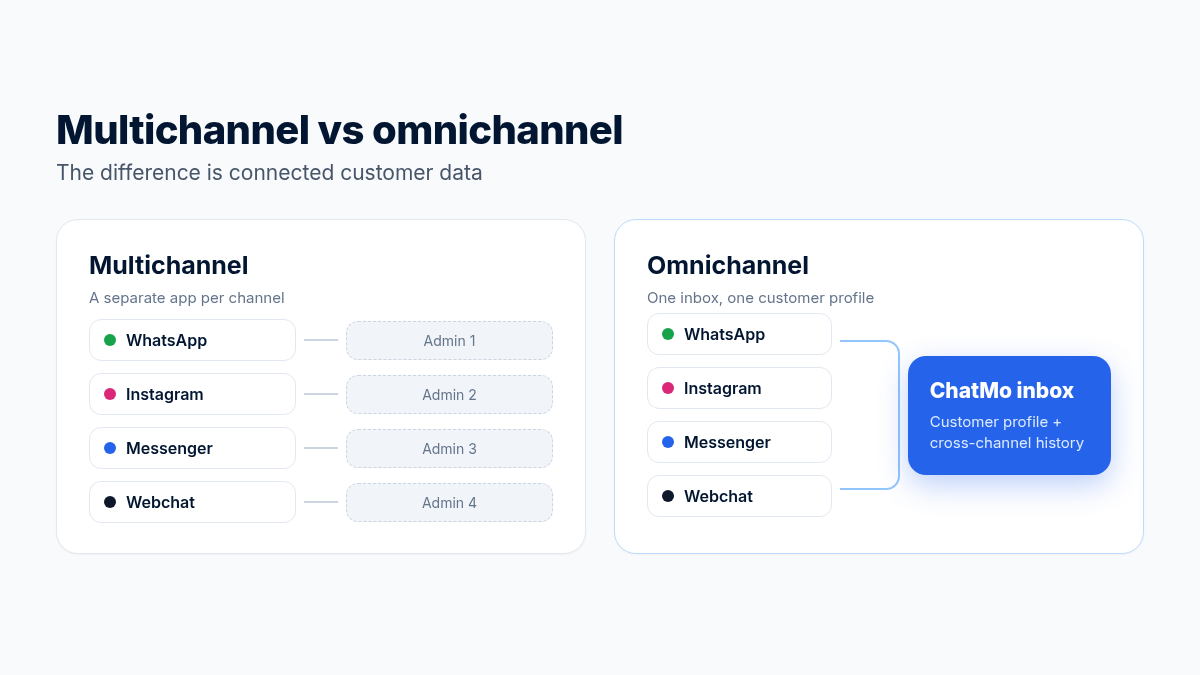
The two terms are often treated as the same, but they differ on one key point: whether customer data is connected.
Signs your business needs omnichannel
Agents keep WhatsApp open on a phone, Instagram on a laptop and Facebook in another tab all day.
A customer asks on Instagram, then continues on WhatsApp, and the second agent knows nothing about the first conversation.
Some DMs or comments are only read two days later.
Managers do not know how many chats come in per channel or how many turn into sales.
When an agent is on leave, nobody can pick up their chats because everything is on a personal phone.
Must-have features in an omnichannel platform
1. A shared inbox for every channel
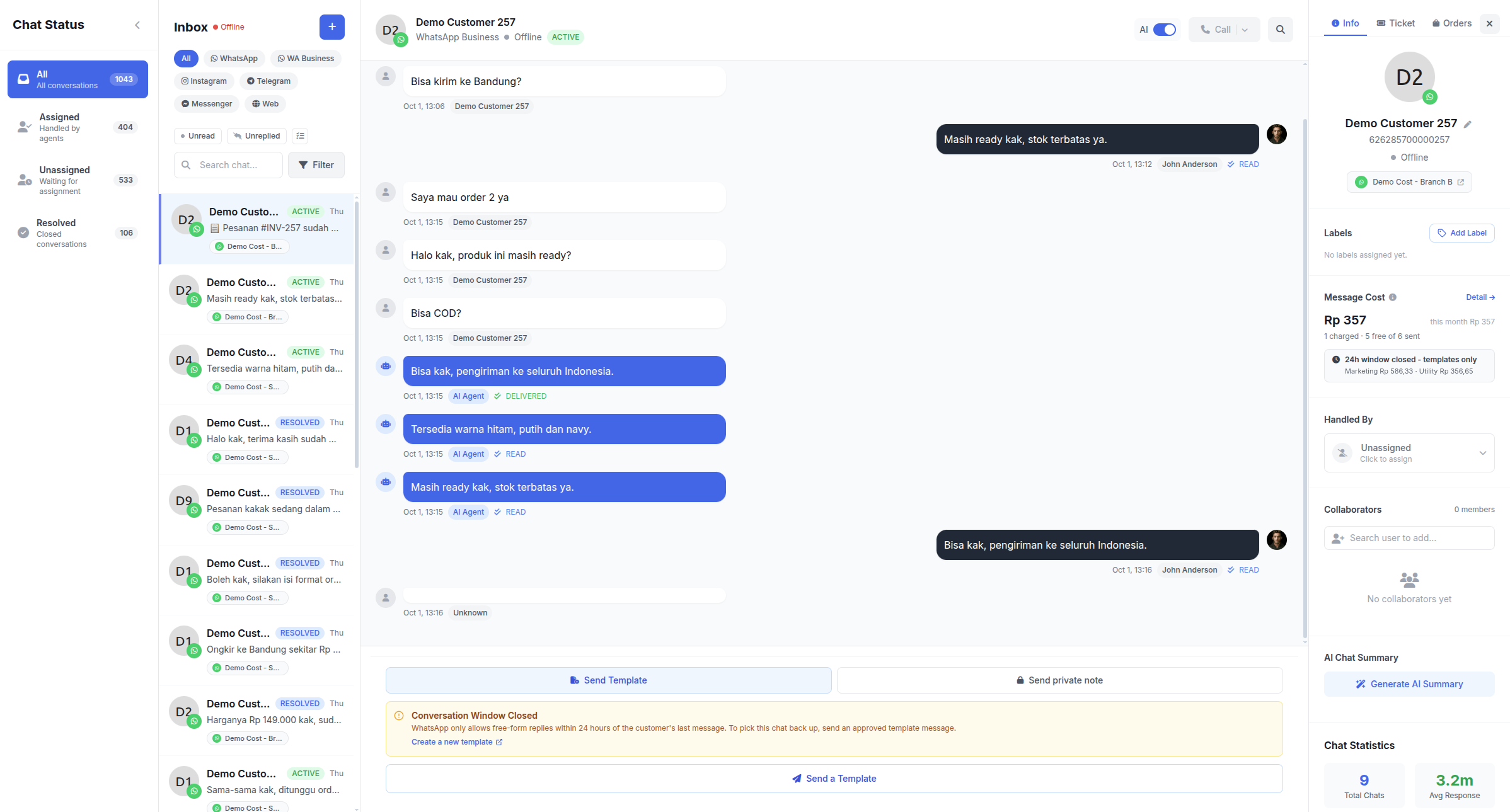
All chats land in one list you can filter by channel, status, label or agent. Every chat has a status (open, pending, resolved), so the team knows what still needs follow-up.
2. Connected customer profiles
One contact can have several channels: a WhatsApp number, an Instagram account and an email address. When an agent opens a chat, they see purchase history, labels, notes and earlier conversations on other channels.
3. Automatic chat assignment
New chats go to a team or specific agents in rotation (round robin) or to the agent with the fewest active chats. For sales teams, you can limit each salesperson to the chats assigned to them.
4. An AI agent on every channel
One AI agent can answer on WhatsApp, Instagram, Messenger, Telegram and webchat from the same knowledge base, then hand over to a person when needed. The full guide is in our article on the WhatsApp AI chatbot for customer service.
5. Tools for teamwork
Quick replies for common answers, with attachments.
Internal notes only your team can see.
Labels to mark customer stages, such as "asked for price", "paid" or "complaint".
Tickets for cases that need follow-up over more than a day.
6. Cross-channel reports
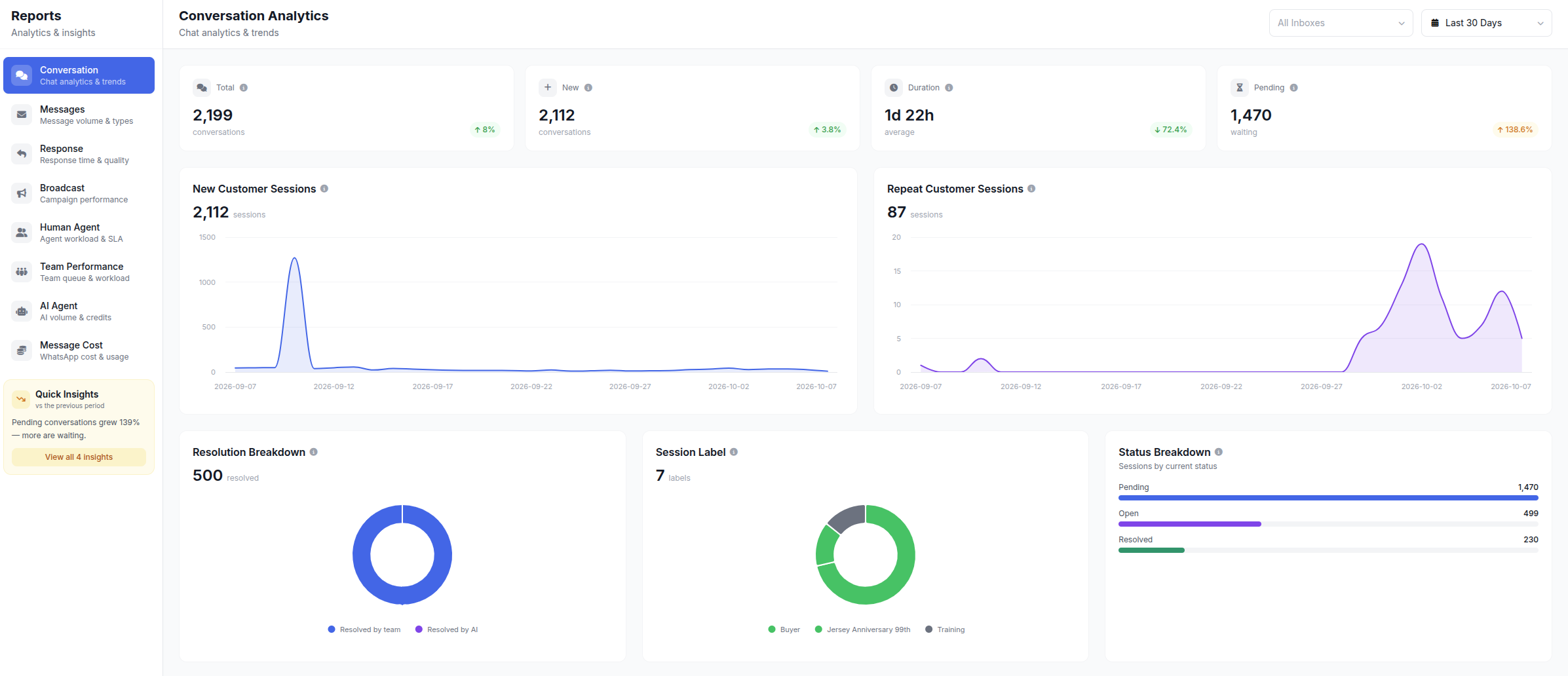
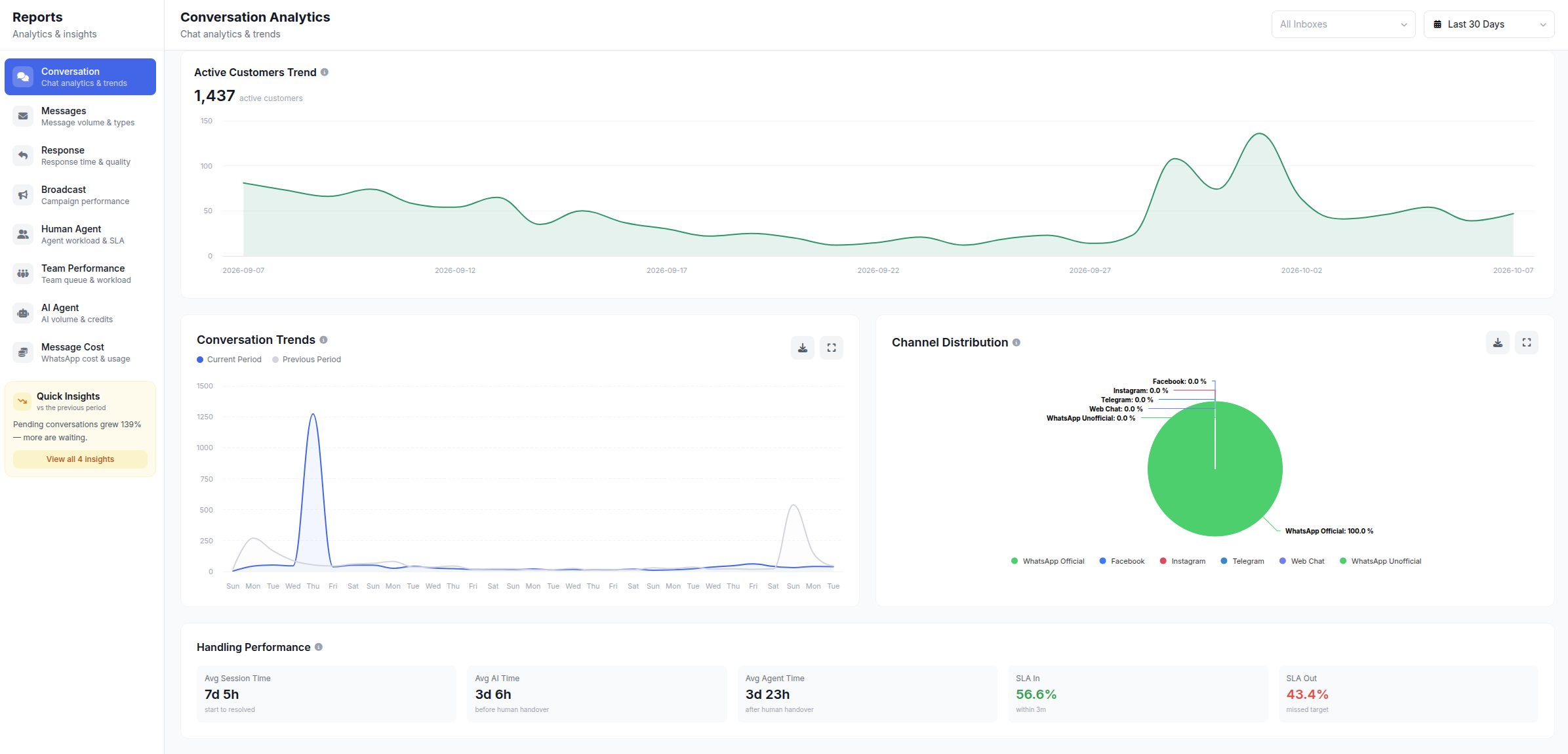
First reply time, resolution time, chats per agent, AI performance and lead sources per channel, all in one place.
Which channels should you bring together?
Start with the two busiest channels, usually WhatsApp and Instagram, then add more once the team is comfortable.
How to roll out omnichannel in ChatMo
Map your channels and chat volume for the last two weeks: which channel is busiest and when the peaks are.
Connect your channels from Integrations: WhatsApp, Instagram, Facebook Messenger, Telegram and the webchat widget.
Set up teams and assignment rules. Create teams (for example Sales and Support), configure auto-assign per channel, and decide who may only see their own chats.
Prepare shared labels and quick replies so every agent speaks the same way.
Add an AI agent for out-of-hours coverage or the most frequent questions.
Set service targets, such as a first reply within 5 minutes during business hours.
Review weekly from the reports: which channel is slowest and which agent needs help.
Tip: let customers know gently. List all official channels in your Instagram bio and on your website, and add a webchat widget that can also point to WhatsApp.
Example of a cross-channel customer journey
Here is a common customer journey at a furniture business, and how omnichannel keeps it smooth:
Instagram: Sinta sees an ad for a dining table and asks the price by DM. The AI agent answers with the price and dimensions, then offers to continue on WhatsApp so she can send a photo of her room.
WhatsApp: Sinta sends a photo of her dining room. Because her profile is connected, agent Rudi sees the Instagram DM history without asking again and recommends the right size.
Webchat: that evening Sinta visits the website and asks about installments in live chat. The AI answers from the same knowledge base and notes her interest on her profile.
WhatsApp again: the next morning Rudi sends the final quote, Sinta pays, and the order confirmation goes out automatically as a template.
Without omnichannel, the same journey would be handled by three different people in three apps, and Sinta would explain what she needs three times.
Setting team roles and access
These limits matter for sales teams working to targets, and they keep customer data visible only to the people who need it.
Metrics to measure results
First response time: the average time until a customer gets the first reply, per channel.
Resolution time: how long a conversation takes to finish.
Missed chats: chats not answered within the time limit you set.
Chats per agent: to keep workloads balanced.
Conversion per channel: which channel brings the most orders.
Common mistakes when rolling out omnichannel
Connecting every channel at once before the team is ready. Start with two channels and add more gradually.
No assignment rules, so every agent opens the same chat and waits on each other.
Each agent invents their own labels. You end up with "price question", "Price Question" and "asked price" for the same thing. Agree on a shared label list.
Duplicate contacts left unmerged. The same customer on WhatsApp and Instagram is recorded as two people, so their history is split.
Nobody reads the reports. Omnichannel gives you data, but the benefit only shows when someone reviews it and acts on it every week.
What does omnichannel cost?
Omnichannel costs usually have three components:
A platform subscription, generally based on plan, number of channels or number of users.
WhatsApp API message fees from Meta, charged per message. Other channels such as Instagram, Messenger, Telegram and webchat have no per-message fee from the channel provider. See the WhatsApp cost simulation in WhatsApp API per-message pricing.
AI usage, usually as credits based on how many conversations the AI answers.
To judge whether it pays off, also count the costs you could not see before: missed chats that never became sales, agent time lost switching between apps, and the extra agents you would need to hire as chat volume grows. ChatMo plan details are on the pricing page.
Checklist for choosing an omnichannel platform
Supports the channels your customers use most, including the official WhatsApp API.
One contact profile across channels, not separate contacts.
Automatic assignment with several methods and access controls.
An AI agent trained on your own documents with human handoff.
Official broadcasts and WhatsApp message cost reports.
Downloadable team and AI performance reports.
A mobile app so agents can reply away from the office.
Local support and pricing in rupiah.
Conclusion
Omnichannel is not just being on many channels; it is bringing them together in one inbox, one customer profile and one way of working. Start with your busiest channels, set up automatic assignment, add AI for repeat questions and measure results every week. Within a few weeks, response times and missed chats usually drop noticeably.
Want to see the ChatMo omnichannel inbox in action? Explore the Shared Team Inbox or book a demo.
Frequently asked questions
What is the difference between omnichannel and multichannel?
Multichannel means being on many channels managed separately. Omnichannel brings every channel into one inbox with connected customer profiles and history.
Which channels can be combined in ChatMo omnichannel?
WhatsApp Official and Unofficial, Instagram DM, Facebook Messenger, Telegram, email, and webchat or website live chat.
Is omnichannel right for small businesses?
Yes, if chats come from more than two channels or more than one person replies. Start with your two biggest channels so the team is not overwhelmed.
How do I split chats fairly across the team?
Use auto-assign with round robin or assign to the agent with the fewest active chats, configured per channel or per team.
What does running omnichannel chat cost?
Usually a platform subscription, WhatsApp API message fees from Meta, and AI usage. Channels such as Instagram, Messenger, Telegram and webchat have no per-message fee from the channel provider.
About the author
Antonio Kurniawan
Product & Customer Success
The ChatMo product and customer success team helps Indonesian businesses run WhatsApp, Instagram and webchat conversations with AI agents and shared inboxes.