Telegram for Business: Telegram Business Features, Channels, Groups and Bots Explained
Telegram offers four different tools for business: Telegram Business accounts, channels, groups and bots. Learn what each one does, when to use it, its limits, and how to serve Telegram customers as a team without sharing one phone.

Antonio Kurniawan
Product & Customer Success
On this page
- Who should use Telegram?
- 1. Telegram Business accounts
- 2. Telegram channels
- 3. Telegram groups
- 4. Telegram bots
- Combining the four tools into one system
- Serving Telegram customers as a team
- Tips for growing a Telegram audience
- Writing channel posts that start conversations
- Example: an online tutoring business
- Keeping your Telegram business accounts secure
- Common mistakes
- Telegram vs WhatsApp for business
- Summary
Key takeaways
- Telegram offers four business tools: Telegram Business accounts, channels for broadcasting, groups for communities and bots for automation.
- Telegram Business features such as opening hours, greeting messages, away messages, quick replies and chat labels are free for Telegram Premium subscribers.
- Channels suit announcing offers and content to many people; groups suit discussion and customer communities.
- Bots cannot start a chat; the customer must tap Start or send a message first.
- For teams, connect a Telegram bot to a shared inbox so chats can be split between agents and answered by AI.
Telegram for business is not one feature but four tools with different jobs. A Telegram Business account is for serving customers one to one, with opening hours, greeting messages, away messages and quick replies. A channel is for one-way broadcasts to many people. A group is for discussion and community. A bot is for automation and can be connected to a shared inbox so several agents can serve customers at once. According to Telegram, all Telegram Business features are free for Telegram Premium subscribers, while channels, groups and bots can be created at no cost.
Many businesses use Telegram halfway: they have a channel with thousands of subscribers, but customer questions arrive in the owner's personal account and often get missed. This guide helps you pick the right tool for each need and combine them into one tidy system.
Who should use Telegram?
In Indonesia, WhatsApp remains the main chat app. But Telegram has a strong user base in certain segments:
Communities and education. Online classes, tutoring, trading communities and study groups often use Telegram because groups can hold very large numbers of members.
Digital products. E-books, templates, software and content subscriptions are often distributed through channels or bots.
Crypto, finance and tech. Users in these segments are used to Telegram and often prefer usernames to phone numbers.
Gaming and entertainment. Game communities, in-game item shops and top-up providers often operate on Telegram.
Privacy-minded customers. Telegram lets people talk through a username without sharing their number.
If your customers are in these segments, Telegram deserves serious attention, not just a backup channel.
1. Telegram Business accounts
Telegram Business turns a regular Telegram account into a business account. Features listed in Telegram's official announcement:
A Telegram Business account suits an owner or a single agent serving customers directly. Its weakness is that the account still belongs to one person. With three agents, they must share the same account, with all the usual problems: no chat assignment, no record of who replied, and a security risk when someone leaves.
2. Telegram channels
A channel is a one-way broadcast: only admins can post, and subscribers receive the posts like a subscription. A channel can have an unlimited number of subscribers.
Channels are good for:
Announcing new products, offers or restocks.
Sharing regular educational content, such as daily tips or market summaries.
Sending service updates, such as holiday schedules or price changes.
To make sure a channel drives sales and not just subscriber numbers, add a clear call to action to every post, such as "Ask about stock and prices at @yourbot_bot". This moves subscribers from the channel into a private conversation, where sales happen.
3. Telegram groups
A group is a discussion space where every member can post. Telegram groups can hold very large numbers of members, far beyond groups in other chat apps, which makes them popular for communities.
Groups are good for:
Customer communities sharing experiences, such as skincare users or course participants.
Online classes where participants ask questions and discuss.
Community-driven product support, where experienced users help newcomers.
Be careful about making a group your main customer service desk. Personal complaints and order details should not be discussed in front of hundreds of other members. Send private questions to a chat with your bot or business account.
4. Telegram bots
A bot is a special account controlled by a program. Bots are created through @BotFather, which gives you a token used to connect the bot to other systems or platforms.
Bots are good for:
Answering routine questions automatically, around the clock.
Sending menus, catalogs or option buttons.
Acting as the entry point for customer service that many agents can handle through a shared inbox.
Sending notifications to users who have subscribed.
One important rule: a bot cannot start a conversation. The user must tap Start or send a message first. So promote your bot link (t.me/yourbot_bot) in your channel, groups, website and social media bios.
The full steps to build a customer service bot are in how to create a Telegram bot for customer service.
Combining the four tools into one system
Businesses that use Telegram well usually combine all four:
An example flow for a digital product store: the channel shares weekly tips and offers, and every post invites subscribers to message the bot to buy. The bot greets them, sends the catalog and answers common questions. More complex questions go to an agent. The community group is where buyers discuss, and admins occasionally point private questions to the bot.
Serving Telegram customers as a team
The classic problem appears when several people handle Telegram chats: one account shared across many devices, chats answered twice, and nobody knowing who owns a conversation.
The solution is to connect a Telegram bot to a shared inbox. In ChatMo, you create a bot through @BotFather, then paste the bot token on the Telegram integration page. Every message to the bot lands in the same inbox as WhatsApp, Instagram, Facebook and webchat. From there, chats can be:
Assigned automatically to agents or teams.
Labelled and annotated with internal notes.
Answered by an AI agent after hours, then handed to an agent when needed.
Analysed in response time and team performance reports.
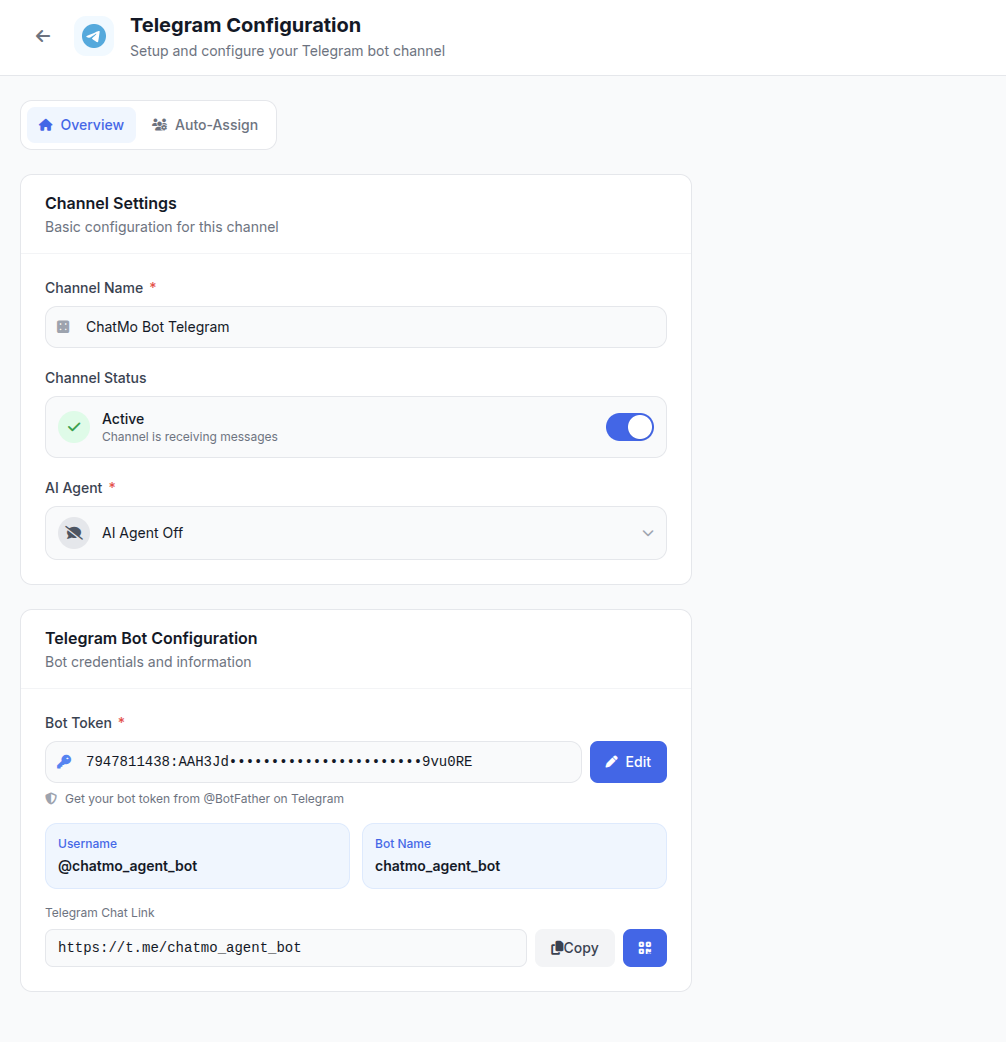
We cover the shared inbox for multiple channels in more detail in omnichannel chat for business.
Tips for growing a Telegram audience
Put your t.me link everywhere. Website, emails, packaging, Instagram bio and receipts.
Give people a reason to join. Exclusive content, early restock alerts or subscriber-only discounts.
Post consistently. A channel that goes quiet for weeks loses its subscribers' attention. Two to three posts a week is usually enough.
Keep groups healthy. Set rules, appoint moderators and turn on anti-spam settings. Groups full of spam quickly lose their best members.
Measure conversations, not subscribers. How many subscribers actually message the bot and buy?
Writing channel posts that start conversations
An effective channel is not the one that posts most often, but the one where every post has a purpose. A few patterns to try:
One post, one main message. Do not combine an offer, a tip and a holiday notice in one long post.
Lead with the benefit. "3 ways to save data while studying online" beats "Today's update from the admin".
End with an action people can take right away. "Type /catalog to our bot" or "Ask about class times at @yourbot_bot".
Use inline buttons if you post through a bot. Buttons under a post let subscribers open the bot or a product page with one tap.
Check views per post. Telegram shows view counts, so you can compare which topics people care about most.
Example: an online tutoring business
An online tutoring business that prepares students for university entrance exams uses Telegram as its main channel. The channel posts daily practice questions and try-out schedules to about 30,000 subscribers. Discussion groups per subject let students ask questions, moderated by tutors.
Questions about fees and registration used to go to the owner's personal account and to three admins sharing one account. During enrolment season, hundreds of messages a day meant many prospective students never got a reply. The business then created a registration bot, connected it to a shared inbox and changed every call to action in the channel to "Ask about fees and register through our bot".
The bot greets prospects and asks for their level and program of interest, an AI agent answers common questions about fees and schedules, and students ready to enrol are passed to an agent. Each agent owns their chats, and the owner can see how many registrations came from each channel post.
Keeping your Telegram business accounts secure
Turn on two-step verification with an extra password, especially on the account that owns your channels and groups.
Add more than one admin to channels and groups, with only the permissions they need. Do not let everyone add new admins.
Store bot tokens safely and never send them in a regular chat.
Watch out for impersonators. List your official username on your website and social media, and remind customers that your team will never ask for an OTP code.
Common mistakes
Serving customers from the owner's personal account. Chats get mixed with personal matters and are hard to delegate.
Discussing orders in groups. Customer data is exposed to other members. Move to a private chat.
Bots with no path to a person. A bot that can only answer menus still frustrates customers. Offer a way to talk to an agent.
Expecting bots to broadcast to everyone. A bot can only message people who have started a conversation with it.
Sharing the bot token carelessly. A bot token is like a password. Store it safely and generate a new one through @BotFather if it leaks.
Telegram vs WhatsApp for business
For most businesses in Indonesia, Telegram complements WhatsApp rather than replacing it. Manage both in one inbox so customers get the same quality of service wherever they reach you.
Summary
Use a Telegram Business account for one-to-one service, channels for broadcasting, groups for community and bots for automation.
Telegram Business features are free for Telegram Premium subscribers.
Bots cannot start chats, so promote your bot link across all your channels.
Connect the bot to a shared inbox so Telegram chats are handled by the team in an organised, measurable way.
Frequently asked questions
Is Telegram good for business?
Yes, especially for businesses with active communities, digital products, education, crypto and finance, gaming, and customers who prefer usernames to phone numbers.
What is Telegram Business?
Telegram Business is a set of features that turn a Telegram account into a business account, including opening hours, location, a start page, quick replies, greeting messages, away messages, chatbot connections, chat links and labels. According to Telegram, these features are free for Telegram Premium subscribers.
What is the difference between a Telegram channel and a group?
A channel is a one-way broadcast from admins to subscribers, good for announcements and offers. A group is a discussion space where every member can post, good for customer communities.
Can a Telegram bot message customers first?
No. A bot can only message users who have already started a conversation with it, for example by tapping the Start button.
How do several agents handle Telegram chats?
Create a Telegram bot for your business and connect it to a shared inbox such as ChatMo. Chats sent to the bot land in the inbox, where they can be assigned, labelled and answered by an AI agent.
About the author
Antonio Kurniawan
Product & Customer Success
The ChatMo product and customer success team helps Indonesian businesses run WhatsApp, Instagram and webchat conversations with AI agents and shared inboxes.