How to Sell on Instagram in 2026: From Content and Ads to Closing in the DMs
A big following does not automatically mean sales. Learn an Instagram selling process that works: a convincing profile, content that sparks DMs, ads that open Direct, and how your team turns DMs into orders.

Antonio Kurniawan
Product & Customer Success
On this page
- The Instagram selling path in four stages
- Stage 1: a profile that makes people comfortable asking
- Stage 2: content that sparks DMs
- Stage 3: ads that start conversations
- Instagram messaging rules to know
- Stage 4: closing in the DMs
- A sample one-week content plan
- Example: a local hijab brand
- Running Instagram DMs as a team
- Numbers to track every week
- Common mistakes
- Summary
Key takeaways
- Instagram sales almost always happen in the DMs, so content and ads should be designed to start conversations.
- A clear profile (who you are, what you sell, how to order) decides whether visitors dare to send a message.
- Reels reach new people, carousels persuade, and Stories prompt replies from followers.
- Businesses can reply to DMs freely for 24 hours; a private reply to a comment can only be sent within 7 days of the comment.
- Measure DMs that become orders, not just likes and views.
The most effective Instagram selling strategy in 2026 is not chasing followers. It is building a clear path: a convincing profile, content that makes people send a DM, ads that open Instagram Direct, and a team that answers DMs quickly until an order is placed. On Instagram, almost every sale for small and mid-sized businesses happens in the DMs. So every piece of content can be judged by one simple question: does it make people want to ask?
This guide walks through each stage with practical examples, the Instagram messaging rules you need to know and the numbers to track every week.
The Instagram selling path in four stages
Many accounts stop at the first stage. Views are high but DMs are quiet, or DMs are busy but few people pay. The problem is usually a skipped stage.
Stage 1: a profile that makes people comfortable asking
Visitors decide in seconds whether your account is trustworthy. Make sure your profile answers three questions: who you are, what you sell and how to order.
Consistent name and username that match your brand on other platforms, so you are easy to find.
A bio with a specific promise. "Handmade leather shoes from Bandung, 1-year stitching warranty" is far clearer than "Best quality shoes".
An ordering prompt in the bio. For example "Order by DM or tap the link below".
Active contact buttons. Professional accounts can show message, email or call buttons.
Useful highlights. Create highlights for Reviews, How to Order, Shipping and Catalog. Serious visitors almost always open highlights before asking.
A link that goes to the right place. If you take orders on WhatsApp, link to wa.me with a pre-filled opening message. Here is how: WhatsApp link and QR code for business.
Stage 2: content that sparks DMs
Each content format has a different job. Do not expect one type of content to do everything.
Reels to reach new people
Reels are the easiest way to reach people who do not follow you yet. Content that sells usually shows the product being used in real situations, how it is made, or before-and-after results. The first three seconds decide whether people stop scrolling, so show the result or the problem right away, not your logo.
Carousels to persuade
Carousels suit content that needs reading: comparing variants, size guides, how-to steps, or answers to common objections such as "Why is it more expensive than others?" This content is often saved and shared, and its readers are usually closer to a buying decision.
Stories to prompt replies
Stories are seen mostly by followers who already know you. Use question, poll, quiz or slider stickers to invite interaction. Every Story reply lands in the DMs, and that is where a sales conversation begins. Example: "Which color are you after for the holidays? Vote in the poll and we'll DM you some picks."
DM prompts with keywords
End captions with a specific prompt, such as "DM us 'SIZE' for the full size guide". Keywords make it easy for customers to start and easy for your team or automation to recognise what they want. We cover automating replies to keywords like this in Instagram DM auto-reply.
Stage 3: ads that start conversations
Organic content takes time. To speed things up, use ads with a messaging objective that send people to Instagram Direct. When someone taps the ad, a conversation opens with that ad's context.
A few practices that help:
Reuse creative that already works organically. Reels with lots of comments usually perform well as ads too.
Prepare opening questions. Message ads can show a few tap-to-send questions such as "How much is it?" or "Is it in stock?"
Make sure the team can reply while ads are running, including evenings if the ads keep serving.
Send signals back to Meta. If your platform supports the Conversions API, send an event when a chat becomes an order, so Meta learns to find people who actually buy, not just people who like to message.
The same messaging ad strategy applies to ads that open WhatsApp. See the Click to WhatsApp ads guide for comparisons and measurement.
Instagram messaging rules to know
Instagram uses rules similar to Messenger:
The 24-hour window. A business can reply freely within 24 hours of the customer's last message.
The HUMAN_AGENT tag. Outside 24 hours, replies typed by a person are still possible for up to 7 days for apps with Meta's permission. Bots must not use this tag.
Private replies to comments. A business can send one private message to someone who commented, within 7 days of the comment.
Professional accounts. Connecting DMs to a third-party platform requires a professional Instagram account (business or creator) linked to a Facebook Page.
The consequence is the same as on Messenger: reply speed matters enormously. A DM left for two days does not just lose the customer's interest; it also falls out of the free reply window.
Stage 4: closing in the DMs
Busy DMs that produce few orders usually come down to three things: slow replies, answers that do not lead to a decision, and a complicated ordering process.
Reply fast, with a personal greeting
Use the customer's name and refer to the content that prompted them. "Hi Nadia, you mean the Sage variant from yesterday's Reel?" shows right away that you are paying attention.
Ask about the need before offering
One or two questions make the recommendation sharper: who it is for, where it will be used, the budget range. Customers feel helped, not sold to.
Offer options, not just one product
Offer two or three options with clear differences. Customers tend to choose among the options given rather than go looking elsewhere.
Make payment easy
Send the total, shipping and a payment link in one message. The fewer the steps, the less chance the customer changes their mind.
Follow up with people who have not paid
Customers who asked for a total but have not paid are your biggest opportunity. Send one polite reminder within 24 hours, for example asking if they need help with sizing or payment.
Hi Nadia, we're holding your Sage bag order until tonight. If you have any questions about sizing or payment, just let us know and we'll help.
A sample one-week content plan
Consistency beats a high posting frequency that only lasts two weeks. Here is a simple plan for a small shop with one person making content:
This plan deliberately puts a DM prompt on almost every post. The aim is not to push, but to give a clear reason to start a conversation.
Example: a local hijab brand
A hijab brand in Solo had 18,000 followers but flat sales from Instagram. Looking closer, the problem was in the asking and buying stages: the content was good, but there was no specific call to action, and DMs were answered about six hours later by the owner herself.
They made three changes. First, every Reel ended with a keyword prompt, such as "DM 'PATTERN' to see more patterns". Second, two part-time agents joined and DMs moved to a shared inbox with automatic assignment, bringing response time down to about 15 minutes. Third, every customer who asked for a total got a label, and those who had not paid within 24 hours received one polite reminder.
Within two months, DMs increased thanks to clearer prompts, and more importantly, the share of DMs that became orders almost doubled. Followers grew more slowly than sales, and that is fine: orders pay the bills, followers do not.
Running Instagram DMs as a team
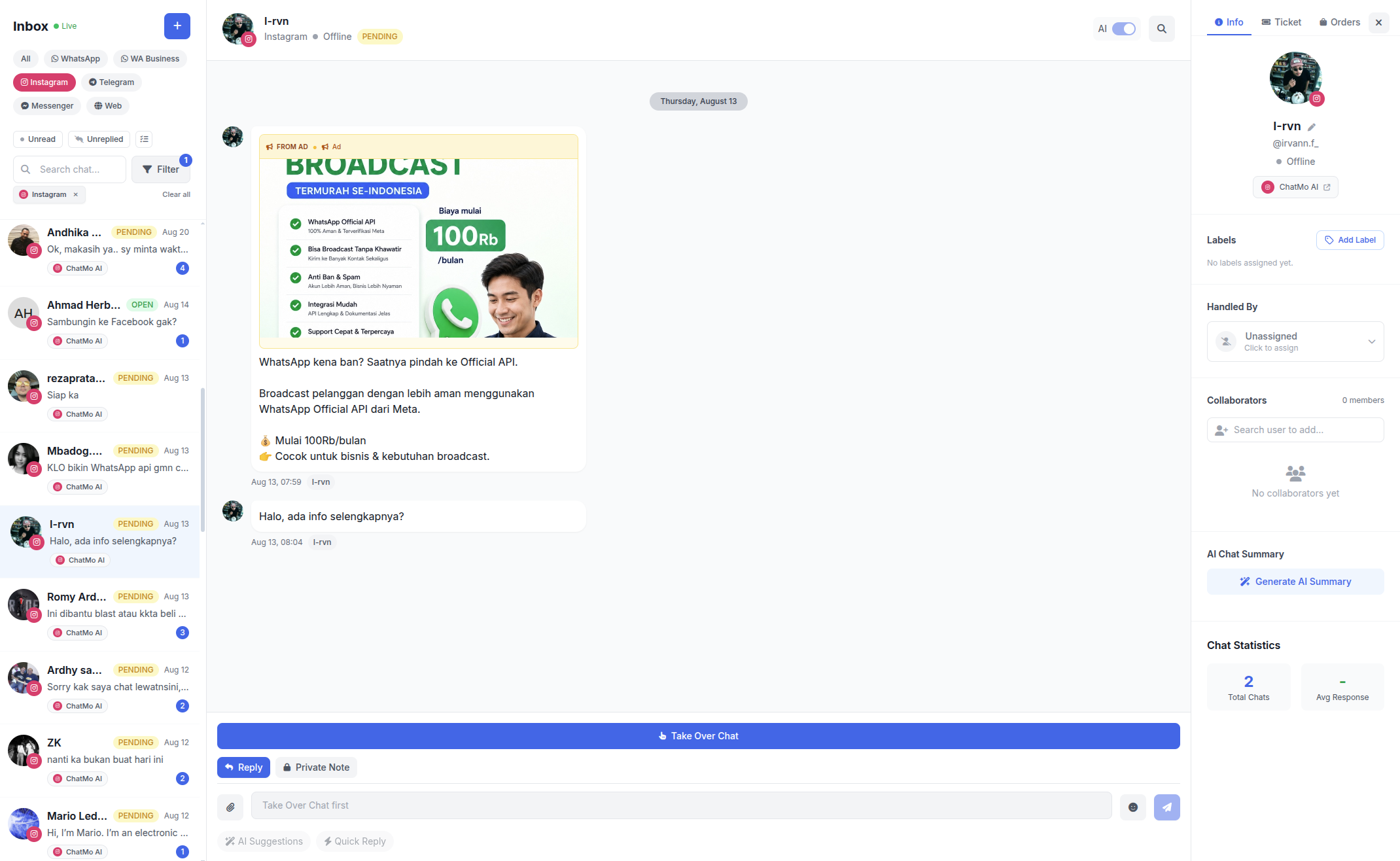
While DMs number in the dozens, one person on the Instagram app can cope. When ads are running and DMs reach the hundreds, the classic problems appear: DMs get buried, the same question gets different answers from different agents, and nobody knows which DMs became orders.
In ChatMo, your professional Instagram account connects to the same inbox as WhatsApp, Facebook, Telegram and webchat. DMs are assigned to agents automatically, labelled with tags such as "Price Question" or "Ordered", and can be answered by an AI agent after hours. The ChatMo workflow builder also supports Instagram, so first messages can be sorted by keyword right away.
Numbers to track every week
Likes and views are still useful for judging reach, but budget decisions should rest on DMs that become orders.
Common mistakes
Writing "check your DMs" without actually sending one. Customers who wait and receive nothing feel ignored.
Hiding prices completely. Replying "price in DM" to every comment puts some people off asking. Consider showing a price range in your content.
Posting nothing but promotions. Accounts full of discounts are rarely saved or shared. Mix in educational posts, behind-the-scenes content and reviews.
No owner for each DM. If every agent opens the same DMs without assignment, some chats get two replies and others get none.
Not recording who has bought. Without labels or notes, you miss the chance to offer repeat purchases.
Summary
Design Instagram as a path: discovered, trusted, asking, buying.
Your profile should explain who you are, what you sell and how to order.
Reels reach, carousels persuade, Stories prompt replies and messaging ads speed up conversations.
Reply to DMs within 24 hours, ideally within minutes, and close with clear payment instructions.
Run DMs as a team in a shared inbox and measure DMs that become orders.
Frequently asked questions
How do beginners start selling on Instagram?
Start with a professional account and a clear bio, post content that shows the product in use, invite people to DM you with a specific keyword, then reply quickly and close with clear ordering instructions.
What content works best for selling on Instagram?
Reels work for reaching new people, carousels for explaining benefits and comparisons, and Stories with question or poll stickers for prompting replies from followers.
What are the rules for replying to Instagram DMs as a business?
A business can reply freely within 24 hours of the customer's last message. Outside that window, manual replies by a person are still possible in some cases through the HUMAN_AGENT tag, with permission from Meta.
Can Instagram ads open a DM directly?
Yes. Ads with a messaging objective can send people straight to Instagram Direct, so the conversation starts with the context of the ad they saw.
How do I manage Instagram DMs with more than one agent?
Use a shared inbox connected to your professional Instagram account, so every DM has an owner, can be labelled and shows up in team performance reports.
About the author
Antonio Kurniawan
Product & Customer Success
The ChatMo product and customer success team helps Indonesian businesses run WhatsApp, Instagram and webchat conversations with AI agents and shared inboxes.