Click-to-WhatsApp Ads: How to Create Them, Handle Leads and Measure Sales
Click-to-WhatsApp ads open a WhatsApp chat straight from Facebook or Instagram, with no form. Learn how to create them in Meta Ads Manager, how to structure ads that bring quality chats, and how to measure ads all the way to sales.

Antonio Kurniawan
Product & Customer Success
On this page
- Why Click-to-WhatsApp ads work
- What to prepare before advertising
- How to create a Click-to-WhatsApp ad in Meta Ads Manager
- Ad structure that brings quality chats
- Handling chats from ads: speed is everything
- An example conversation flow from an ad
- What is a sensible starting budget?
- Click-to-WhatsApp ad ideas by industry
- Measuring CTWA ads properly
- Common Click-to-WhatsApp mistakes
- Ad policies to keep in mind
- Checklist before your ad goes live
- Preparing your team for a surge of chats
- Conclusion
Key takeaways
- Click-to-WhatsApp ads open a chat with your business in one tap, with no form or landing page.
- Conversations from ads answered within 24 hours open a free 72-hour window for every WhatsApp API message type.
- Reply speed matters most: an AI agent and auto-assign make sure every ad lead gets an answer within seconds.
- Measure ads down to cost per sale, not just conversations started.
- Send conversion events back to Meta through the Conversions API so the algorithm finds people similar to buyers.
Click-to-WhatsApp (CTWA) ads are Facebook or Instagram ads with a "Send Message" button that opens a chat with your business on WhatsApp. Prospects do not need to fill in a form or visit a website; one tap and their first message lands in your inbox. For businesses in Indonesia, CTWA usually produces cheaper leads that close faster than ads sending people to a landing page, as long as chats from the ad are answered within minutes and followed up properly.
This guide covers how to create a CTWA ad in Meta Ads Manager, how to structure ads that bring quality chats, how to handle the spike of chats an ad creates, and how to measure which ads actually lead to sales.
Why Click-to-WhatsApp ads work
No form friction. Every form field lowers completion. With CTWA, there is a single tap.
A two-way conversation. Prospects can ask about price, sizes or schedules straight away, and you can learn what they need before making an offer.
The contact is captured automatically. You get the prospect's WhatsApp number for future follow-up.
Lower message costs. Conversations started from a CTWA ad and answered within 24 hours open a free 72-hour window for every WhatsApp API message type. See WhatsApp API per-message pricing for details.
The industries that benefit most are those that need a conversation before a purchase: property, automotive, education, clinics and beauty, travel, and products with many variants.
What to prepare before advertising
An active WhatsApp business number, on either the WhatsApp Business app or the WhatsApp Business API. For high chat volume, the API is safer because chats can be shared across many agents.
A Facebook Page linked to that WhatsApp number. Link it in the Page settings under linked accounts.
An ad account in Meta Ads Manager with an active payment method.
A team or AI ready to reply while the ad runs, including outside business hours.
How to create a Click-to-WhatsApp ad in Meta Ads Manager
Create a new campaign and choose the Engagement objective (or Leads/Sales if you optimize for conversations that convert).
At the ad set level, choose Messaging apps as the conversion location, then select WhatsApp and your business number.
Set the daily budget, schedule, location, age and interests. Start with a fairly broad audience so Meta's algorithm has room to learn.
Choose the format: single image, video or a carousel to show several products.
Write the primary text and headline, and pick the Send WhatsApp Message button.
Set up the opening message template: a greeting and quick questions (such as "How much is it?" or "Is it available in my city?") that prospects can tap.
Review and publish. The ad usually goes live once it passes Meta's review.
Tip: write quick questions that signal buying intent, such as "I want to check the family package price". They help your team or AI give a relevant answer right away and double as an interest marker for segmentation.
Ad structure that brings quality chats
Many CTWA ads produce plenty of chats that say "info please" and then go silent. To attract more serious chats, focus on three things:
A specific offer. "Free kitchen design consultation + cost estimate within 24 hours" beats "Contact us for info".
Light qualification in the ad copy. Mention a starting price, service area or requirements. People who are not a fit filter themselves out.
Visuals that answer questions. Show the product, before-and-after results or real testimonials in the first 3 seconds of the video.
Example ad copy
Want a new kitchen without the hassle? Our team handles design, costing and installation across Greater Jakarta. From Rp15 million. Tap Send Message, share a photo of your kitchen and get a free estimate today.
Handling chats from ads: speed is everything
A prospect who taps your ad is at peak interest. If your reply comes two hours later, their attention has moved to a competitor's ad. Practices that help:
Reply within seconds with an AI agent. The AI answers basic questions, asks about needs, then hands ready leads to sales.
Assign chats to sales automatically. Use round-robin auto-assign to balance the load, and let each salesperson see only their own leads.
Label chats by ad or product so you know which campaign each lead came from.
Use the free 72-hour window. Send catalogs, offers and follow-ups during this period before message fees apply.
In ChatMo, chats coming from Click-to-WhatsApp ads are logged with their ad information (headline, source and creative), so the team knows the context of each conversation immediately.
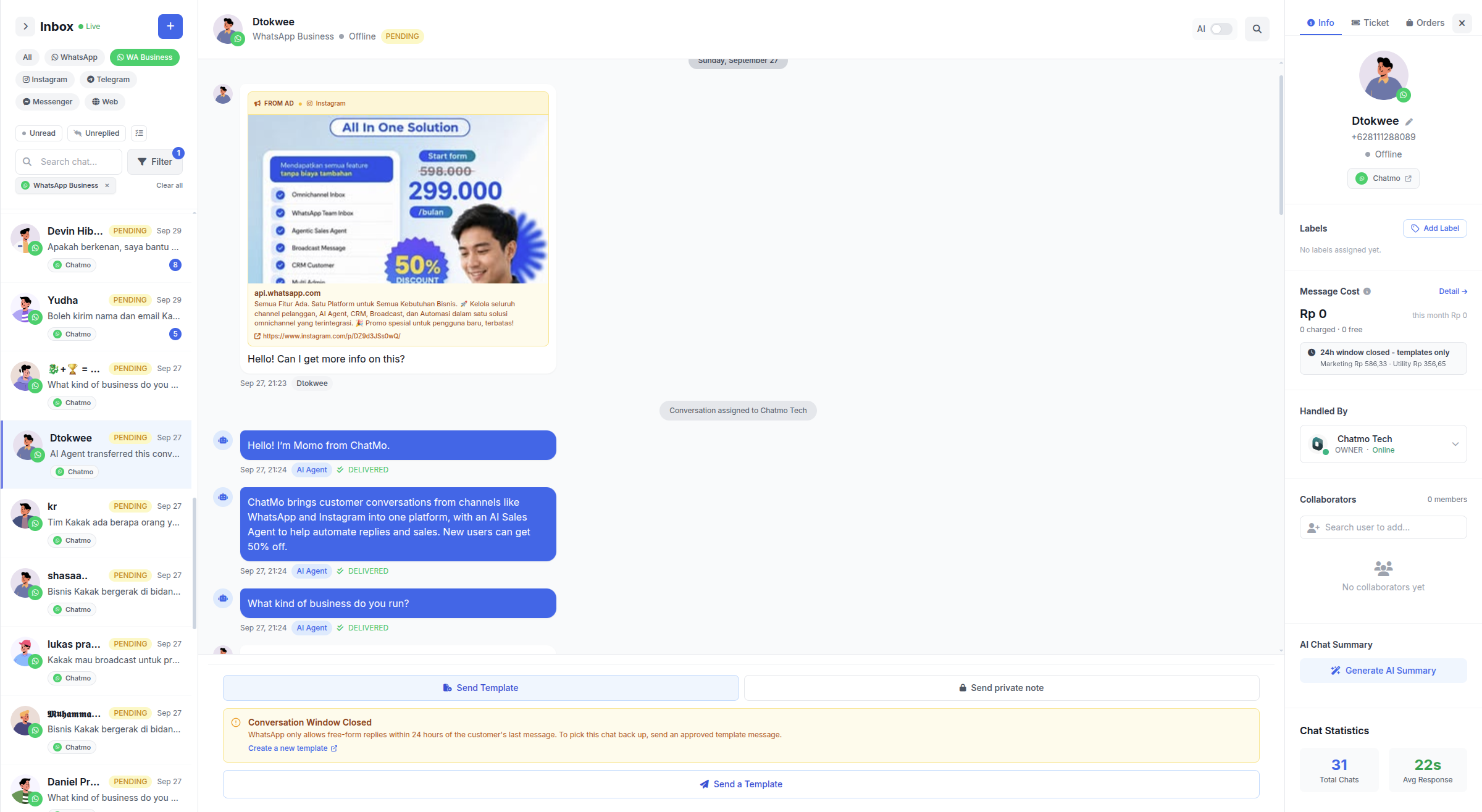
An example conversation flow from an ad
Here is a flow we recommend for a renovation service. An AI agent handles the first three messages, then a salesperson takes over when the prospect is ready.
The prospect taps a quick question: "I want a kitchen cost estimate."
The AI agent replies within seconds: "Sure! Could you send a photo of your current kitchen and its rough size? Which city are you in?"
The prospect sends a photo and says "Bekasi, about 3 metres".
The AI agent gives a price range from the knowledge base, offers a survey slot, then labels the chat "ready for survey" and "October kitchen ad".
A salesperson receives the chat through auto-assign, sees the full history and confirms the survey slot.
In this flow the prospect never waits, sales only receives leads with clear needs, and every chat records its ad source.
What is a sensible starting budget?
No single number fits every business, but this testing pattern keeps you from wasting budget:
Test 2-3 creatives at once with equal budgets for 5-7 days, so the algorithm has enough data.
Set a maximum cost per qualified lead up front, based on your product margin and your team's closing rate.
Turn off ads whose cost per qualified lead is far above that limit, and move the budget to the winners.
Scale budgets gradually, about 20-30% every few days, so performance stays stable.
Click-to-WhatsApp ad ideas by industry
Property: "Send a message for the price list and a viewing slot for the show unit this week."
Beauty clinics: "Free consultation with a doctor on WhatsApp before your treatment."
Education: "Ask about class schedules and get a free sample module."
Automotive: "Check an installment simulation for your down payment right in the chat."
Fashion and products with many variants: "Send your height and weight and we will help you pick the right size."
The same pattern repeats: offer something that is easiest to deliver in a conversation, not on a web page.
Measuring CTWA ads properly
Ads Manager's built-in metrics only show how many conversations started. What happens afterwards matters more.
The next step is sending conversion data back to Meta through the Conversions API. When a chat is marked as a qualified lead or a purchase, that event goes to Meta, so the algorithm learns to find people similar to buyers, not just people who like tapping buttons. In ChatMo, these events can be sent automatically based on conversation labels.
Common Click-to-WhatsApp mistakes
Nobody replies at night or on weekends, while the ad keeps running.
A generic opening message, so agents have to start every conversation from scratch.
Every chat goes to one phone, so leads pile up and some are missed.
Judging ads only by the number of chats, not by the sales they produce.
No follow-up for leads who go quiet after asking about price. See how to follow up customers on WhatsApp.
Ad policies to keep in mind
Special categories. Credit, employment, housing and political ads must be declared as special categories, with more limited targeting options.
Restricted products. Supplements, medicine, financial and adult products have strict rules. Read Meta's advertising policies before creating creatives.
Claims you can back up. Avoid promises of instant results or figures you cannot justify, because ads can be rejected and accounts restricted.
Consistency between ad and chat. Prices and promotions in the ad must match what you say in the chat. Even small differences can trigger complaints.
Checklist before your ad goes live
The WhatsApp number is linked to the Facebook Page and to the team inbox.
An AI agent or auto-reply is active for out-of-hours chats.
Auto-assign and campaign labels are set up.
The quick questions in the opening message reflect buying intent.
Follow-up templates are prepared and approved.
The team has agreed how to record sales from chats, so cost per sale can be calculated.
Preparing your team for a surge of chats
A successful ad can bring hundreds of chats in one afternoon. Without preparation, that success turns into a long queue and cold leads. Put the following in place before you raise the budget:
An AI agent as the first responder to answer common questions such as price, stock and shipping, and to collect key details such as city and needs.
Auto-assign so chats that need a person go straight to an agent on duty instead of waiting to be shared out manually.
Quick replies for frequent answers, complete with product photos or a catalog.
A rota that follows the ad schedule. If ads run into the evening, make sure someone is watching or the AI is ready to answer.
A capacity limit. If the queue starts to pile up, lower the budget for a while instead of leaving leads waiting for hours.
Watch first response time closely during the first days of a campaign. It is usually the first sign of whether your team can handle the ad volume.
Conclusion
Click-to-WhatsApp ads cut the distance between an ad and a sales conversation. The best results come from a specific offer, very fast replies, tidy lead assignment and measurement all the way to the sale. With the free 72-hour window, CTWA is also one of the cheapest ways to start conversations on the WhatsApp API.
Ready to handle ad leads with an AI agent and auto-assign? Book a ChatMo demo.
Frequently asked questions
What are Click-to-WhatsApp ads?
Facebook or Instagram ads with a Send Message button that opens a WhatsApp chat with your business, so prospects can ask questions without filling in a form.
Are chats from Click-to-WhatsApp ads free?
On the WhatsApp Business API, if the first chat from an ad is answered within 24 hours, every message is free for 72 hours. Meta ad spend still applies.
Which campaign objective should I use for Click-to-WhatsApp ads?
Usually Engagement with Messaging apps as the conversion location and WhatsApp as the destination, or Leads/Sales if you optimize for conversations that convert.
Can Click-to-WhatsApp ads use the regular WhatsApp Business app?
Yes. For high chat volume handled by many agents, though, the WhatsApp Business API is safer because chats can be assigned automatically.
How do I measure Click-to-WhatsApp ads?
Track cost per conversation, first response rate, cost per qualified lead and cost per sale, and send conversion events back to Meta through the Conversions API.
About the author
Antonio Kurniawan
Product & Customer Success
The ChatMo product and customer success team helps Indonesian businesses run WhatsApp, Instagram and webchat conversations with AI agents and shared inboxes.