How to Set Up Facebook Messenger Auto-Replies: Instant Replies, Away Messages, FAQs and 18 Examples
Messenger auto-replies give Facebook customers an answer right away, even when your team is offline. Learn the built-in automations in Meta Business Suite step by step, ready-to-use message examples, and when to move up to an AI agent.

Antonio Kurniawan
Product & Customer Success
On this page
- Built-in Messenger automations
- How to create an instant reply
- Instant reply examples
- Away message examples
- Frequently asked question examples
- Keyword reply examples
- Auto-replies for post comments
- Example: a furniture store running Messenger ads
- Measuring whether your auto-replies work
- Limits of the built-in automations
- Moving up to an AI agent: when and how
- Keeping auto-replies from sounding robotic
- Common mistakes
- Quick setup checklist
Key takeaways
- Meta Business Suite offers free Messenger automations: instant replies, away messages, frequently asked questions and keyword replies.
- A good instant reply greets the customer, states service hours and asks one question that makes it easy to continue.
- Away messages must be honest about when someone will reply, because the Messenger 24-hour window keeps running.
- Built-in automations suit simple questions; an AI agent is needed when questions vary and chat volume is high.
- Review auto-reply content every month so prices, offers and opening hours stay accurate.
A Facebook Messenger auto-reply is a message sent automatically when a customer contacts your Facebook Page. The fastest way to set one up is in Meta Business Suite: open Inbox, choose Automations, then turn on instant replies, away messages, frequently asked questions or keyword replies. All of these are free. When customer questions vary a lot or hundreds of chats come in each day, the next step is an AI agent that understands open questions and hands the chat to a person when needed.
Auto-replies matter on Messenger because of the 24-hour window. A customer who is not answered until tomorrow afternoon has left that window, and the business can no longer send free-form messages. The right automatic reply keeps the customer engaged until an agent is ready.
Built-in Messenger automations
The Automations menu in Meta Business Suite offers several reply types. Availability can differ slightly between Pages and regions, but the most common are:
These automations work for Messenger, and some can also be used for Instagram DMs when the Instagram account is linked to the same Page. For Instagram specifically, see Instagram DM auto-reply.
How to create an instant reply
Go to business.facebook.com and select the Page you want to set up.
Click Inbox in the left menu, then choose Automations (a lightning icon or the three-dot menu, depending on the layout).
Choose Instant reply and click Edit or Create automation.
Pick the channel: Messenger, Instagram or both.
Write the message. Use the personalization button to insert the customer's first name.
Check the preview, then click Save changes.
Test by messaging the Page from another Facebook account that is not a Page admin.
Away messages and frequently asked questions work almost the same way. The difference is that away messages need a schedule or an away status, while FAQs ask you to write each question and answer one by one.
Instant reply examples
A good instant reply does three things: greets the customer, says when they will get an answer and invites them to share what they need.
"Hi {first name}, thanks for contacting Langkah Shoes. Our team is online from 9 am to 9 pm. Which model and size are you looking for?"
"Hey {first name}! We got your message. To speed things up, send us a photo of the product you saw in the ad."
"Hi, thanks for contacting Prima Skin Clinic. To book, please send your name, preferred branch and the date you'd like."
"Hi {first name}, welcome to Pintar Language School. How old is the learner? We have classes for kids, teens and adults."
"Hi, thanks for stopping by! See our full catalog at the link below, or just ask here. We're happy to help."
"Hi, this is Jaya Motor Workshop. Tell us your bike model and the problem, and we'll estimate the service cost."
Away message examples
Away messages must be honest. Do not promise a reply "soon" if nobody is online until tomorrow morning.
"Hi {first name}, we're outside our service hours right now. We'll reply tomorrow from 8 am. Thanks for your patience."
"Thanks for reaching out. Our team is off on Sundays and will reply on Monday morning. In the meantime, browse our catalog here."
"Hi! We're on a short break and back at 1 pm. Leave your question and we'll reply in order."
"Hi, the store is closed for the Eid holiday until the 12th. Orders placed now will be processed from the 13th. Happy holidays!"
Frequently asked question examples
Choose the four questions that come up most in your chats. Look at your last 50 chats and count the repeated topics.
How much is shipping to my city? "Shipping depends on weight and destination. Send us your city and we'll calculate it."
Can I pay cash on delivery? "Yes, in Greater Jakarta and Bandung. For other cities, please pay by transfer or e-wallet."
Where is your store? "We're at Jl. Melati No. 8, Yogyakarta. Open Monday to Saturday, 9 am to 8 pm."
How do returns work? "Returns are accepted within 7 days of delivery with an unboxing video. Send your order number to start."
Keyword reply examples
Keyword replies are useful for ads that ask customers to type a specific word.
Keyword PRICE: "Here is our latest price list. To order, reply with the product name and quantity."
Keyword CATALOG: "Here's our full collection for this month. See something you like? Send us the product number."
Keyword LOCATION: "We have 3 branches: South Jakarta, Bekasi and Depok. Which one is closest to you?"
Keyword PROMO: "This week's offer: 20% off your second item. Valid until Sunday at 11:59 pm."
Auto-replies for post comments
Comments like "Price?", "Info please" or "Still available?" are buying signals that often get missed. Replying to each one takes time, and ignoring them sends buyers to another shop.
A comment automation can send a Messenger message to people who comment with a specific word, while posting a short public reply. A pattern that works: in the comments, write "We've sent you the details by message", then in Messenger send the price, the variants and one follow-up question. The price stays out of public view and the conversation moves to a space where you can follow up.
Be careful not to message every commenter indiscriminately. Complaints and technical questions are better answered by a person, because an automated reply that misses the point looks bad in public.
Example: a furniture store running Messenger ads
A furniture store in Surabaya runs Click to Messenger ads for bookshelves and desks. About 120 chats come in every day, most of them in the evening after working hours. Before using automations, around a third of chats were only answered the next afternoon, and many customers never replied again.
They built their automations step by step. The instant reply greets the customer by name, states service hours and asks for the room size. Four FAQs cover shipping, payment, production time and warranty. A PRICE keyword reply sends the price list for the products in the ad. The evening away message explains that the team replies from 8 am, while still asking for the room size so an agent can recommend something straight away.
The result: in the morning, agents no longer open chats that only say "Hi". Most chats already include the room size and the product of interest, so one agent can finish far more conversations per hour. Next, they added an AI agent to answer questions about materials and care in the evening.
Measuring whether your auto-replies work
A good auto-reply shows in the numbers, not in how long the message is. Track these:
Share of customers who reply after the instant reply. If it is low, the question in your instant reply may be too vague or too long.
Most tapped FAQ options. These show which topics need better explanations in your ads or posts.
Time until an agent first replies. Auto-replies do not replace a human answer; they only buy time.
Chats that pass 24 hours without an agent reply. This number should be close to zero.
Limits of the built-in automations
Meta's built-in automations are a great start, but they have clear limits:
They do not understand variations. "How much is it?", "price pls" and "what does this cost" can slip past a rigid keyword rule.
They are one-way. An automation sends an answer but cannot ask a follow-up question or carry the conversation on.
No chat assignment. After the automation fires, chats still pile up in one inbox for every admin.
No link to other channels. If the customer also chats on WhatsApp, the history stays separate.
Moving up to an AI agent: when and how
Signs you need an AI agent for Messenger: more than 50 chats a day, many questions arriving after hours, and agents spending most of their time on the same questions.
An AI agent works differently from an auto-reply. It reads any question, finds the answer in the business information you provide (products, prices, policies, opening hours) and replies in natural language. When a customer is ready to buy, complains or asks something beyond its knowledge, it hands the chat to an agent.
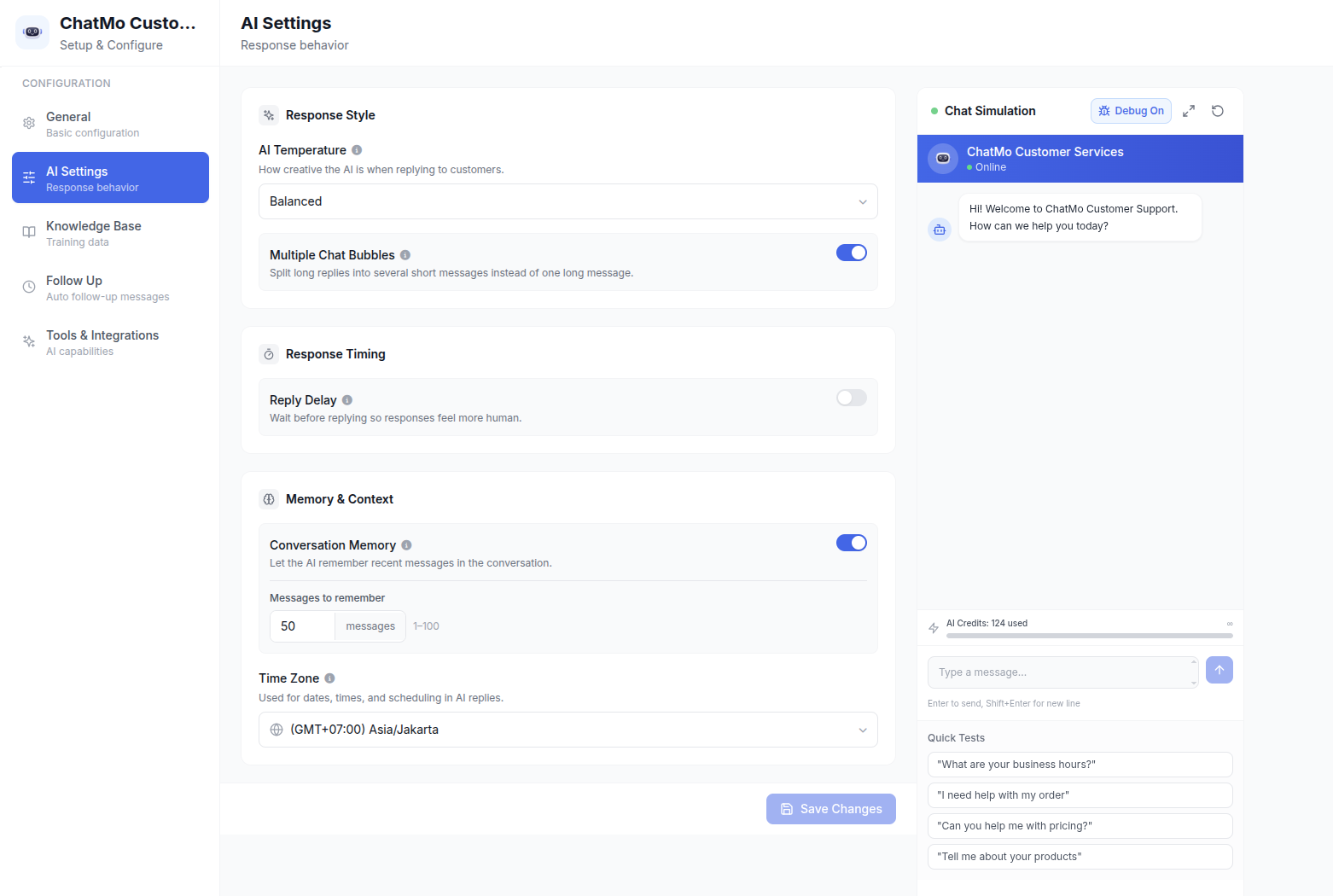
In ChatMo, an AI agent can run on a connected Facebook Messenger channel. You can set a reply delay so it feels natural, the tone of voice, and when the AI stops and passes the chat to a person. After the handoff, the chat goes to an agent or team based on your automatic assignment rules.
We go deeper into how AI agents work in chat in WhatsApp AI chatbot for customer service. The same principles apply to Messenger.
Keeping auto-replies from sounding robotic
Write the way your best agent writes. Use the same greeting your team normally uses.
One message, one purpose. Do not cram opening hours, offers, location and payment methods into one instant reply.
Do not make promises you cannot keep. Only write "we reply within 5 minutes" if that is really true.
Offer a path to a person. Add a line such as "Type AGENT to talk to our team directly."
Update regularly. An expired offer that still appears in an auto-reply disappoints customers.
Common mistakes
Not testing from a non-admin account. Page admins often do not receive automations when testing from their own account.
An away message that never switches off. A wrong schedule tells customers "we're offline" in the middle of the day.
Clashing with other apps. If the Page is connected to several chat apps, make sure only one handles automatic replies so customers do not get two different messages.
FAQs nobody taps. If an FAQ option is rarely chosen, replace it with a question people really ask.
No follow-up. An auto-reply is only an opener. Without an agent or AI continuing within 24 hours, the customer is still lost.
Quick setup checklist
Turn on the instant reply and away message in Meta Business Suite today.
Write four FAQs based on your most common questions.
Add a keyword reply for every ad that asks customers to type a word.
Test everything from a non-admin account.
If chats keep growing, consider an AI agent and a shared inbox so every chat is answered and followed up.
The basics of Messenger for business, including the 24-hour rule and the 2026 message tag changes, are in Facebook Messenger for business.
Frequently asked questions
How do I set up an auto-reply on Facebook Messenger?
Open Meta Business Suite, go to Inbox, then Automations. There you can turn on instant replies, away messages, frequently asked questions and keyword replies for your Page.
Are Messenger auto-replies free?
Yes. The built-in automations in Meta Business Suite are free. Costs only come from third-party platforms or paid AI agents.
Can Messenger auto-replies use the customer's name?
Yes. Instant replies and some other automations offer personalization such as the customer's first name, filled in automatically.
Why is my Messenger auto-reply not sending?
Common causes are that the automation is not turned on for the right Page, the away message only runs on its schedule, or a third-party app has taken over the conversation.
What is the difference between a basic auto-reply and an AI agent?
A basic auto-reply sends the same text under a set condition. An AI agent understands open questions, answers from your business information and hands the chat to a person when needed.
About the author
Antonio Kurniawan
Product & Customer Success
The ChatMo product and customer success team helps Indonesian businesses run WhatsApp, Instagram and webchat conversations with AI agents and shared inboxes.