How to Get the WhatsApp Business Verified Badge: Requirements, Steps and Approval Tips
The WhatsApp Business verified badge comes through an Official Business Account for WhatsApp API numbers or a Meta Verified subscription where available. Both need business verification, a consistent name and proof of brand reputation. Here are the requirements and steps.

Antonio Kurniawan
Product & Customer Success
On this page
- Three terms that get mixed up
- Why the verified badge matters
- Official Business Account requirements
- How to apply for the WhatsApp Business API verified badge
- Documents to prepare for Business Verification
- A 30-day preparation plan
- What about Meta Verified for Business?
- Common reasons applications get rejected
- If you are rejected, what next?
- After you get the badge: what to protect
- Protecting customers from fake numbers
- Conclusion
Key takeaways
- Meta has replaced the green check for official WhatsApp accounts with a blue check.
- There are two routes: an Official Business Account for WhatsApp API numbers, or a Meta Verified for Business subscription where available.
- Business Verification in Meta Business must be completed before you apply for the badge.
- Most rejections come from weak reputation evidence, such as relying only on your own website or paid press releases.
- The badge does not raise sending limits and can be removed if you change your display name or violate policy.
To get the WhatsApp Business verified badge, there are two official routes: apply for an Official Business Account (OBA) through the WhatsApp Business API, or subscribe to Meta Verified for Business where it is available in your country. Both require a business verified in Meta Business, an approved display name and brand reputation you can prove. The green tick once known for official accounts has been replaced by Meta with a blue check, the same as on Instagram and Facebook.
Many businesses think the badge is a one-time form that gets approved right away. In reality, applications are often rejected because of one small thing that was missed. This article explains the terms people mix up, what Meta looks at, how to apply, and how to improve your chances.
Three terms that get mixed up
So the order is: Business Verification first, then the badge. Without business verification, an OBA request will not be processed.
Why the verified badge matters
Less fraud in your brand's name. Customers can tell your official number apart from fake numbers pretending to be your support team. This matters most for banks, e-commerce and services that ask for personal data.
Higher read rates. Order or invoice notifications from a verified account are ignored less often as suspected spam.
Your business name is always visible. Customers who have not saved your number still see your brand, not just digits.
Good to know: the badge does not raise your sending limit or lower message costs. Limits depend on business verification and quality rating. See our guide to broadcasting without getting banned to raise them.
Official Business Account requirements
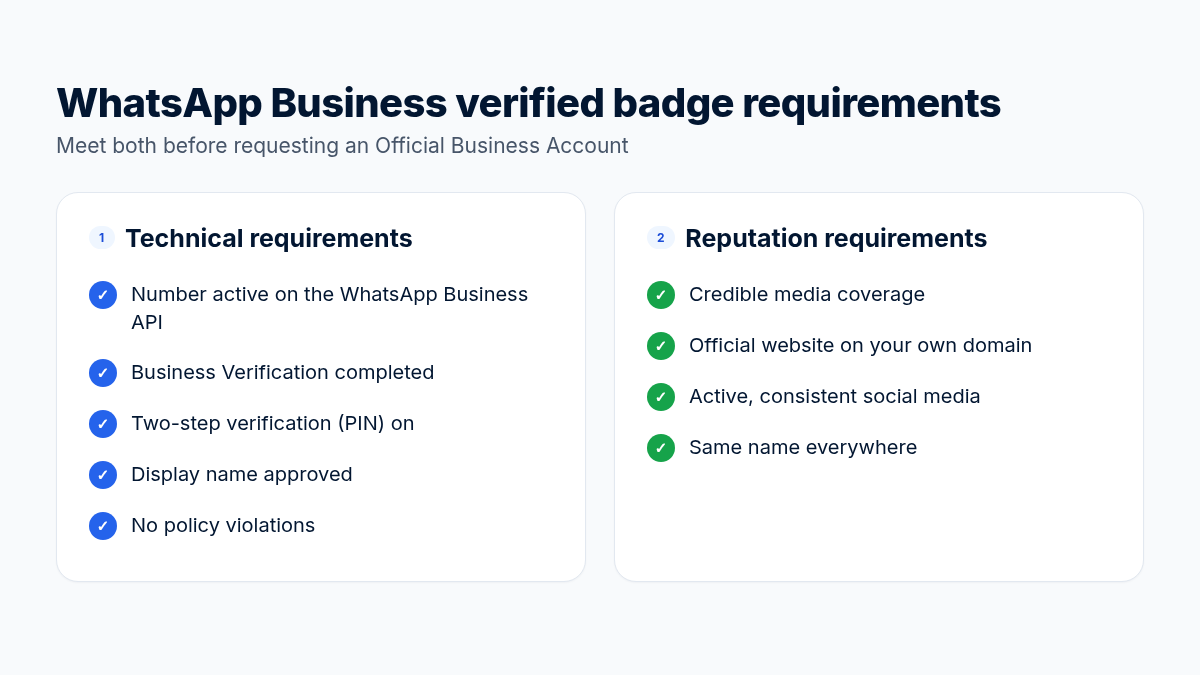
Meta looks at two things: technical eligibility and brand reputation.
Technical requirements
The number is registered and active on the WhatsApp Business API (not just the app).
The business portfolio is verified through Business Verification.
Two-step verification (PIN) is turned on for the number.
The display name is approved and matches your brand.
The account follows the WhatsApp Business Messaging Policy with no serious violations.
Reputation (notability) requirements
This is where most applications fail. Meta wants to be sure your brand is publicly known and actively searched for. Evidence it looks at:
Credible media coverage of your business, such as articles on national news sites or industry media. Paid press releases and sponsored content usually do not count.
An official website that is active, on your own domain, and shows the same business name as your display name.
Active, consistent social media, ideally verified accounts or profiles with real engagement.
A consistent name everywhere: legal documents, website, social media and the WhatsApp display name.
How to apply for the WhatsApp Business API verified badge
Complete Business Verification. In Meta Business Suite, open Business Settings, then Security Center, and upload legal documents such as your business registration and tax number. Make sure the name and address match exactly what you entered in Meta.
Make sure the number is connected to the API, for example from Integrations in ChatMo, and the display name is approved.
Turn on two-step verification for the number in WhatsApp Manager.
Prepare 3-5 links proving reputation: media articles, company profile pages and official social accounts.
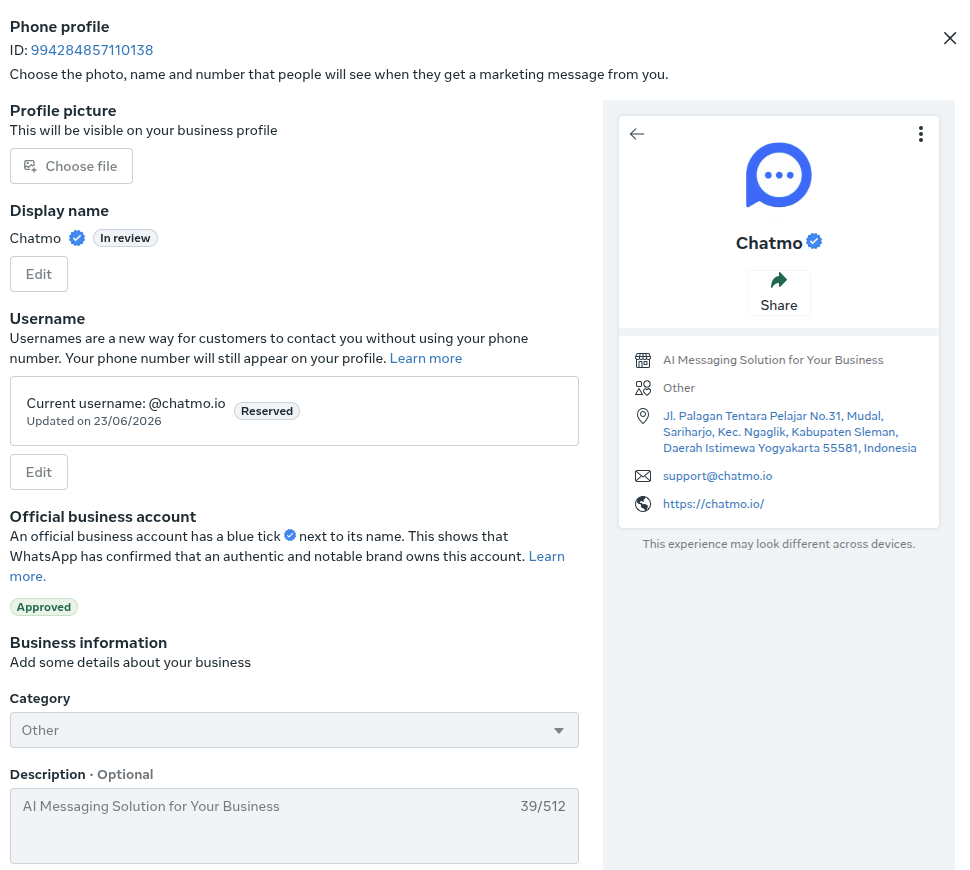
Request an Official Business Account in WhatsApp Manager (in the phone number settings) or ask your official partner for help. Add the reputation links to the form.
Wait for the review. It usually takes a few working days. Once approved, the blue check appears on your profile automatically.
Documents to prepare for Business Verification
The most common mistake at this stage is inconsistent spelling, for example "PT Maju Jaya" on documents but "Maju Jaya Store" in Meta Business. Match the legal name; your brand name can be the WhatsApp display name as long as the link is clear, for example the brand appears on the company website.
A 30-day preparation plan
Week 1: tidy up Meta Business, submit Business Verification and connect the number to the WhatsApp API.
Week 2: align the name and logo across your website, Instagram, Facebook and WhatsApp profile. Complete the About and Contact pages on your website.
Week 3: gather existing media coverage. If you have none, prepare a newsworthy story, such as a milestone, interesting data or a community program, and reach out to relevant media.
Week 4: make sure the number sends messages regularly with a green quality rating, then request an Official Business Account.
What about Meta Verified for Business?
Meta Verified is a monthly subscription that gives a blue check, protection from impersonators and faster support. For WhatsApp it is rolling out country by country, so availability in Indonesia can change over time. The usual requirements: the business account has been active for some time, sends messages regularly, and can verify its identity.
If Meta Verified is available for your account, it can be faster because it relies less on media coverage. If not, the OBA route remains the main option for WhatsApp API numbers.
Common reasons applications get rejected
Reputation evidence only from your own website or paid press releases.
A display name that differs from your legal documents or website, for example an abbreviation.
Business Verification not finished or rejected because the address does not match.
A newly registered number with no sending history.
A business category restricted by Meta's policies.
If you are rejected, what next?
Read the rejection reason in WhatsApp Manager. Meta usually only gives a general category such as "insufficient notability".
Collect new, credible media coverage. Founder interviews, customer case studies or industry awards can help.
Make your name and business details consistent across every channel.
Apply again after Meta's waiting period, usually around 30 days.
Tip: while you wait for the badge, show that your number is official in other ways: list it on your website and official social accounts, use a clear logo as the profile photo, and fill in your business profile with address and opening hours.
After you get the badge: what to protect
The verified badge is not permanent. Several things can remove it or trigger a new review:
Changing your display name. A name change triggers a new review, and the badge can be removed until the new name is approved. Plan any rebranding carefully.
Policy violations. High spam complaints, a long-running red quality rating or prohibited content can lead to losing official status.
A lapsed Meta Verified subscription. If the badge comes from the subscription, it disappears when the subscription is not renewed.
Moving the number to another business account. Official status is tied to the number and business portfolio, so ownership transfers should be coordinated with your partner.
Keep message quality high as usual: message only contacts who agreed, use relevant templates and check your quality rating every week.
Protecting customers from fake numbers
The badge helps, but fraud in your brand's name can still happen through other numbers. Extra steps you can take:
State on your website and social media that you use only one official number, and display it clearly.
Make it clear in your templates that your team never asks for OTP codes or PINs.
Send payment links only from your official domain and name that domain in the message.
Set up a reporting path, such as a "report" keyword that goes straight to your security team.
Conclusion
The WhatsApp Business verified badge comes through an Official Business Account for API numbers, or through a Meta Verified subscription where available. It comes down to three things: completed Business Verification, a consistent name everywhere, and proof that your brand is publicly known. Prepare them early and your chances of approval on the first try are much higher.
No WhatsApp API number yet? Start with our WhatsApp Business API guide, or book a ChatMo demo and our team will help with verification.
Frequently asked questions
Does WhatsApp still have the green tick?
No. Meta has replaced the green check for official accounts with a blue check, the same as on Instagram and Facebook.
Is the WhatsApp Business verified badge paid?
An Official Business Account for a WhatsApp API number has no subscription fee. Meta Verified for Business is a paid subscription and its availability varies by country.
How long does a verified badge application take?
An Official Business Account review usually takes a few working days once every requirement is met, including completed Business Verification.
Why was my verified badge application rejected?
The most common reasons are weak brand reputation evidence, a display name inconsistent with your documents, unfinished Business Verification, or a newly registered number.
Can I reapply after a rejection?
Yes, after Meta's waiting period, usually around 30 days. Use that time to gather media coverage and make your name consistent everywhere.
About the author
Antonio Kurniawan
Product & Customer Success
The ChatMo product and customer success team helps Indonesian businesses run WhatsApp, Instagram and webchat conversations with AI agents and shared inboxes.