How to Manage a Telegram Customer Community Group: Rules, Moderation, Anti-Spam and Topics
A Telegram group can become an active customer community or a place full of spam and uncontrolled complaints. Learn how to set up the group, write rules, configure admins and permissions, use topics, slow mode, join approvals and moderation bots, and when to move conversations to private chat.

Antonio Kurniawan
Product & Customer Success

On this page
- When does a business need a Telegram group?
- Setting up the group
- Writing clear group rules
- Setting up admins and permissions
- Anti-spam features to turn on
- Using topics in large groups
- Handling complaints in front of other members
- Connecting the group to customer service
- Keeping the group alive
- Welcoming new members
- Sharing the moderation schedule
- Measuring community health
- Example: a coffee machine owners' community
- When to split or close a group
- Common mistakes
- Summary
Key takeaways
- Telegram groups suit customer communities, online classes and community support, not discussions of private order details.
- Clear rules pinned from the start are the foundation of a healthy group.
- Set member and admin permissions, use join approval, slow mode and anti-spam filters to protect quality.
- Topics keep large groups organised by separating discussions by theme.
- Move personal questions and order complaints to a chat with a bot or agent to protect customer data.
Managing a Telegram customer community group well takes three things from day one: clear pinned rules, permission settings that prevent spam and a tidy split of admin roles. Telegram groups can hold very large numbers of members, so without moderation a group quickly fills with spam, other people's promotions or uncontrolled complaints. With features such as join approval, slow mode, topics and moderation bots, a group can become a community that builds loyalty. One key principle: the group is for discussion and general questions, while complaints and order details are handled in private chats.
This guide covers when groups suit a business, how to set one up, the rules to write, anti-spam settings, using topics and how to handle complaints in front of other members.
When does a business need a Telegram group?
Groups differ from channels. A channel is a one-way broadcast, while a group is a discussion space where every member can speak. Groups suit:
Product user communities, such as skincare users sharing experiences or owners of a particular vehicle.
Online classes and tutoring, where students ask questions and discuss the material.
Community-based support, where experienced users help newcomers, for example with software or devices.
Member or reseller programs, for sharing stock news, promotional materials and announcements.
If your main goal is announcing offers, a channel fits better. If you want customers to interact with each other and feel part of a community, a group is the choice. The full comparison of Telegram tools is in Telegram for business.
Setting up the group
Create a new group from the new message menu and give it a clear name, such as "Glowly User Community".
Upload a photo and write a description explaining the group's purpose and who may join.
Choose the group type: public with a username and t.me link, or private with an invite link.
Set member permissions: whether members can send media, links, stickers or polls.
Add admins with permissions that fit their tasks.
Write and pin the group rules.
Turn on topics if the group will be large and cover many themes.
Writing clear group rules
Clear rules prevent most problems. Keep them short and easy to understand, and pin them at the top of the group. For example:
Welcome to the Glowly User Community. To keep the group pleasant:
1. Be polite and respectful.
2. No promoting other products or services without admin permission.
3. For questions about orders, payments or shipping, message @glowly_bot directly to keep your data private.
4. Do not share suspicious links or ask other members for personal data.
5. Admins may delete messages and remove members who break the rules.
Also include how to reach admins and the business's official channels, so members know where to go for personal matters.
Setting up admins and permissions
Split admin roles by need. Owners hold full control, and more than one person should have high-level access so the group is not locked if one account runs into trouble. Moderators delete spam, warn and remove rule breakers. Content admins pin announcements and answer product questions.
For member permissions, consider restricting new members from sending links or media straight away. Many spam accounts join and immediately post links. This restriction stops most spam without bothering serious members.

Anti-spam features to turn on
Approval for new members. For private groups, turn on join requests so admins can review people before they enter. This is very effective against spam accounts.
Slow mode. Limits how often each member can post, such as one message every 30 seconds. Useful when the group is very busy, for example after a big announcement.
Built-in anti-spam. Large Telegram groups can turn on an anti-spam feature that filters suspicious messages automatically where it is available. Review filtered messages regularly.
Moderation bots. Third-party bots can filter specific words, verify new members with a simple challenge or send automatic welcome messages. Choose bots from trusted sources and grant only the permissions they need.
Limit who can add members. So nobody brings in many accounts without permission.
Using topics in large groups
As a group grows, a single stream of messages quickly becomes chaotic: announcements get buried among discussions, and product questions mix with casual chat. Topics split the group into several spaces by theme, for example:
Announcements, where only admins can post.
Product Questions, for general questions about products.
Share Your Experience, for testimonials and tips between members.
General Chat, for casual conversation.
With topics, members can follow the discussions that matter to them, and admins can monitor more easily.
Handling complaints in front of other members
Complaints in a group are seen by every member, so how you handle them affects many people's trust at once. Recommended steps:
Respond quickly and calmly in the group, acknowledging the issue without being defensive.
Move the details to a private chat: "Sorry about the trouble. Please send your order number to @glowly_bot and our team will check it now."
Resolve it in the private chat with complete details.
Follow up in the group if relevant, such as "Rina's issue has been resolved, thanks for your patience."
This pattern shows other members that complaints are taken seriously, without exposing customers' personal data in public.
Connecting the group to customer service
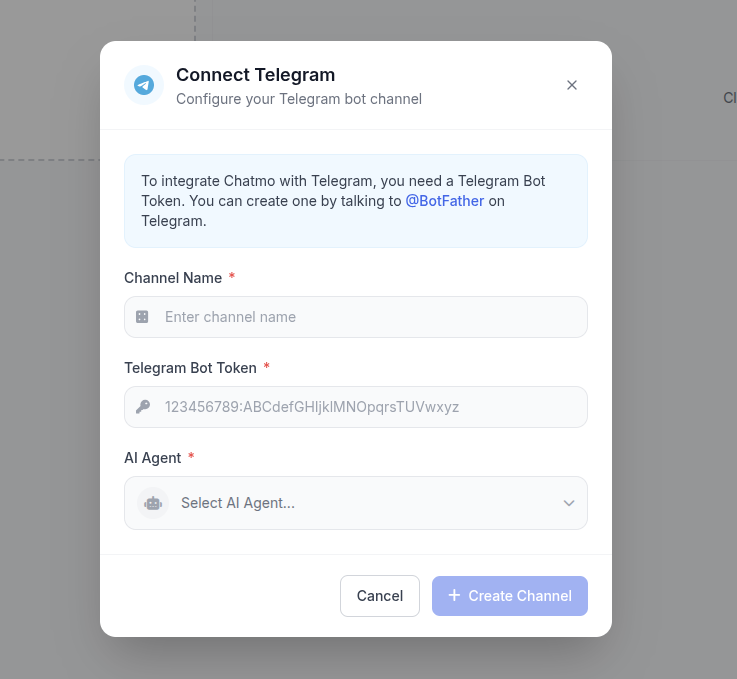
The group should not be your only service channel. Provide a clear private route, such as an official Telegram bot. In ChatMo, a Telegram bot connects with a token from BotFather, and every message to the bot lands in a shared inbox, so several agents can serve customers without sharing one account. An AI agent can answer common questions after hours, then hand chats to an agent when needed.
Keeping the group alive
A group that only comes alive during promotions quickly goes quiet. A few ways to keep it active: hold regular Q&A sessions with the owner or an expert, invite members to share photos or results with the product, run small challenges with simple prizes, and recognise members who actively help others. A community that feels valued tends to stay for a long time and become loyal buyers.
Welcoming new members
New members' first impression decides whether they become active or stay silent. Prepare a short welcome message, sent manually by an admin or automatically by a moderation bot. It should state the group's purpose, point to the pinned rules, explain the available topics and say where to go for order issues. Invite newcomers to introduce themselves in the general topic, for example by mentioning the product they use. Small interactions like this make members feel welcome and more likely to return.
Sharing the moderation schedule
Spam and conflict do not keep office hours. Groups moderated only during the day often find spam piling up overnight, annoying serious members. Create a simple moderation schedule, such as two moderators alternating mornings and evenings, with a backup for weekends. Also agree on standard actions: when deleting a message is enough, when to warn and when to remove a member. Shared standards stop moderators from treating similar violations differently, which can spark complaints from other members.
Measuring community health
A healthy community is not measured by member count alone. Watch how many members post each week, how many questions are answered by other members without admin help and how much spam has to be removed. If more questions are answered by members over time, the community is becoming self-sustaining and delivering real value to customers. Also note product questions that keep coming up in the group and turn them into educational content or product improvements.
Example: a coffee machine owners' community
A home coffee machine store created a Telegram group for its buyers. At first the group was busy, but within weeks it was full of spam accounts offering investments, and long service complaints in the group made prospective buyers hesitate.
They tidied up the group: join approval was turned on, new members could not send links for their first few days, and the group was split into Announcements, Recipes and Tips, Machine Questions and General Chat topics. Service complaints were directed to the official bot, handled by the technician team through a shared inbox. Spam almost disappeared, and the Recipes and Tips topic became a place where members shared ideas, which indirectly drove sales of beans and accessories.
When to split or close a group
A group that grows too large can lose its closeness. If discussions become too busy and members complain they cannot keep up, consider splitting the group by region, product type or skill level. On the other hand, a group that has been quiet for a long time and no longer adds value should be announced as closing or merged with another group, rather than left to fill with spam. Explain the reason to members and point them to a replacement, such as the official channel or the customer service bot.
Common mistakes
No pinned rules. Members do not know the limits, and admins struggle to enforce them.
Every member can post links from the moment they join. The group fills with spam fast.
Discussing order details in the group. Customers' personal data is exposed to hundreds of people.
Only one admin. Night-time spam goes unhandled until morning.
A group used only for promotions. Members get no value and slowly leave.
Summary
Use groups for community and discussion, not for private order details.
Write clear rules and pin them from the start.
Set up admins, member permissions, join approval, slow mode and anti-spam.
Use topics to keep large groups organised.
Provide a private route through a bot connected to a shared inbox for complaints and orders.
Frequently asked questions
What is the maximum size of a Telegram group?
Telegram groups can hold a very large number of members, up to hundreds of thousands, far beyond groups in many other chat apps.
How do I prevent spam in a Telegram group?
Turn on approval for new members, restrict link and media permissions for newcomers, use slow mode, enable built-in anti-spam where available and consider a moderation bot.
What are topics in a Telegram group?
Topics split a group into several discussion spaces by theme, such as Announcements, Product Questions and General Chat, so conversations do not get mixed up.
Should customer service happen in the group?
Not entirely. Groups suit general questions and discussion, but complaints and order details should be handled in private chats with a bot or agent.
How many admins should a Telegram group have?
It depends on size and activity. Small groups need two admins, while large groups should have moderators across different active hours so spam is handled quickly.
About the author
Antonio Kurniawan
Product & Customer Success
The ChatMo product and customer success team helps Indonesian businesses run WhatsApp, Instagram and webchat conversations with AI agents and shared inboxes.